Raspberry Pi Desktop now available for PC and Mac
We’re really sorry you had to wait so long…
Here, at last, is the fully updated Debian Trixie with Raspberry Pi Desktop for PC and Mac. Download it from our website now to give your other computers a Raspberry Pi makeover. We’ve even included a Raspberry Pi Connect client.
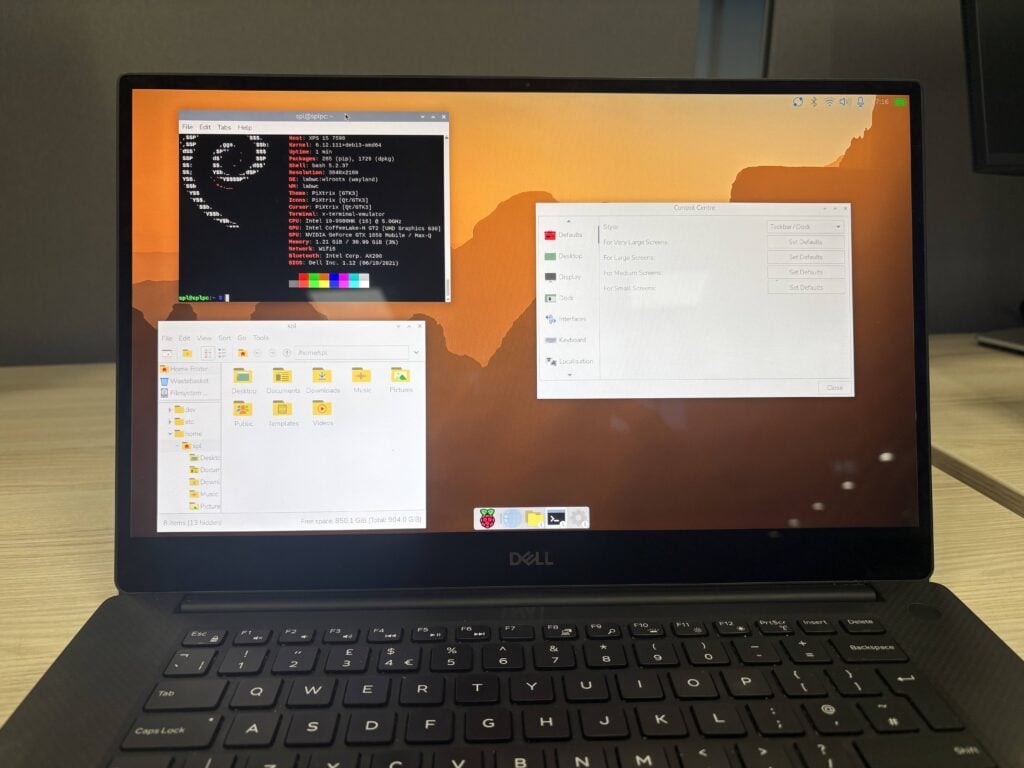
Back in 2016, I’d just finished the initial set of changes to make the default LXDE desktop into something Raspberry Pi-specific. (I’d wanted to call it PIXEL, an acronym for Pi XWindows Environment Lightweight I’d come up with a couple of years earlier, but a certain other tech company had claimed the word by then, so it was sadly not to be…). As I was fiddling with it, our CEO Eben Upton walked past my desk and suggested, “wouldn’t it be cool if I could run this on my Mac…?”
Side quest
A couple of weekends later, I was a bit bored at home, and, knowing that it was possible to boot a Mac into Debian, I wondered just how hard it could be to add our desktop to a stock Debian image. A few hours later, I was sitting there with my Mac booted from a USB stick, with the Raspberry Pi desktop running pretty much in its entirety. On Monday, I wandered over to Eben carrying my MacBook and said, “you might want to see this…”
So I’d proved it was possible, but there is a long way to go from a hacked-together weekend experiment to something that you can actually let people use. As a sort of ‘Skunk Works’ project, Serge (the engineer responsible for, amongst other things, packaging and creating the Raspberry Pi OS images) and I spent some time over the course of the next few months making something a bit more usable. That Christmas, we gave away a bootable DVD with the PC and Mac version of the Desktop on the front cover of The MagPi Magazine, as Raspberry Pi Official Magazine was called then.
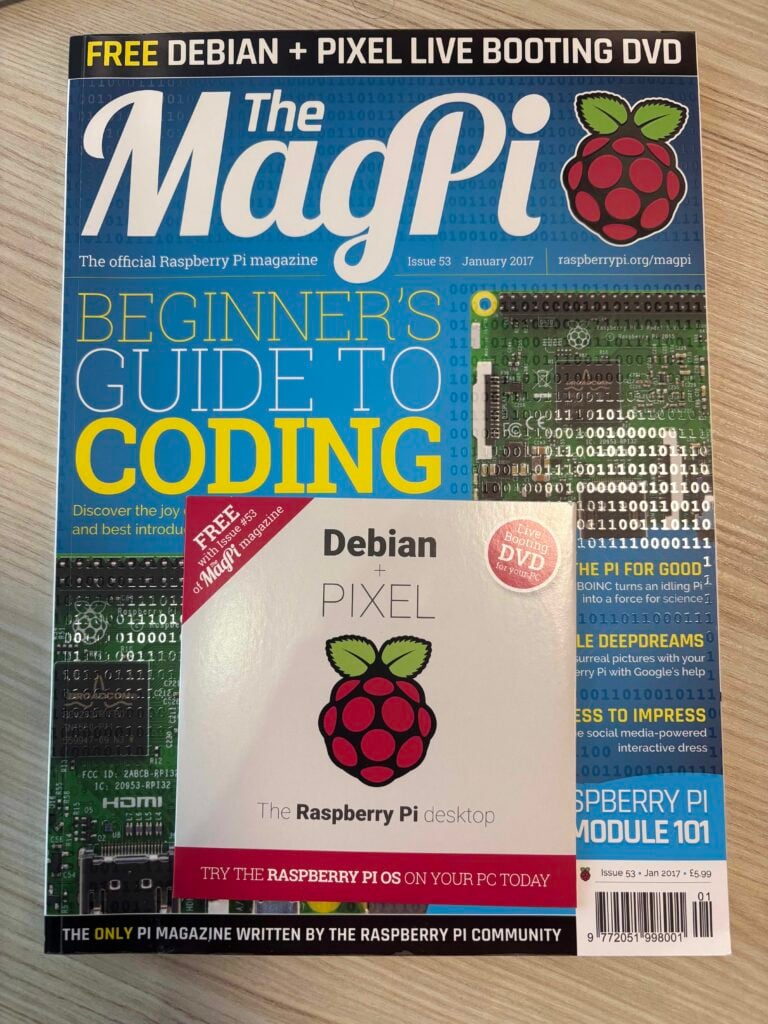
We were, I have to say, a bit taken aback by the reception – it was far more popular than I’d ever dreamed it might be. That DVD was just a bootable live image, but in 2017, after a lot more work by Serge, we released the first installable version of Debian with Raspberry Pi Desktop for PC and Mac, and that seemed to be even more popular.
The only problem was that we had created a bit of a rod for our own backs. People really liked using the Raspberry Pi Desktop on non-Raspberry Pi computers – but the trouble is that we make our money from selling Raspberry Pi computers; we’ve never charged for the software that makes them work. So it was hard to justify spending too much time maintaining the PC version, and the engineering team here has a lot of stuff to do!
High demand
We managed to find the time to update the Desktop for the Buster and Bullseye releases of Debian, but then we all just got too busy with other things, and, while we left the Bullseye version on the website for anyone who wanted it, we simply didn’t have time to release any newer versions. But people kept on asking for it – we get two or three emails every week asking when the PC Desktop will be updated, and we haven’t had an answer, because we honestly didn’t know when we might get a chance to do it. We’ve continually tried to allocate time to be able to work on this, but it hasn’t been easy.
Until now.
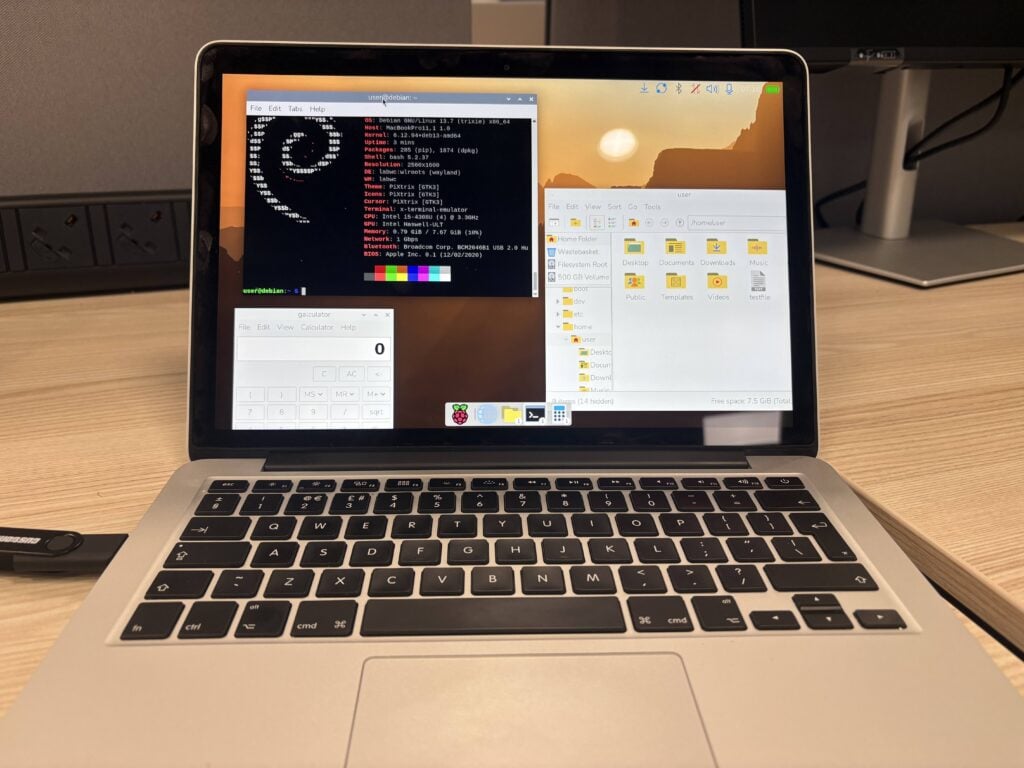
Earlier this year, we (or rather Serge) finally got the latest version of the Desktop running on top of a Debian Trixie image. It’s now based on 64-bit Debian (the amd64 architecture) rather than the older 32-bit version, as Debian itself has stopped supporting 32-bit for PC architectures. This shouldn’t be a major problem – most PCs made in the last 15 years or so will quite happily run the 64-bit version of Debian, as will most Intel-based Macs. (Debian support for Apple Silicon is still experimental, so unfortunately those of you with the latest and greatest shiny fruit products will not be able to run this.)
Raspberry Pi Connect compatible
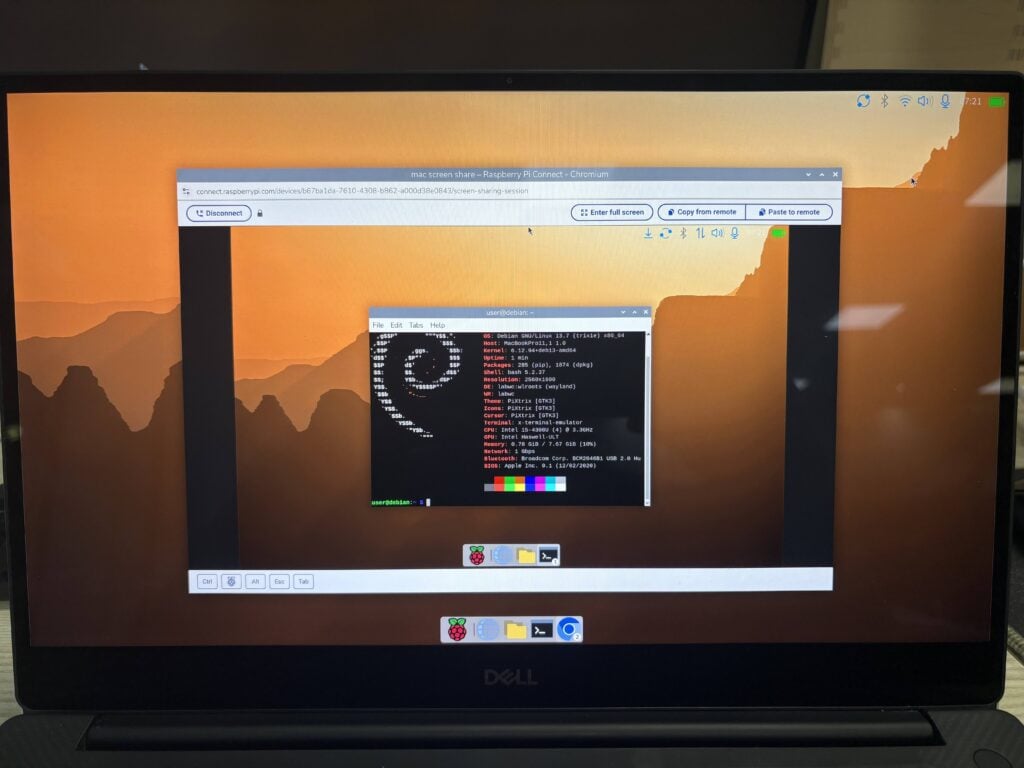
The new Raspberry Pi Desktop is fully up to date with all the latest desktop changes, such as the Control Centre and the new dock. In addition, we have added the Raspberry Pi Connect client, so you can control a PC or Mac running the Desktop along with your Raspberry Pis running Raspberry Pi Connect. It works in exactly the same way as on a Raspberry Pi; the only difference is that when you set up a PC for Connect, you will be asked to enter a name with which to identify that device – this isn’t required on a Raspberry Pi, where a unique hardware ID is used instead. The name you choose will then appear in the list of devices you see when you log into the Connect website, and you will be able to use screen sharing or a remote terminal on the device.
How to get it
Raspberry Pi Desktop is supplied as a downloadable live Debian image: flash the .iso file to a USB stick, insert it into your computer, and boot from the USB. When prompted, choose “run with persistence” – this means that any changes you make will be saved back to that USB stick. The same menu also gives the option to reset persistence; if you choose this, any changes will be deleted and your USB stick will be back to a clean original image.
Once booted to Raspberry Pi Desktop, you can also choose to install it on your computer’s own hard drive or SSD: you can run the standard Debian installer, Calamares, from either the desktop shortcut or the Install Raspberry Pi OS entry in the System Tools category of the main menu.
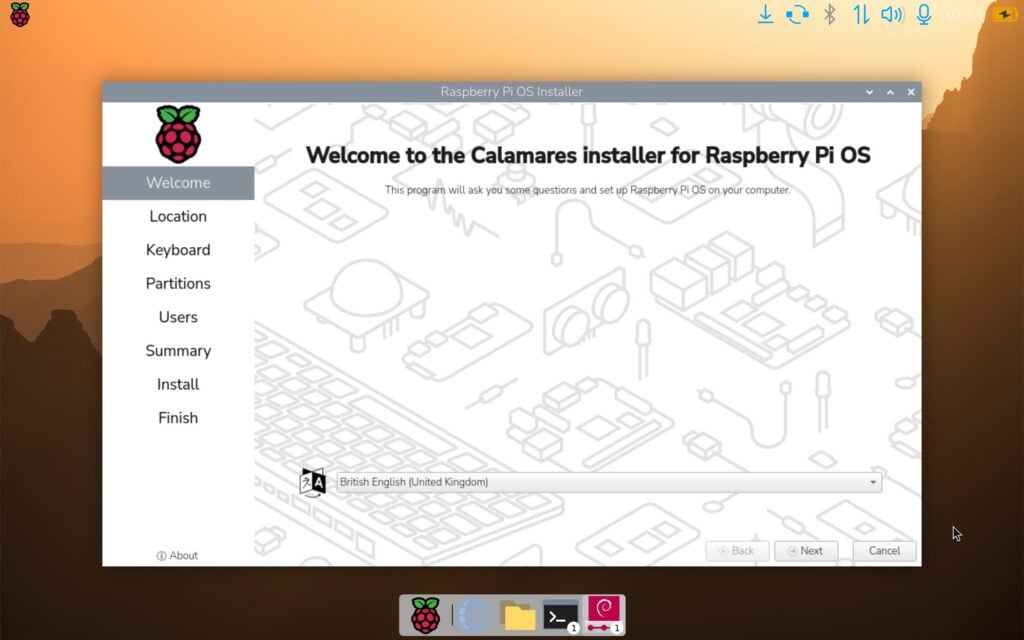
The PC and Mac version of Raspberry Pi Desktop is available right now from our website. I hope you enjoy it – and as I said at the start, we’re really sorry about the wait!

75 comments
Jump to the comment form
Russell
Thank you – this is wonderful news. This OS release once gave me an extra 4-5 years out of a 5-year old low-end laptop that could no longer keep up with Ubuntu’s system requirements.
As for the cost/benefit of allocating time to this release, think of offering it as a gateway drug to funnel in users to stuff that Raspberry Pi *does* make money on. First one’s free, kid!
Ric
Thank you so much for this. Your work and persistence is appreciated . I have it running on an old think-pad and it is very smooth. Can I ask are widgets old LXDE format? I would like to write a wastebasket/trash widget.
Raspberry Pi Staff Simon Long — post author
No, widgets are in a new format, because we are no longer using the old lxpanel. The new panel, wf-panel-pi, is designed to run under Wayland instead of X.
The good news from the point of view of writing widgets is that very similar code can be used to write widgets for both lxpanel and wf-panel-pi with thin wrapper layers. Most of our widgets are written like this, so just download the source for one – I’d recommend something simple like the updater – and look at how it is written. See https://github.com/raspberrypi-ui/pplug-updater for an example.
Ric
Thanks ! Also just installed on an old MacBook Air … A breath of fresh air!
Earl Baugh
I have been running the older version of it on my server PC for years now. Wondering, can you upgrade from an older version to this version or is it a complete replacement?
Raspberry Pi Staff Simon Long — post author
No, this is a 64-bit version; older versions were 32-bit. You won’t be able to upgrade from an older version – this has to be a complete replacement.
Alec Devlin
Just to let you know, yesterday I installed the latest version of the Raspberry Pi 64 Bit Desktop on Windows 11 running Hyper V, seems to work, noticed a slight delay during the boot process haven’t investigated this so far, but you can login fire up a browser I used Chromium and works inside the virtual machine. Didn’t have much time to spared installed the 64 bit Desktop on a Dell Precision laptop also it is a dual boot, Windows 11 and Pi Desktop, some nice tools in there for the installation. Had been waiting on this for some time pleased to see it. Great Job. Many Thanks. Alec.
Chris Burton
Great news but I think your torrent tracker needs to be updated to whitelist the last couple of releases ( https://forums.raspberrypi.com/viewtopic.php?t=400905 ).
Andy
Great news – I have the previous version running on an Intel Atom tablet with 1gb RAM that came with Windows 8. I look forward to rescuing some other old PCs with this version.
Mike C
Wow! May I ask what tablet model? I have a Windows 8 atom tablet that historically doesn’t like Linux (GPU driver issue I think), so this would be amazing if it worked.
Riley Cakhoun
Are there any plans for an ARM version of this for M-series MacBooks?
Raspberry Pi Staff Simon Long — post author
Not at present, and I doubt we would even attempt one until Debian’s support for Apple Silicon is no longer regarded as experimental.
Your best bet for running the desktop on Apple Silicon at the moment is to use some sort of virtualisation to run the standard 64-bit ARM image for Pi – although I have never tried it, and have no idea if it is even possible; theoretically, it should be, but that’s mostly just a guess…
PicoPusher
If anyone is able to run any of the current ports smoothly in a VM on macOS 27, please post instructions…
Sheddyian
This is amazing, thanks for doing this. I used to have the old Bullseye version installed on my Windows PC in Hyper-V, where it worked well with only limited resources allocated to it.
Do you know it it’s possible to install this new Pi distro under WSL in Windows 11?
Raspberry Pi Staff Simon Long — post author
I’ve not personally tried doing that, no, but as it happens I was talking to a colleague today who did think it ought to be possible. So that’s a maybe, not a definite no…
ED
That’s great news. But the reasons you lay out for not doing it sooner sound reasonable; does this mean that this is another one-off?
Raspberry Pi Staff Simon Long — post author
We don’t intend it to be. We can’t make any promises, but the intention is to continue to support and release it. If it wasn’t, we wouldn’t have bothered updating it at all and would have just quietly let it die…
That said, it will almost certainly depend on how popular it is and if people actually download and use it. And given how many assurances I have given to the powers that be here that it is much in demand, I’m going to look pretty silly if they don’t! ;)
ComputerL
Good job! I’m excited to use the Live version.
Steve
Is the installer something that could be used to create a virtual machine on Proxmox?
Bill S
Great question. I wondered the same.
Bill S
Down below, someone reported it’s working on QEMU, which means it’ll probably work in Proxmox VMs
Jensen
Dear Simon and everybody at Raspberry Pi
Thank you, thank you very much.
This is written on a PC using the former much used and loved desktop Raspberry Pi OS. It matters a lot. We use it to prolong usage of older Laptops. It also makes it possible to use old laptops to provide screens for headless Raspberry Pi’s. It saves so much money and makes so much possible. This is indeed a Christmas gift for the entire year.
Thank you again :) I do not know how to make an ascii art for giving you all a huge hug but you deserve it.
Best wishes to you all.
Jerry
Will it run under VirtualBox ?
dingo
Great news! Thanks for the update.
Just one question: I’m running it on a MacBook air intel 2012 and it’s fantastic but how did you make brightness and keyboard backlight buttons to work?
Josh
Those function buttons are generally standardized, but even if Apple used something different from most PC makers, it would have been documented by others using Linux on their older MacBooks and other Intel-based Apple computers, so Simon et al would not have to do anything to make them act as expected. IOW, it works without needing configuration *because* of the nature of open source software being developed atop other, smaller and less well-known projects, though you may want to check your localization settings since UK keyboards are set as the default.
Ric
Try: sudo brightnessctl -d smc::kbd_backlight set 50% then if that works (it should the driver is there)
Then you need to write that as a script to brightnessctl up/down by 10% and then link that to the f4 f5 keys in ~/.config/labwc/rc.xml. NOTE this can get over written when you change themes I’m not sure manual writing to th rc is encouraged BTW you can also set up multiple desktops in this file as was as well. Hope the helps
Phil Atkin
Misleading headline guys – please update to read “PC and Intel-based Mac” because I justt got very disappointed.
matt
well debian trixie is based on amd64 bit architecture…
Phil Atkin
… yet this page has ARM64 installation instructions. https://www.debian.org/releases/trixie/arm64/
Anders
Your link is to instructions for a native ARM version of Debian Trixie.
This announcement is for an x86_64 version of Raspberry Pi OS for Intel and AMD based computers.
Raspberry Pi Staff Simon Long — post author
Debian arm64 is not compatible with Apple Silicon. They do share a similar underlying architecture, but are not directly compatible. There is a Debian project called Bananas which is producing Apple Silicon builds, but it is currently regarded as experimental only, and is not a part of the standard Debian releases.
See https://wiki.debian.org/InstallingDebianOn/Apple/M1 for more details.
Kevin Bowers
Thank you! I’d about given up hoping for this but I’m now typing this comment on my ancient Dell Lat E4300 (core2duo, 64GB RAM, Vista era). It’s been running Linux Mint but that’s become way too heavy for it; the old Dell now runs like someone poured nitromethane in its tank! I’m particularly in love with this laptop because of the keyboard, they don’t make them like this anymore. Even my high-end laptop has flat chicklets. Can’t thank you enough…
fanoush
E4300 with Core2Duo with 64GB of RAM? very unlikely :-)
Kevin Bowers
Oops. Would you believe 64MB? It was a high-end business laptop back in the day but…
Peter
Thanks! Breathing new life into my 2011 Intel Mac.
Jon Witts
Does this release include an updated version of the Pi Server software to support booting Pi 5s?
Matt Sandy
As an Industrial consumer I am interested in this as well. I have patched piserver together to keep us operational as new mac addresses need supported but I would love the security of longer support.
Esbeeb
Congrats on this release. RaspberryPi OS is my favorite distro for low-spec AMD64 hardware. Has polish that other low-spec distros can’t even dream of.
Nick
Sweet! :D
Well, it’s bitter-sweet to see the 32-bit Debian go away. My 1GB RAM 32-bit Atom netbook would’ve loved a fresh (Pi) OS.
midnitet0ker
Your time is valuable, particularly if it deviates from other constructive duties you could be performing in the course of your paid work. Ergo, don’t be afraid to charge for the product of your labor. I think most people wouldn’t mind coughing up $5 or $10, especially is they’re hounding you for support/updates.
I know that paying for Linux is akin to blasphemy but I personally think that entitled users can get rekt. You shouldn’t be apologizing for blessing the community with the fruits of your labor and expertise.
Wouter
Great! It runs fine on my ancient netbook with Atom N550 cpu. One question: after apt update still apt full-upgrade or just apt upgrade?
Raspberry Pi Staff Simon Long — post author
We always recommend full-upgrade, as this makes sure you get any new dependencies installed.
Michael
Thanks, as along time rpi and linux pc user, this is great news! And after installing it on my favorite subnotebook and i can say it works amazing, low mem footprint and powerconsumption. Labwc works as a charm and the new overview works perfect. Keep it up!
Simon Pooley
This is excellent – thank you!
The Desktop amd64 is working very nicely in a couple of limited (2GB RAM / 32GB storage) laptops here: a Celeron-based HP Stream Laptop 11 and an HP Pavilion X2 Detachable laptop/tablet with Intel Atom cpu.
Jacob Bradshaw
WOW this is awesome! Thank you for your time and dedication to this! Look forward to trying it out.
Klaas Sybranda
I tested this on a Macbook 112 that I use for Altima Linux and I find that no scaling to screen size, no wifi detected, no ability to troubleshoot either issue. Calamares runs full screen with controls hard to see at current scaling.
Raspberry Pi Staff Simon Long — post author
Both screen scaling and wifi require Debian to include the correct drivers for your hardware – it seems like it doesn’t. You will probably have to find the correct drivers and install them yourself.
Ric
The wifi driver you need is broadcom. but they are not well maintained and can be slow I have it install on my macbook air and it is adequate for my use but a usb wifi will work out of the box. There is documentation out there for getting linux working on intel macbooks but i found most llms did a good job of collating them and I used that to get a fully working macbook working with debian. It is worth your persistence. Simon Long has done a bang up job. I have tried a number of linux repos on macs and in my opinion Raspberry Pi Desktop is the best optimized for the older hardware if intel macs.
Archisman Panigrahi
You can try connecting it to internet with USB tethering, and then using AI agents like OpenCode which will fix these issues by appropriately changing the configuration files or finding the right driver. They work reasonably well.
Jeremy K
This is great, and I’d love to use it as a utility boot tool. I wonder how hard it would be to change where the persistence file lives? Would be nice to have this ISO as an option in Ventoy, then point to an overlay on a different device partition.
Nick
Please add a boot option “Run without persistence” – which allows booting into the OS without fiddling with the Grub menu entry to disable that option. This is a huge oversight, because the persistence requires write access, and booting the ISO in read-only mode (Ventoy, QEMU, DVD) leads to a long chain of failed startup services, since they have to write somewhere. Creating users also relies on persistence, meaning that the automatic login fails due to lack of a user. Once you remove “persistence” from the boot options, it boots just fine in the live session.
By the way, it’s really cool to see the desktop in 1024×768 running with QEMU’s Cirrus Logic GD5446 and a compositor up and running well with only 4MB of GPU memory. :) That’s impressive!
James E Harper
So I tried to run on a Dell Inspiron Mini but found that it is a 32 bit processor. I am going to try the older 2022 version but can you do updates to bring the 32 bit version into the modern world?
Nick
I have the same netbook, so the same problem. The answer is no, because that release is based on Debian 11 “Bullseye”, which stopped getting updates this August. The last Debian release to support 32-bit is Debian 12, which has been “end-of-life” since June this year, but is currently in the long-term support phase, and will get security updates until the end of June 2028.
What still works is getting the most recent installation image – debian-12.15.0-i386-netinst.iso -, and install LXDE when asked which desktop environment you want. Still, if your netbook is just like mine, and you only have 1GB RAM, you’ll have to disable some of the services that you don’t need, to lower the amount of used RAM. Otherwise it’s going to struggle with the available RAM.
Archisman Panigrahi
Debian dropped the 32 bit installer, but not the packages in the repository. AnTiX is a distro which uses Debian Trixie 32 bit packages with its own installer, and provides a 32 bit iso.
Nick
Debian 13 (Trixie) dropped a few thousands of 32-bit packages, and doesn’t have a 32-bit kernel, or a 32-bit installer. So what they still have is still a decent amount of 32-bit packages, for compatibility reasons, but distros like antiX still need their own kernel, installer, and replacements for what Debian no longer provides. One of those things is an updated browser.
Firefox 144 is the last major browser offering 32-bit support, and once version 145 goes out in November, 32-bit will be done. LibreOffice also no longer maintains a 32-bit build.
Sadly, 32-bit-only PCs no longer have all the software choices that we have for 64-bit. So even if they’re capable of many things, they are – for practical reasons – hardware time capsules with incomplete software support.
Nick
By the way, 32-bit support is now at a point where a 32-bit operating system is no longer adequate for day-to-day tasks and online use. That’s because the major browser dropped support for 32-bit, and without an actively maintained browser, the risk of security breaches online becomes very serious. I have quite a few 32-bit-only PCs, so this is really a bummer for me. That said, if you avoid using a browser on a 32-bit PC, you can still do a lot of things with it – nearly everything.
Greg Burns
I have been trying to install the new ISO in VMWare Workstation but the installation fails because of invalid autologin credentials and eventually hangs. Has anyone else tried this?
Ilyu Hxn
I am not successful running it on VMware Workstation 26H1u1 on Windows 10 and also ESXi 6.7 u3.
On both cases, after the splash screen, I got a blank screen and a blinking cursor.
Anyone have recommendations or logs to check?
Nick
You have to press Tab to edit the boot parameters to remove the persistence option(s) because those are only usable when the ISO is written to a read/write storage device.
Using the ISO from the image itself with a VM or Ventoy makes the environment read-only, and the persistence options simply fail and the Pi OS can’t boot as a result.
BLE TOU 202 FX National
For The Moment RPiOS Is Malfunction On VirtualBox, But QEMU It’s Working.
Gareth Howell
Thanks for creating this. However, I am getting nowhere on my old Mac Mini. I can get the USB to boot, but only by using a wired keyboard and mouse. After that, there’s no wifi or bluetooth support. Having to use wired devices is hopeless in this use case.
Ilyu Hxn
Here is my workaround for running it on VMware Workstation or ESXi 6.7 u3
# TTY0 (Ctrl+Alt+F1) and run
sudo raspi-config, then do | 6 Advanced Options | A7 Wayland | W11 X11
# Force installer to restart
sudo systemctl restart lightdm
Mike
I will put this on my 2006 Acer Aspire 5100. It currently runs on Linux Mint LTS Xfce but it’s a bit sluggish but usable. So I hope for an improvement. Thanks for this.
mike
Running ok from sd card/adapter. but I am confused. It created a user called user. I don’t want that. I will add another. But this “user” won’t let me ssh inn or with filezilla. Known host updated. I installed ufw and an allow rule but no joy even if ufw is disabled. I changed the password from the GUI and it said it was done. So pretty sure that’s ok. Any clues out there? (for context my other four RP’s sbc’s all ssh ok.
Nick
That SD card needs a remake. To make sure you don’t get anything wrong, completely avoid any customization. You might also try Ventoy to easily copy/paste ISOs on a USB drive and boot them on any machine. But just watch out about the boot options: you’ll have to hit Tab on “Run with persistence”, move with the arrow keys from the end of the line and delete “persistence” because that causes failures when booting directly from ISO files.
Other than that, if don’t already have 4GB RAM in your laptop, it’s cheap enough to upgrade, and it’s worth it. And if you can add an SSD, you’ll notice a serious performance boost as well – be that either Mint or Pi OS. For a laptop of that age, a 256GB or 512GB SSD is more than enough. Samsung 860 PRO 256GB would be amazing to breathe new life in it. I did the same for my 2009 laptop and it’s faster and of course quieter.
Gabriel-Science
Live boot for the win 😎 !
Tony Abbey
Installed OK on my i86 Macbook Air, but seems to be a problem with setting up a wifi connection. The connection info on the desktop has two lines with a line through. Added the SSID of my network and WPA etc security with passphrase. But it doesn’t connect. Previous R Pi versions would list the SSIDs it could see.
tony abbey
Google AI found the problem for me:
“problems with getting wifi connection on i86 macbook with new r pi image”.
Knowing that you have the Broadcom BCM4360 chip changes things significantly. This specific chip cannot use the open-source b43 firmware mentioned earlier. It strictly requires Broadcom’s proprietary wl driver, which is packaged in Debian/Raspberry Pi OS as broadcom-sta-dkms
sudo apt update
sudo apt install linux-headers-$(uname -r) broadcom-sta-dkms
sudo modprobe -r b43 b44 bcm43xx brcm80211 brcmfmac brcmsmac ssb
sudo modprobe wl
I could then see my wifi and connect to it.
Gavin O’Brien
Forgive my total ignorance on this matter, but if I try this new Raspi OS on my Latitude E5430, will it overwrite my Windows 10 permanently?
Raspberry Pi Staff Simon Long — post author
Only if you install it. If you just copy the image to a USB stick, you can boot from that stick into what is called a “live image”, whereby all the files for the OS live on the USB stick and your PC’s hard drive is never touched.
Once booted from the live image, you can, if you wish, run the installer which is included within it, which will then overwrite Windows on your hard drive. But unless you deliberately choose to run the installer – and you absolutely do not have to – then your Windows installation will remain untouched.
Gavin O’Brien
Thank you Simon, for your full and prompt reply, I will give it a go. I have followed the Raspberry Pi story since the inception, and I am really impressed with the skills and integrity exercised on behalf of your customers.
Gavin.
Alan
Have to say fantastic having new OS on a PC a little like a trip down memory lane for me as a good few years ago I downloaded on to an old laptop, that was the start dipping my toes in the water as I went on to purchase various Pis and Pico’s and quite a few other Raspberry Pi products must be close to or above four digits I have spent over the years and learning a great deal on the way. so I understand when the OS don’t make money directly although in my case it has as I would never of purchased my first Raspberry Pi 2 zero which is still going strong, have to wonder how many people have a similar story? Lets hope the price of memory comes down soon. All the best to Raspberry Pi Team and fellow Makers
Richard
Simon,
Clearly an answer to years of prayer since the last update. I had just about lost hope and was near accepting having to hobble along with the old 32 bit release of the x86 desktop. Over the last few years, I have have repeatedly asked and pleaded with you to get the 64 bit x86 going and up to date. This is really a huge blessing for me personally, as I have many older (2007 era) high end dell computers with decent processors and decent amount of ram (4-16GB). This new version really works well in persistence mode, i am using an SP 256GB U3, class 10, A1 microSDXC card, passes the rpi diagnotics speed test with lots of room to spare.
One problem I am having is getting the Raspberry connect to work properly in the persistence mode. When I log on to connect.raspberrypi.com with the x86 trixie (I have a Pi4 8GB currently signed in), it asks for the new device when I click the rasperry connect icon. I give it a name, which then shows up under the device list. When I try to log in to it from my other RPi4 computer, it is having a problem in not logging in to it, yes I have enabled the screen sharing mode on the x86 trixie desktop. When I turn off raspberry connect, then try to turn it on again, it asks for the new device name. It is not remembering the device name, although it if I type in the same name, it now shows up as a duplicate with the same name I previously typed in for the x86. Does it have something to do with needing to use an authentication key or some such. It seems there is a bug or something not working in the raspberry connect when in persistence mode. I like persistence mode, since i can access old windows model files that i can no longer boot into that old windows, because it needs to be connected to a particular website address to boot up in windows. nevertheless, running in peristence mode, i can access and copy or write to all the files on the hard drives on the old computers, without ever having to use a (long forgotten and unknown) windows password. Please help me if you can. Thanks
Mark Dickie
I’m trying to boot on an old Macbook 2,1 which is 64 bit but has 32 bit EFI. Is there some way to include a grubia32.cfg in the EFI/boot directory. The usb ISO is read only. Cheers
Gavin O’Brien
Went into the BIOS on Dell Latitude E5430, moved the USB boot option to the top of the list, Apply, Restart.
Invalid Partition Table!
Do I have a dodgy download?
Help!
Gavin.