Heating and cooling Raspberry Pi 5
Every time a new Raspberry Pi is released, there are mutterings around thermal control of the new board. People want to know whether it’s necessary, and if so, what you’ll need to do to make it happen. This time around, with the release of Raspberry Pi 5, we’re introducing two new official hardware solutions for cooling.
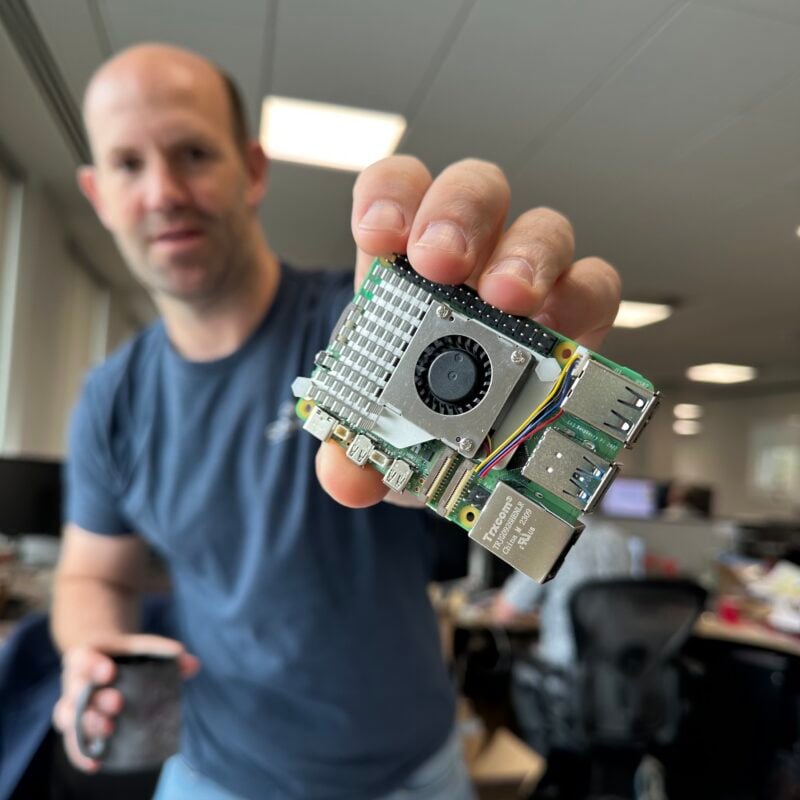
For normal usage of your Raspberry Pi, adding cooling is entirely optional. The idle performance of a Raspberry Pi 4 and a Raspberry Pi 5 is about the same, and under typical loads Raspberry Pi 5 will run cooler than a similarly loaded Raspberry Pi 4. However, a heavy continuous load will mean that the board could potentially go into thermal throttling. Throttling happens as there are software controls to limit CPU speeds if things get start to get too toasty. Although, even when fully throttled, a Raspberry Pi 5 is still going to run faster than a Raspberry Pi 4!
But data makes everything better, so I decided to grab some early production hardware and run some tests to help you make up your own mind whether you’re going to need to cool your own Raspberry Pi 5.
How we measure CPU temperature
The vcgencmd command is an amazingly useful source of information about the things that are happening on your Raspberry Pi, and the Python bindings surface all of that and let you programmatically monitor pretty much everything that needs monitoring. Here we’re going to use the vcgencmd Python bindings to monitor and log the temperature, along with the current CPU clock speed and the current throttling state, to a file.
import sys
import os
import time

from vcgencmd import Vcgencmd

def main():
    start_time = time.time()
    fb = open("/home/pi/readings.txt","a+")
    fb.write("Elapsed Time (s),Temperature (°C),Clock Speed (MHz),Throttled\n")
    vcgm = Vcgencmd()
    while True:
        temp = vcgm.measure_temp()
        clock = int(vcgm.measure_clock('arm')/1000000)
        throttled = vcgm.get_throttled()['breakdown']['2']

        string = '%.0f,%s,%s,%s\n' % ((time.time() - start_time),temp,clock,throttled)
        print(string, end='')
        fb.write(string)
        time.sleep(1)

if __name__ == '__main__':
    main()
Once we have the script up and running in a Terminal window, we can open up another and kick off a stress test on all four cores to load the CPU. To do that I’m going to use the stress command line tool to impose a heavy workload on all four of the CPU cores.
$ sudo apt install stress
$ stress --cpu 4
To prevent overheating, all Raspberry Pi boards begin to throttle the processor when the temperature reaches 80°C, and throttle even further when it reaches the max temp of 85°C.
No cooling
The first thing to do is to measure what happens when the Raspberry Pi 5 is not cooled. Without any cooling in place, the Raspberry Pi 5’s CPU idle temperature is around 65°C when sitting out in the open air on the lab bench.
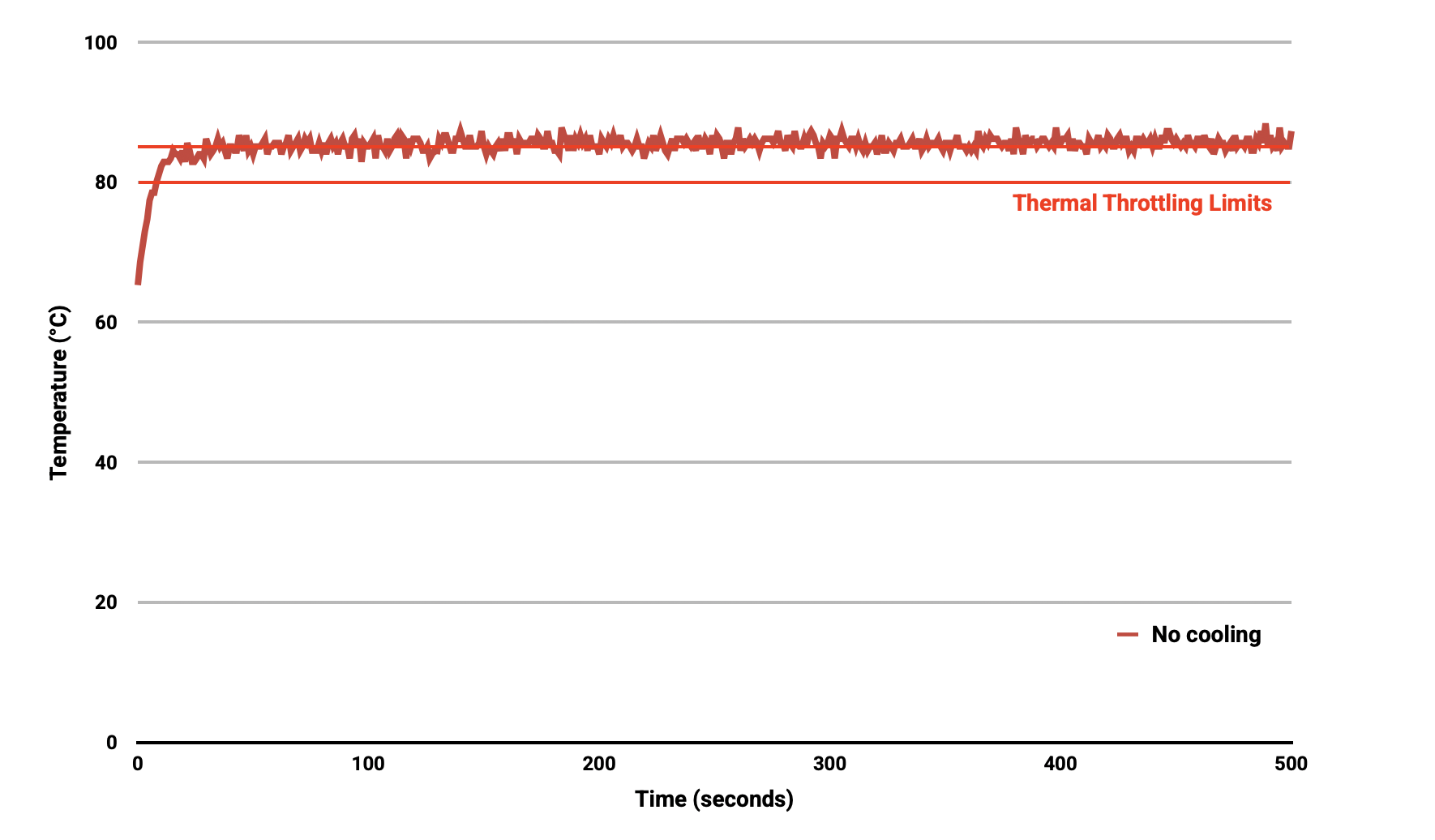
For normal use adding cooling is optional. If you’re watching a YouTube video, or working on the desktop, you aren’t going to be stressing the CPU like we did in this test. But, unsurprisingly, with the heavy sustained load we’re imposing on the CPU with no cooling the maximum temperature climbs to and then remains stable just above the 85°C thermal limit during extended testing. This leads to sustained thermal throttling after the temperature reported by the processor rises above the throttling limits.
Fitting the Active Cooler
I then ran the same test with managed active cooling using the new Active Cooler, and then with the Active Cooler still fitted but with the blower’s fan disconnected. Both these tests were done with the Raspberry Pi sitting in the open air on the lab bench.

The Active Cooler is a single-piece anodized aluminium heatsink with an integrated blower. It has pre-applied thermal pads for heat transfer, and is mounted to the Raspberry Pi 5 board directly using spring-loaded push pins. It is actively managed by the Raspberry Pi firmware: at 60°C the blower’s fan will be turned on, at 67.5°C fan speed will be increased, and finally at 75°C the fan increases to full speed. When the temperature drops back below these limits, the blower’s fan will spin down automatically.
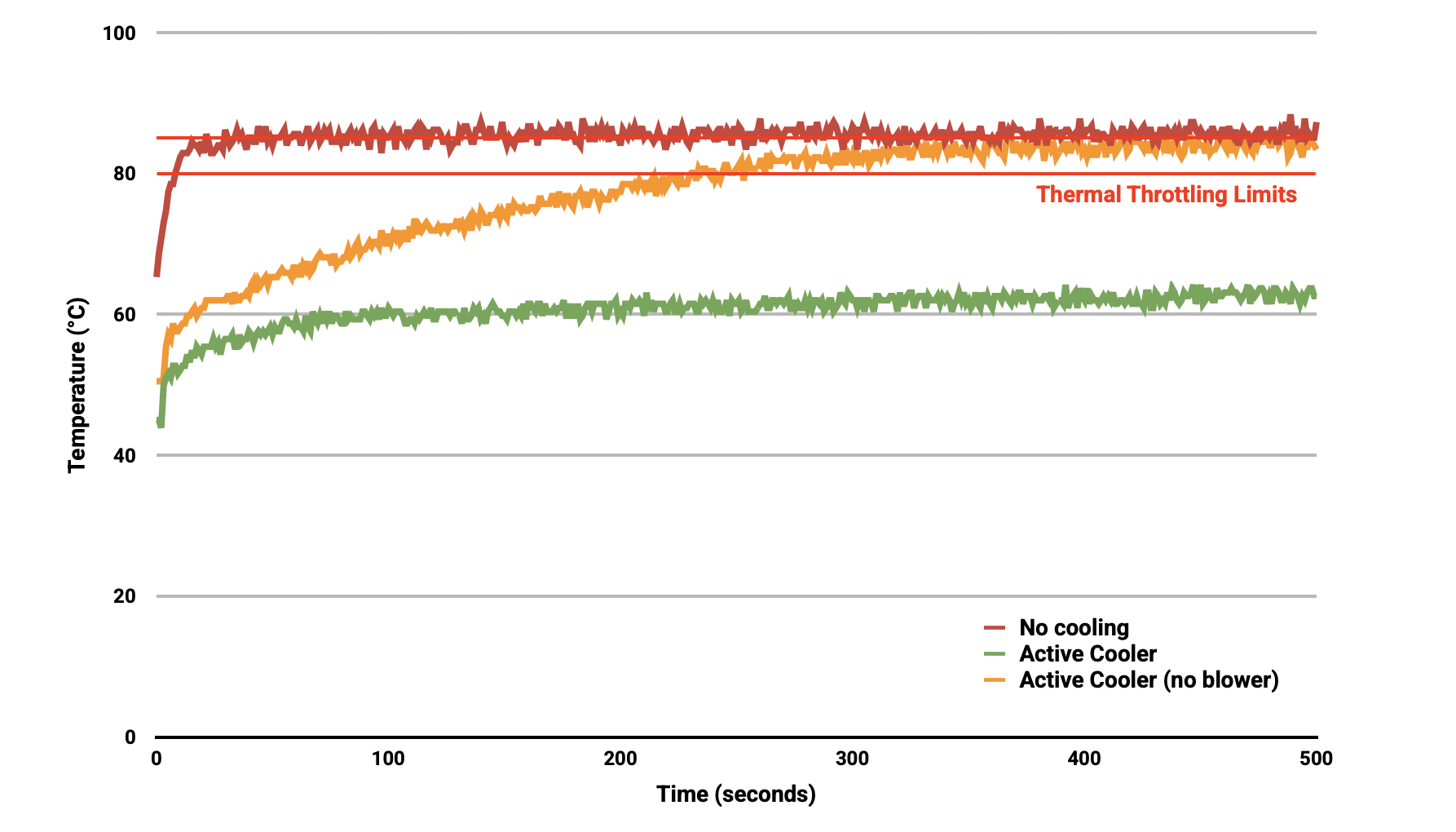
Thanks to the passive heatsink, with the Active Cooler fitted we see a much lower idle temperature, around 45°C. During extended testing under load, the fan of the Cooler spins up at low speed to stabilise the CPU temperature at 60°C, with a maximum temperatures of 62 to 63°C being seen during the tests.
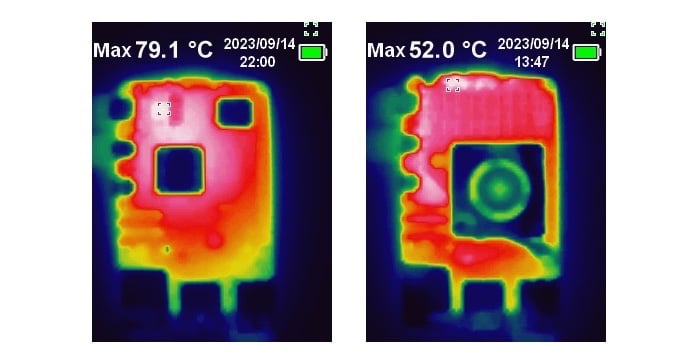
Noise levels of between 35 to 40 dB were measured during the load test while the fan was in operation – that’s about as much noise as you’ll make turning the page of a book. During the extended stress testing the fan never actually needed to run at full speed to maintain temperature control of the Raspberry Pi.
Unplugging the fan and relying solely on the passive cooling provided by the aluminium heatsink, the idle temperatures were similar; but under extended load the CPU temperature eventually reaches the point at around T₀ + 200 seconds where thermal throttling occurs.
Reattaching the cable causes the fan to spin up to full speed immediately, and with the load removed, the CPU is cooled back to an idle temperature of around 45°C within a further 300 seconds, with the fan spinning back down to lower speeds as the temperature falls back to normal.
If you’re thinking about overclocking the new Raspberry Pi 5, then the Cooler will happily cope with that. More information about over and underclocking the Raspberry Pi 5 can be found in Jeff Geerling’s post.
But what about a HAT?
The big question a lot of folks will have at this point is, what happens when you add a HAT?
Well, you can mount a HAT above the Active Cooler using a set of 16mm GPIO extenders. Inevitably there is some disruption to the air flow which will cause the Raspberry Pi to run hotter, but the Active Cooler is still able to handle extended stress tests without significant temperature rises.
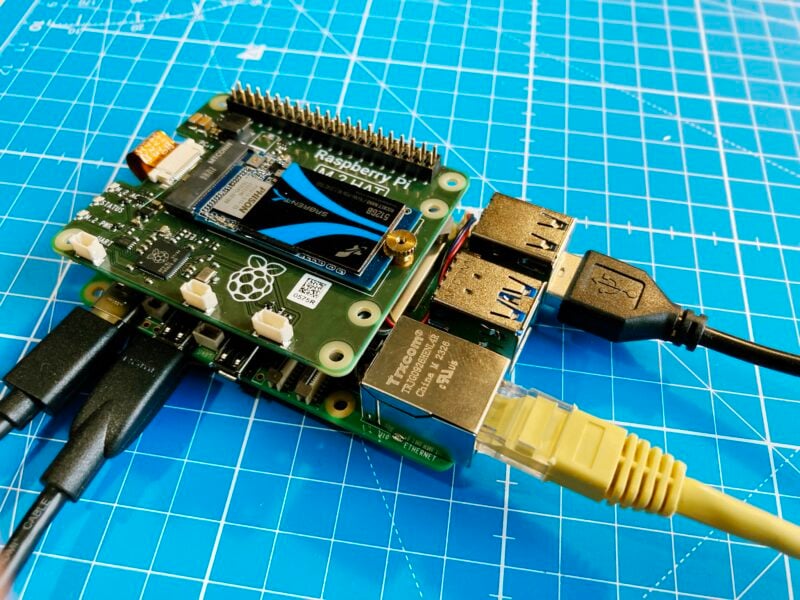
Testing was done with a prototype of the new M.2 HAT, booting the Raspberry Pi from the NVMe drive — both because I happened to have one on my desk, and also because this is going to be a pretty common use case for the Raspberry Pi 5 — and just a reminder: the only thing you really need to remember about the prototype M.2 HAT is that the production version will almost inevitably look nothing like the one in this picture!
With the M.2 HAT fitted above the Active Cooler, the idle temperature of the Raspberry Pi was slightly higher than without the HAT present, at around 49°C.
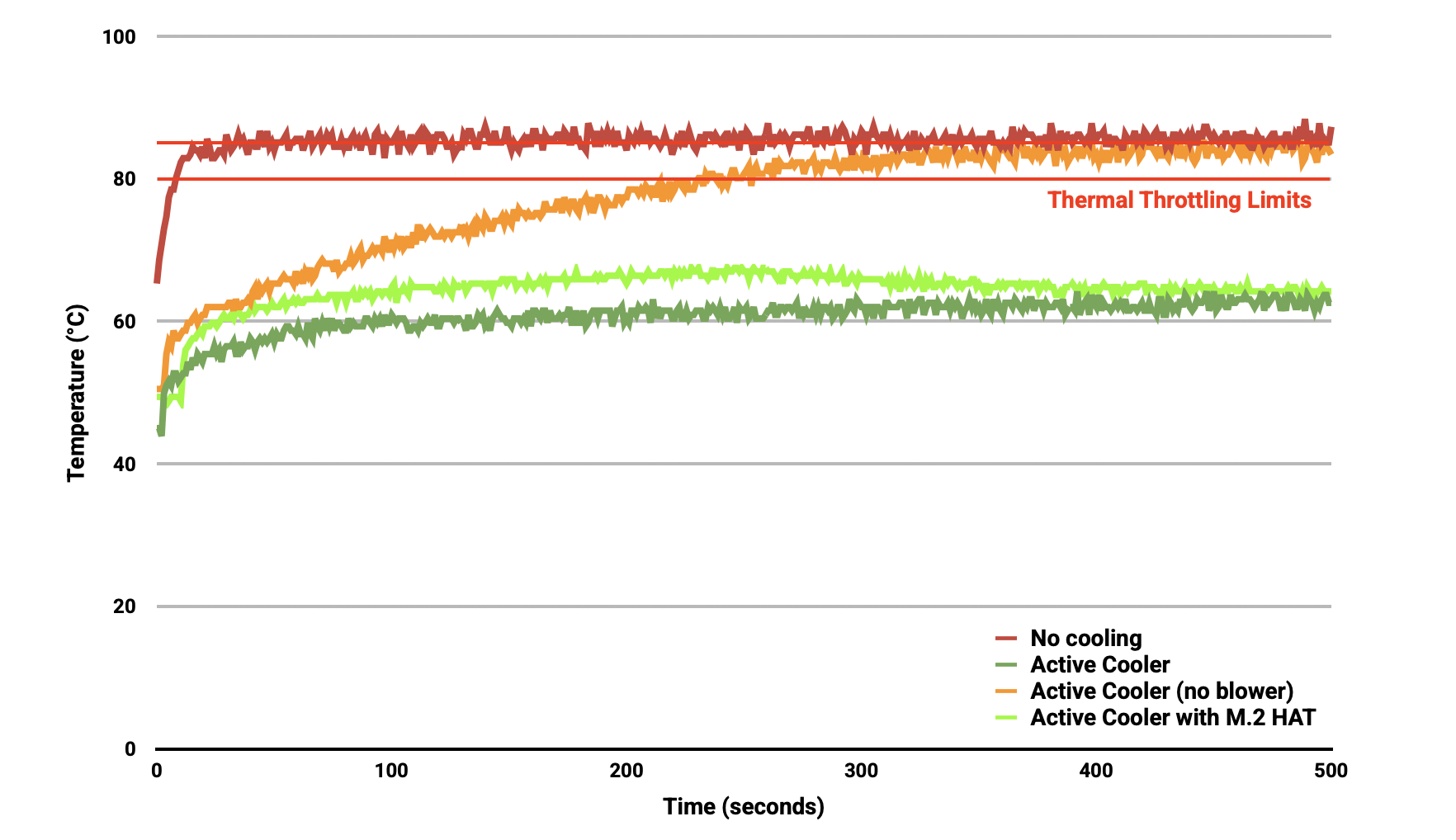
Under sustained load the CPU temperature initially rose to the second 67.5°C trigger point, spinning the blower’s fan up from low to its middle speed. However, this quickly dropped the CPU temperature below the trigger point, which in turn dropped the fan speed back to its lower setting. The CPU temperature then stabilised at around 64°C for the remainder of the sustained testing.
Using the new case
Next on the test bench was the new fan case. I removed the Active Cooler from my board, and went ahead and fitted the Raspberry Pi 5 inside the new case. The new case comes as four components; the base which the Raspberry Pi clips into, then a frame and fan assembly, and finally a lid that clips on top.
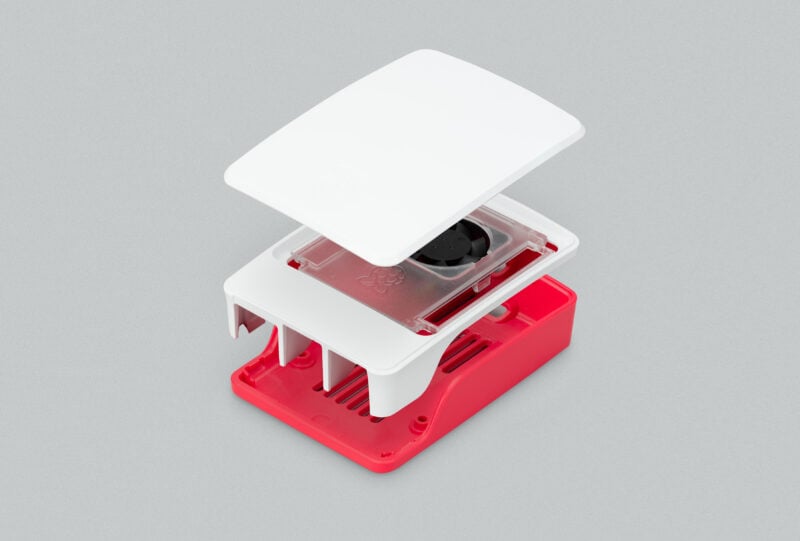
Like the Active Cooler, the fan assembly is actively managed by the Raspberry Pi firmware: at 60°C the blower’s fan will be turned on, at 67.5°C fan speed will be increased, and finally at 75°C the fan increases to full speed. When the temperature drops back below these limits the fan will spin down automatically.
Testing was carried out in the same fashion as before, first with the fan assembly in place, but with the lid removed. Then again with both fan assembly in place, and this time with the lid clipped on top.
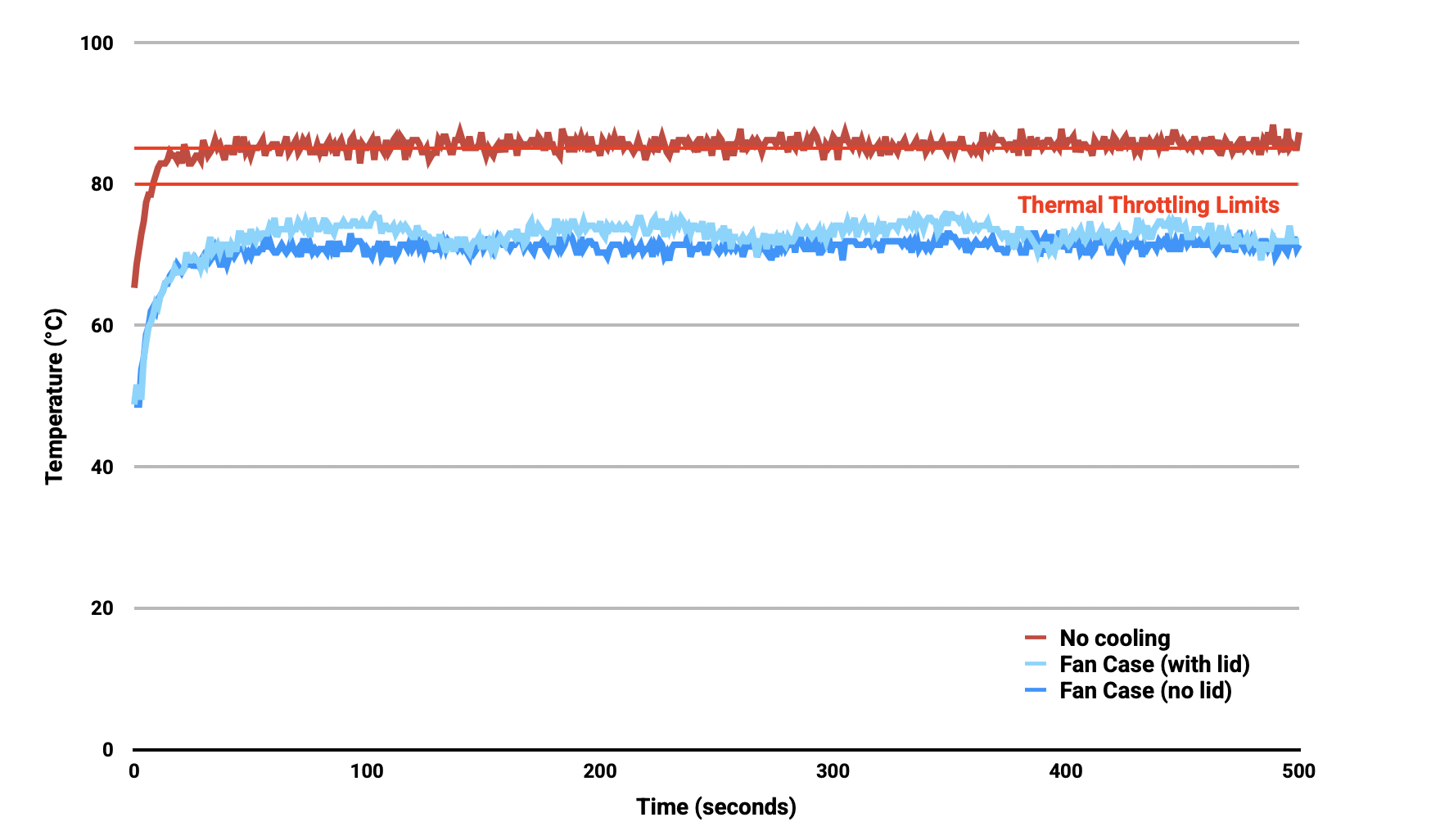
Using the fan case we see idle temperatures a couple of degrees hotter than with the Active Cooler on its own, at around 48°C. With the lid removed we see maximum temperature of approximately 72°C under sustained load, and with the lid in place we see a marginally higher maximum of around 74°C under load.
We can see that while temperature under load is higher than with the Active Cooler, the maximum temperature under load is still well below the 80 and 85°C throttling temperatures.
Conclusions
For normal use adding cooling is optional, although performance may be improved with the addition of active cooling. However a heavy continuous load, such as rebuilding the Linux kernel, will force the new Raspberry Pi 5 into thermal throttling. For heavy loads thermal throttling can extend processing times, and passive cooling is probably going to be insufficient thermal management for heavy loads that extend beyond 200 or 300 seconds of duration, with active cooling necessary to prevent thermal throttling from occurring.

When deciding on a cooling solution you should consider what sort of use you’re going to put your Raspberry Pi 5 to, and make a decision on cooling based on that, rather than just arbitrarily adding cooling. Because for a lot of day-to-day use cases, it’s not going to be needed.
Cooling of any type isn’t mandatory, no harm will come to your Raspberry Pi if it’s left uncooled — and even while throttling under heavy load, a Raspberry Pi 5 is still faster than an unthrottled Raspberry Pi 4.






93 comments
Martin
Can you fit the active cooler into the new case?
Raspberry Pi Staff Alasdair Allan — post author
Yes! If you remove the fan assembly you can fit the Active Cooler into the new case. But as the case comes with the fan assembly, I don’t see use case for doing that?
Anders
Jeff tested this and found that the active cooler with the heatsink in the case results in slightly cooler than just a fan.
Jeff Geerling
Indeed! It was only a very small amount, probably more due to the fact the heatsink pulled heat off the board a bit more efficiently than just the air from the case fan.
I would be okay either way, the case fan has slightly more optimal air flow in the case.
nafanz
How to get an avatar? ;-)
AndrewS
nafanz, see https://gravatar.com/support/what-is-gravatar/
Luca
What about using both? the active cooler as well as the fan assembly cap, with both fans running?
Matthew
Firstly, thanks for your time in running these tests and providing the numbers, it’s all looking really good. In response to the query above, I also was wondering this as I’ve ordered both already and I see the use case as I want the improved cooling and the quieter fan with the active cooler but also a case to protect the pi. Also looking at the pictures the M.2 HAT looks great and perhaps it will be possible to run the bottom part of the case, active cooler and HAT together? Thanks!
Raspberry Pi Staff Alasdair Allan — post author
So if you remove the fan assembly, you can fit the Active Cooler inside the new case. Then using GPIO extenders you can fit the M.2 HAT on top. You won’t be able to attach the lid. But the Pi will be sit inside the bottom half of the case without a problem in that configuration.
Matthew
Thank you for your reply, that’s great info!
Moonji
In the launch post there is talk about two different M.2 HATs. The standard form factor that was seen here and a second, L-shaped form factor. I assume the latter is more space efficient, so I’m wondering if it can be mounted alongside the active cooler, inside the case with the lid on. This would be the ideal configuration for my use case.
Vince
Going with the integrated active cooler+fan reportedly is much quieter than the case fan (isn’t it?). It will be interesting comparing the pi5 with active cooling vs. a pi4 with a FLIRC case which keeps the pi4 at a nice 47 C or so typically for my no-gui workloads.
Anthony R. King
Use cases:
1) Case fan stopped working and happen to have a spare active cooler.
2) Even a modest improvement in performance as mentioned by Jeff, might be appreciated in places where ambient temperatures are higher. Ambient temperature isn’t stated or discussed here, but not everybody living with 40 Celsius ambient will have air conditioning.
3) If the active cooler, as has been suggested, is quieter, that would make it generally more desirable. Noise levels have not been quoted for the case fan solution here, I note.
Anthony R. King
Further to this, Chris Barnatt’s in his recent video on Pi5 cooling suggests to use just this configuration (case + active cooler), as it’s quieter, ‘effectively a silent solution’ even:
https://www.youtube.com/watch?v=vYUF1H-_7TQ
Roger Woollett
Have you tested wihout cooling but with the board vertical rather than flat on the bench? I have 3D printed supports for my Pi4 and have never seen it get hot. I can feel warm air rising from it when under heavy load.
Raspberry Pi Staff Alasdair Allan — post author
Nope, haven’t tested in that configuration. Sorry!
xeny
You’re thinking back to the Pi 4 cooling article that suggested it ? https://www.raspberrypi.com/news/thermal-testing-raspberry-pi-4/ It feels as if it can only help, although if components are no longer through hole soldered, I wonder if that will reduce the amount of heat transmitted to the bottom of the board.
John Lind
I, too, have seen dramatic differences in passive cooling with the 3, 3B, and 4, with heat sinks that are mounted so that the fins are veritcal when the board is on edge. On a 3 recompiling Marlin for a 3D printer, it’s the difference between throttling and not throttling. For the 4, the CanaKit passive cooling case kept it from throttling while ripping Blu-ray discs for hours. Are your 3D models available somewhere, or would you consider making them available? I have a 3D printed rack with sleds that I got off thingiverse, but the sleds neither lock into the rack properly nor stay in the guides, and I’d like to replace it. By using it on edge, I’m able to keep my 3B+s from throtting under full database and routing loads, but I’m looking for a better design.
stan423321
So, this is arguably my dumbest question yet, but here it goes. How did we end up with HATs being, well, attached over top of SoC? By now I guess we have back-compat to worry about and earlier Pis needed cooling less, but there were still complications with recommended holes. Does anyone remember why the standard wouldn’t go with an arrangement of top board extending outside?
Raspberry Pi Staff Alasdair Allan — post author
The 40-pin headers point up, so that’s where the HAT goes. More on the HAT standard at https://github.com/raspberrypi/hats.
stan423321
The pin direction explains SoC not being above the extension board (obviously aside from 400, where it is different, and possible future hardware). I was thinking if a setup where the board goes outside the Pi surface instead of over it was considered. Like a _- instead of =.
AndrewS
Because that would take up more physical space, and in many scenarios the compactness of the Raspberry Pi is an advantage. However if you really want to do that, there are solutions like https://shop.pimoroni.com/products/mini-black-hat-hack3r
Tunahalf
Using the old standard 40 pin IDE cable with male on one end to female other end. Their still available on Amazon. Just mount the Hat outside. In a pinch it would work.
I have used this method in the past.
CooliPi
What is the longest length of the PCIe FFC cable to an M.2 HAT? We can mount it sideways (hence not blocking airflow) to a (potential) CooliPi 5 heatsink as we did on a Raspi 4 version – but it’d need a bit more than 5cm. Can it work with 10cm cable? GPIO is connected 1:1
Raspberry Pi Staff Alasdair Allan — post author
Documentation around the Raspberry Pi connector for PCIe, and the specifciation for the FPC, will be coming in the next few weeks!
Anthony (Elmo) L
Is there cooling stats for a m.2-poe-active_cooling hat???
Raspberry Pi Staff Alasdair Allan — post author
Unfortuantely I’m not sure what you mean by “m.2-poe-active_cooling hat”..?
nafanz
I could be wrong, but it seems to me that he wants to use active cooling and two hats: m.2 and PoE
Anthony (Elmo) L
As in are you guys going to make us a hat that has poe, active cooling and m.2…?
Paul Kersey-Smith
Regarding the actual cooler – do you have the MTBF values by any chance?
Alan
The cooling solutions being offered are looking very useful for heavier tasks when needed, and it’s good to hear the Pi 5 keeps cool enough during normal kinds of use without any active fan or passive heat sink cooling. Looking forward to actually seeing how well it holds up in practice when it’s in a suitable case with vents only.
Roland23
Thanks for this comprehensive testing report, but there is one piece of essential data missing: what frequency did the CPU throttle down to? I’m interested in having “no moving parts” solutions, and am a big fan of the Pi 400 for this reason, as it passively cools very well, and throttles on extended load from overclock of 2.1Ghz to about 1.95Ghz average. I would love to know how Pi 5 copes in this regard, what the actual penalty is in CPU speed when throttled.
Raspberry Pi Staff Alasdair Allan — post author
When the 85°C thermal throttling limit is exceeded the Raspberry Pi 5 firmware will throttle the CPU down from 2.4GHz to 1.5GHz.
nafanz
Thanks for the detailed tests. Could you tell us a little about your behind the scenes in one of the articles? Especially about testing boards and software. What approaches and technologies do you use for this?
Josh Ellison
So, being curious, what’s that “RP2” chip about on the HAT prototype?
Raspberry Pi Staff Alasdair Allan — post author
That’s our RP2040 microcontroller!
Nicko
It would have been interesting to see the un-cooled chart with both the temperature and the clock-speed when throttled. Presumably the throttling kicks in, the temperature drops, and then it goes back up to full speed. Understanding how deep and how frequent the throttling is would be very helpful.
Raspberry Pi Staff Alasdair Allan — post author
Here’s a chart showing exactly that!
Anthony R. King
That’s interesting, Alasdair – the speed is shown as never dropping below 1.5Gh, which is 15/24 = 5/8 = 62.5% of full-speed. The chart could use some information regarding testing conditions, of which there is none.
Raspberry Pi Staff Alasdair Allan — post author
Not sure what you mean by testing conditions? In the uncooled instance the board was sitting on my bench in the office. The office is air conditioned. I mean, we’re not under strict lab conditions here, but it’s a pretty normal set of circumstances “in an office”.
Anthony R. King
Hi Alasdair. I thought it was notable that the chart doesn’t include a heading explaining what it’s a chart of. Of course, ambient temperature is germane and should be noted, as all test temperatures will pretty much be relative to it, right? Given the Pi foundation’s repeated pledge to democratisation of access to these technologies, it comes across as a little dismissive of those living in warmer climes who, if all they can afford for a computer is a Pi, may well not be able to afford air-conditioning.
Bean Genie
My use scenario is for a dust-proof setup at the very least (a bonus if I could make it drip-proof). From the pictures, it appears that passive cooling will only work with the top off. Is this correct?
I’ve seen x86 setups (typically a low TDP Pentium or Celeron) where passive cooling is done via an all-metal heat-sink case. So is (waiting for) a heat sink case the only option for me?
HankB
Look at the Flirc cases. They already have one for the Pi 5. I use them with the 4B and they keep it cool overclocked to 2GHz and running s-tui/stress-ng. No fans, just a fair amount of aluminum.
Stefan
I hoped the PI5 would have POE+ onboard.
So it still needs a POE+ hat stacked on top,
plus Z-WAVE hat … so it still stays a BigMac …
Will the existing POE hats like Waveshare work?
Raspberry Pi Staff Alasdair Allan — post author
No the PoE+ connector on the board has moved between Raspberry Pi 4 and 5, existing PoE solutions won’t work with Raspberry Pi 5.
Vivement
What about the power consumption?
Rubén
If anodized in black, it would improve aluminum’s emissivity and thus be able to dissipate more heat, specially at higher temperatures.
James Adams
We’ve already tried this and it makes no detectable difference.
Betto
If the fan breaks from the heatsink is it replace-able? (only the fan not the heatsink)
If the fan from the case breaks it is replace-able?
Raspberry Pi enthusiast
Could the Raspberry Pi 5 appear in the future with 16 GB of RAM on board?
Konstantin
What about a POE+ hat? I am using it on my RPI 4 and I pre-ordered RPI 5. Tell me more information about it, please.
Raspberry Pi Staff Alasdair Allan — post author
There will be a PoE+ HAT specifically for Raspberry Pi 5, there is a picture of a prototype in the launch blog post. Older HATs and existing third-party products will not fit on Pi 5 as the PoE header has moved on the board.
SamVimes
Why don’t you leave the GIPO port unpopulated and maybe even ship the RasPi 5 with a hammer header? That way you can place HATs under the RasPi if you want to use the active cooler.
Raspberry Pi Staff Alasdair Allan — post author
Because for 99% of our user base, they’re perfect as they are!
SamVimes
That was true until the RasPis got so powerful that active cooling and proper airflow was actually necessary if you didn’t want to constantly reach the thermal throttling limits (that’s at least what i gather from this article).
I had a Pi3B+ in a WDLABS housing together with a USB-hdd. A selfmade passive cooler was enough to keep it reasonably cool although the hdd added to the RasPis heat and there was NO airflow at all inside that case.
My Pi4 is now in a FLIRC case and it definitely gets warmer than lukewarm.
I see a trend here. And that trend is screaming: Don’t use HATs with a Pi5 if you actually want to use its full processing power!
AndrewS
Try reading the article again – the Active Cooler works perfectly fine with HATs.
Nikolay
I don’t want active cooling because of noise and energy consumption. Can I easily undervolt Pi 5 to do that?
SamVimes
Just don’t make use of the Pi5’s processing power…
Seriously: I see no problem here. RasPis have a thermal throttling limit that clocks down the processor if it gets too hot.
Plus: There are some very good 3rd party cases for the RasPis that work as a massive passive cooler.
Neels Theron
Can we run the Pi5 with a active cooler, a M.2 hat and say a dac+ soundcard all at once?
Thomas
“at 60°C the blower’s fan will be turned on”
Hence we can assume that the temperature curve is identical for the test with and without the fan plugged in. But if you’re looking at the graph below that quote, you will notice that this is not the case.
Gizmo_RA2
I’m very curious about the noise level of the fan and the life expectancy of the fan.
I’ve found the PI4 fan gets incredibly loud and whiney in a very short amount of time, usually hours, and tends to fail randomly withing weeks to months of consistent use.
Do you have any decibel and frequency graphs for the noise output of the fan? And any expected life expectancy information?
Thanks
Andy M
Spot on. I am also concerned about the lifetime of the fan. Although everything depends on computing load, I wonder if there is a way to estimate MTBF. I use primarily the 3B(+) for reliability. I have some 4s using carefully-selected cooling fans.
Anthony R. King
I haven’t spotted any comment on any fan control available to the user. If the Pi 5 is capable of running safely without cooling, how can the user demand silent running via software (when a fan is in place), when they so require?
P Jacques
Pi5: With the eye on cooling, do you think there will be a combined keyboard & Pi5 solution?
Karl E Wohhg
When I try to run the script I get
Traceback (most recent call last):
File “/home/tmp/vcgencmd.py”, line 5, in
from vcgencmd import Vcgencmd
File “/home/tmp/vcgencmd.py”, line 5, in
from vcgencmd import Vcgencmd
ImportError: cannot import name ‘Vcgencmd’ from partially initialized module ‘vcgencmd’ (most likely due to a circular import) (/home/tmp/vcgencmd.py)
How do I fix?
Raspberry Pi Staff Alasdair Allan — post author
As I mentioned in the post, you’ll need to install the vcgencmd Python library first.
Muhammed
Can I use more than one fan on the Pi 5?
Adam L
When will full schematics be available for this (and other products in this release)?
Raspberry Pi Staff Alasdair Allan — post author
We have never released full schematics for a Raspberry Pi, except for our microcontroller board the Raspberry Pi Pico, because the Raspberry Pi is not open source hardware.
jackra1n
I would love to finally see a possibility to have PoE, NVME and a cooler on a single Pi! Doesn’t matter of its a single hat or separate as long as they are compatible with each other.
Iustin Pop
I’ll be looking forward to comparisons between these and (e.g.) the flirc case. I’m using those with the RPI4 and they seem pretty good, if it reduces the throttling significantly but not eliminate it might still be worth as an alternative.
And thanks for the post, was very informative!
Peter G
Just received a pi5 from The Pi Hut using my Hackspace code. I tried the program from this and get an error been a long time since i did any programming and should know how to fix the problem.
====== error message under thorny ======
Traceback (most recent call last):
File “/home/pi-env/programs/pi55 testing.py”, line 5, in
from vcgencmd import Vcgencmd
ModuleNotFoundError: No module named ‘vcgencmd’
PeterFram
You need to install the vcgencmd python binding first.
Nicklas
Really nice piece of kit – love its low profile and how it mounts without using GPIO pins or the case-mounting holes in the board.
I’m curious, though… the fan control seems to be part of the Pi OS – as opposed to something in hardware/firmware. I’m guessing this given the behaviour of the fan under other OSes. Any idea how to install the appropriate controller on, for example, Ubuntu?
Jesper E. Siig
I would like to know that as well. I am running Ubuntu on my Pi5, and the fan on the active cooler runs constantly, which is annoying.
EnglishBob
I got the same module error when trying to run the script.. so did some tweaking to get it to work. The script will run every 5 secs for 24 hours and it closes the file every minute to provide visibility. Thanks Alasdair, great article
____________________________________________
import sys
import os
import time
import vcgencmd
def main():
start_time = time.time()
# edited to “w” rather than “a+” to truncate the file
fb = open(“/home/pi/readings.txt”,”w+”)
fb.close()
fb = open(“/home/pi/readings.txt”,”a+”)
fb.write(“Elapsed Time (s),Temperature (°C),Clock Speed (MHz)\n”)
number = 0
while number < 1440:
number2 =0
fb = open("/home/pi/readings.txt","a+")
while number2 <13:
#print(f"Number is {number}!")
temp = vcgencmd.measure_temp()
clock = int(vcgencmd.measure_clock('arm')/1000000)
string = '%.0f,%s,%s\n' % ((time.time() – start_time),temp,clock)
#print(string, end='')
fb.write(string)
time.sleep(5)
number2 = number2 + 1
fb.close()
number = number + 1
if __name__ == '__main__':
main()
Peter P.
Just acquired my pi 5 8Gb model. What an absolute unit! One question though: any way to adjust the fan “curve” / limit on the active cooling? Since it has PWM, is the fan control exposed to the OS in any way?
Soma
Hi all
Several posters asked and noone has replied so, here is it again:
Is there anyway to control the speed/temperature curve of the fan? Be it via a script, raspi-config, config.txt, etc
Just started with it and, on idle, the Pi is ~@45º.
For me that is too much. With a CM4 with a ICY Tower low speed fan , idle temp is ~@34º and on full ~@45º-50ºC
I want to have the “active cooler/fan” to REALLY BE “active”.
Thank you
Ed
I too would like to know if the threshold temperatures of the new Pi 5 active cooling fan can be set by the user. Can’t find anything for that in /boot/overlays/README unfortunately. For example, I might want to set it to switch on above 50°, switch off below 40°.
nigel ackroyd
Is there a passive cooler option for the RPi5? My RPI5 will replace my RPi4 for my 24/7 Minecraft server & I want to keep fan free cooling with <70°C temperatures.
Nate Contino
The active cooler works just fine as a passive case if you don’t plug it in, though not quite as well as it works with the fan running. I’ve been personally running a Minecraft server on a Pi 4 for a few years now with a Flirc passive cooling case along with a lot of other home automation stuff. Idles around 40C most of the time, depending on the season. Works very well, though I’m sure I could eke faster chunk loading times out with active cooling. Given that the Pi 5 runs cooler for the same workloads, and my 4 is hardly running at max capacity, I’m sure the 5 would work very comfortably as a Minecraft server with only passive cooling. You might even be able to get away without any cooler at all, give it a try on the bare board!
Hal
I’m a bit puzzled by the measurements because my Pi 5 in the red and white official case idles at about 31 – 32 degrees (vcgencmd measure_temp). With the active cooler it actually idles a couple of degrees hotter. I’m running Ubuntu 22.10 Server, if that makes a difference. The fan does spin faster some times but it’s fairly quiet mostly. The Pi is running Docker and ArangoDB as well as sporting a 4TB USB SSD encrypted with LUKS.
Andrew
It’s very helpful to see all these measurements.
I’m rather excited to have just received a Pi 5 (annd anctive cooler), and will try it out this weekend. Before fitting the active cooler, there’s a question I’d like to ask. Just as soon as it’s available, I will order the new POE hat (for the Pi 5), and will then always use that to power the Pi. So my question is:
Will it be possible to fit the new POE hat if the active cooler is already in place, or would it be better to not fit the cooler until the POE hat is available?
(I’m assuming that, because of the sticky attachments, it would be better not to remove the cooler, once fitted.)
Thanks …. Andrew
raspberry pi Q
I’m using my raspberry pi 5 (as I’m typing this) and the temp reads 45-49 degrees Celcius and the fan isn’t running. It ran while booting up but thats it. Thnx!
Ploedman
How do you remove the active cooling unite safely without damaging the SMDs on the underside?
Leo
Did you try making a watercooled Raspberry PI 5 ?
Chris
To modify the script to also report the fan speed:
fb.write(“Elapsed Time (s),Temperature (°C),Clock Speed (MHz),Throttled,Fan Speed (rpm)\n”)
…
string = ‘%.0f,%s,%s,%s,%s\n’ % ((time.time() – start_time),temp,clock,throttled,open(‘/sys/devices/platform/cooling_fan/hwmon/hwmon1/fan1_input’,’r’).read()[:-1])
Change the path to the fan input according to your system.
Tony
The blower’s fan turns on at at 50°C , not at 60°C
The steps are:
https://www.raspberrypi.com/documentation/computers/raspberry-pi-5.html#cooling-raspberry-pi-5
below 50°C, the fan does not spin at all (0% speed)
at 50°C, the fan turns on at a low speed (30% speed)
at 60°C, the fan speed increases to a medium speed (50% speed)
at 67.5°C, the fan speed increases to a high speed (70% speed)
at 75°C the fan increases to full speed (100% speed)
It is also possible to adjust the default settings in /boot/firmware/config.txt (see /boot/firmware/overlays/README)
The defaults are:
fan_temp0=50000
fan_temp0_hyst=5000
fan_temp0_speed=75
fan_temp1=60000
fan_temp1_hyst=5000
fan_temp1_speed=125
fan_temp2=67500
fan_temp2_hyst=5000
fan_temp2_speed=175
fan_temp3=75000
fan_temp3_hyst=5000
fan_temp3_speed=250
So, to have the fan start at 55°C instead of 50°C, in /boot/firmware/config.txt add the line:
dtparam=fan_temp0=55000
Chip F.
The Active Cooler is a nice idea, but when running BOINC and einstein@home with 100% CPU utilization, the fan on mine doesn’t run except occasionally when coaxed with a finger. Seems like a fan QC issue to me.
Raspberry Pi Staff Liz Upton
What temperature does your Raspberry Pi end up at? (I have other questions, but that’s the big one.)
Chip F.
I should have mentioned that the heatsink temp is about 77 deg. C.
Raspberry Pi Staff Liz Upton
That *does* sound off – can you check the fan cables?
Chip F.
In addition to the Raspberry Pi Active Cooler with the inoperative (or intermittently operative) fan, I have a Raspberry 5 case with a somewhat different fan built into the lid. I removed the inop fan from the active cooler (three screws) and set it aside, and plugged the fan from the case lid in and set it on top of the heat sink fins of the active cooler assembly. That fan runs properly, cooling my heatsink to about 52.5 deg. C. Liz, why don’t you PM me for my address and send me a replacement active cooler fan? I live in Arizona. Hope that’s not too inconvenient.
Comments are closed