Wanna build a Raspberry Pi 5 cluster?
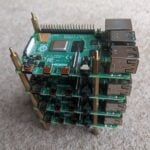
Nurgaliyev Shakhizat took three Raspberry Pi 5s and smashed (technical term) them all together to create a magical Ceph cluster. And look, it’s all colourful and stuff! Nurgaliyev advises that this is an advanced project for the particularly tech-savvy, and that it took him about six hours to complete.

The Raspberry Pis are connected in a private network via a 1 Gbit switch, with three 256GB SSD drives providing the storage. Ceph is an open source software-defined storage solution, and is very scalable, offering interfaces for multiple storage types within a single cluster.

Nurgaliyev has put together a satisfyingly detailed Hackster post explaining how he put everything together and got it up and running using Raspberry Pi 4 as a thin client.
Code along to create a cluster
Special out to Kevin McAleer’s Raspberry Pi 5 cluster, which he built live last month during one of his code-along YouTube sessions. If this is your preferred learning style over reading, have a watch below.
Well, well, well, what a coincidence
This seems like an excellent time to let you know that we’ve updated our How to build a Raspberry Pi cluster tutorial to make it compatible with the latest Raspberry Pi OS, Bookworm. Now that’s not the only reason we chose to blog about clusters today, but it is a most happy coincidence.

We have tonnes of tutorials on our site. You can learn how to do all sorts of things, from building your own flight tracker, to creating a wearable Iron Man Arc Reactor.
We’re also up for taking requests, so if you’d like a simple, clean tutorial on how to build something with Raspberry Pi, comment below and I’ll share your idea with the appropriate grownup at Pi Towers.


25 comments
Len of Quirm
FPGA (Field Programmable Gate Array) tutorial?
There are fpga dev boards that interface or contain Pi’s and Pico’s but they could be better written. I’d like to have a crack at a simple NPU for AI using a FPGA – because… I know nothing about the subject, they look interesting and well why not.
This one can use a Pi for programming : https://www.olimex.com/Products/FPGA/iCE40/iCE40HX1K-EVB/open-source-hardware
And there are many old tutorials for disconntinued FPGAs:
https://www.cl.cam.ac.uk/teaching/1819/ECAD+Arch/fpga-intro.html
Raspberry Pi Staff Liz Upton
Oh, I like that. It’s on the list.
Raspberry Pi Staff Alasdair Allan
We certainly have a bunch of in-house expertise around FPGA to rely on!
Raspberry Pi Staff Liz Upton
Oh good. I WAS hoping you’d say something like that.
BLMac
I’d love to see a cluster set up so that I could run an various emulated OSes on it, eg MacOS
nafanz
Besides PoE and separate power supplies for each raspberry, is there any elegant solution for powering the cluster?
Raspberry Pi Staff Alasdair Allan
Honestly, using PoE is probably the cleanest approach to building a cluster. Which is why I used it myself when I wrote our own official tutorial.
nafanz
Maybe you still have recommendations for proven models of USB switches or something similar for powering the cluster? Perhaps you should think about releasing a new product, a power supply for multiple devices?
Steve Trefethen
I’m trying to follow these instructions using Pi 5’s and the same switch from the post. Once the home node is setup with DHCP I’m not seeing the switch listed with a lease on the DHCP server though I can see it on my home network if I plug it in directly to the network. I’m also not having much luck getting network boot to work on the first node. There what looks like some inconsistencies using “pi-cluster” and “cluster” and I’m not sure that’s intentional. Also I see the serial number being used but I could use a better explanation of exactly how that plays a role here as the folder with the serial number is empty which seems pointless.
I’d love to see this updated for Pi 5’s and will continue to see if I can get the cluster up and running. I welcome any thoughts/hints.
Steve
Ian Bonham
Hi Liz.
Here’s a challenge for you when it comes to clusters. I have TADO smart bulbs all around my house. All on 5Ghz.
They are drawing power all the time on standby to light up the led’s.
Can I push a Cambridge designed OS image on to them, removing the Chinese firmware, and then join them to a cluster so they are doing useful stuff during the day, rather than just being power hoovers?
A PI 5 could host the light bulb cluster. Let’s make use of all the edge power to help projects like SETI , et all.
This is your challenge, if you choose to accept it…
Ian B
Dave
We just neet the Pi5 Power Over Ethernet hats to be released so we can all build a cluster of Pi5’s without the need for lots power supplies. When is the official PoE hat for the pi5 due to start shipping?
Raspberry Pi Staff Liz Upton
I could tell you, but I’d have to keep you in a small room until release date so you didn’t tell anyone else.
nafanz
If there is food there and there are boards all around, I agree.
Dave
So soon then ;-)
NickMon68
I think for me, a simple to follow guide to get a local AI running on the PI would be a great addition to the tutorials, The software to install, optional hardware to make it faster/better etc.
In fact what I am dieing for is an P(a)i, that’s been trained over all the Pi Mag issues, and technical documentation, that can answer any Pi question would be great !
Raspberry Pi Staff Alasdair Allan
Are you thinking about ML for tasks like image or speech recognition, or the new coolness, generative AI?
NickMon68
I was just thinking about it from the point of view of being able to train an AI yourself in what ever takes your fancy, such as, All the Pi Mags, The works of an Author, Academic papers etc. So learning how to install and then train, maybe an add on topic of OK what can you buy to make this easier.
Calvin
Can anyone tell me where I can buy a PI5 Cluster with fans like the one in the picture?I urgently need…
Guru
Excuse me, this is a beautiful case, I wonder where I can buy it, or where to download the design file?
AndrewS
It looks like it might be this https://www.amazon.co.uk/dp/B083FP9JRY
nafanz
Regarding ideas for the textbook, nothing original, but I would really be interested.
– Automatic watering and soil moisture control. Most of the available instructions seem to me to be quite outdated, but most importantly, almost everyone knows how to water only one plant. How to scale this so as not to put raspberries in each pot?
– Environmental monitoring (temperature and other possible measurements)
Both ideas can be complemented by graphs with historical data.
– Digitization of old audio\video cassettes, is this even possible?
Raspberry Pi Staff Liz Upton
The irrigation idea’s a good one; we see a ton of undocumented builds, but I’m not sure I’ve seen anything very up-to-date or at much scale with a tutorial attached.
I have just the massively overplanted office in mind for some experimentation, too.
Environmental monitoring’s coming to a website near you soon: Toby and I were just blowing on an anemometer this afternoon.
AndrewS
“massively overplanted office” ? I have nooooo idea what you’re talking about! ;-D
John Bainbridge
My request for a tutorial is the definitive how to make old speakers bluetooth capable using a Raspberry Pi. Ideally NOT using the Balena solution. I tried that, but it seems to spend too much time signalling back to the mothership when you turn it on.
There’s a lot of information in a forum post, but it’s from 2019:
https://forums.raspberrypi.com/viewtopic.php?t=235519
An update for Bookworm and the latest audio stack would be nice.
newyork10023
Step-by-step how-to to network boot a number of RPi’s (preferrably using iSCSI even if it requires a pre-boot from SD card). Followed some directions online to no avail. My environment uses OPNsense (for DHCP) and TrueNAS Core (for iSCSI), but I’d read any netboot directions though iSCSI would be ideal.
Comments are closed