The inside story on the new Raspberry Pi 5
The next iteration in the world-conquering Raspberry Pi line-up is here. HackSpace magazine caught up with Eben Upton (co-founder of Raspberry Pi and CEO of Raspberry Pi Ltd), and James Adams (CTO and principal hardware architect at Raspberry Pi, and designer of six of the seven flagship Raspberry Pi boards).
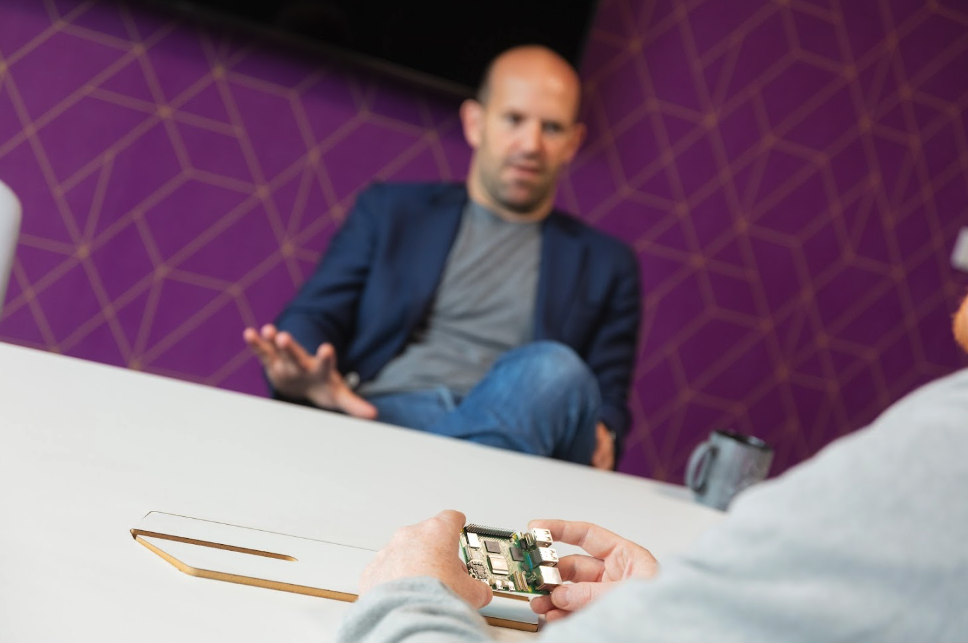
Here’s what they had to say about Raspberry Pi 5…
Raspberry Pi 5. What is it?
Eben: It’s our new flagship product. It’s the seventh iteration of the flagship product: we’ve had Raspberry Pi 1–4, and the 1+, and the 3+. It’s roughly two-and-a-half times as fast as a Raspberry Pi 4, which makes it about 130 times as fast as Raspberry Pi 1. If you measure using the JetStream JavaScript benchmark, it has a little over half the performance of my last-generation Intel MacBook Air.

So over 10, 11 years of development you’re pretty much keeping up with Moore’s law. Nice!
Eben: We’re about on track. Eleven years is about seven iterations of Moore’s law [Gordon Moore’s observation that computing power doubles every 18 months], which is 128, and we posted 130, so I think we are more or less clinging by our fingernails to Moore’s law.
James: It works very nicely as a desktop machine now. I mean, Raspberry Pi 4 did as well.
Eben: We have this idea that there’s a kind of bell curve of demand for computing. There are some people who don’t really want very much performance at all [Eben points to the left-hand side]. And then some people who want as much performance as they can get – extremely high-end gaming, or CAD [Computer Aided Design] programs. [Eben points to the right-hand side.]
Some people, say, just want to read a value from a sensor once a minute in a Python script and log it to the network and turn an LED on and off – Raspberry Pi 1 could do this, of course. So, there was a market for Raspberry Pi 1 as a PC, but only for people with relatively modest demands.
People’s ambient expectation of how much computing power they need drifts to the right, but it doesn’t charge to the right. So, over the generations, we’ve been catching up.
The interesting thing about Raspberry Pi 4 was that it got past that median. I could give it to my parents, to use as a generic PC. They can’t really tell that it’s not a MacBook Pro, because they don’t need a MacBook Pro’s worth of performance. With Raspberry Pi 5, we’re now going back down the other side of the slope: most people will be in the same camp as my parents.

Power for the peripherals
The power system has had an overhaul. Can you tell us about it?
James: We’ve worked with Dialog (now Renesas) to build this chunky power management chip. You can see there are a lot of inductors around it. These little black guys are inductors, and these four grey things at the top are inductors. It’s a quad-phase 18–20 amp switcher, which supplies the core of the chip.

Eben: You have two-ish megahertz PWM [pulse-width modulation], so every half a microsecond you connect the five volts to the output node for a fraction of half a microsecond. The more load it’s under, the greater the duty cycle of the PWM. And that’s how most of the switchers work, how the rails work.
But with the quad-phase rail, you have four of these machines all feeding the same node through their own inductors, and those periods are offset by an eighth of a microsecond, so they are at 90-degree phase offsets.
And that means that you can respond faster [to changes in the board’s power demand].
At launch, Raspberry Pi 4 had a single-phase core supply. But the newer boards have dual-phase, and this is now quad-phase. Going from single-phase to dual-phase is what enables the 1.8GHz operating point on Raspberry Pi 400 and the more modern Raspberry Pi 4s.

And, of course, the big news is that there’s now a power switch!
James: We’ve got a power switch, which works much like a PC or laptop power button. It has a soft and hard power-off modes: if you touch the button when it’s booted, it will tell Linux to shut down; if you hold the button for long enough, it powers off hard, by cutting the supply rails.
The other thing that this power management chip does is it talks ‘PD’ to USB power supplies [Power Distribution – the standard for negotiating with the type of USB-C power supply used by higher-power devices].
USB PD provides a serial interface to the USB power supply that a chip can talk to and say, ‘Hey, what voltages and currents can you give me?’, and then it can choose one. [Raspberry Pi 5] will always choose 5 V, but we now have the ability particularly to talk to the supply to check that it can support 5 amps.
[Ed note: Raspberry Pi is launching a 5 V, 5 A power supply, but currently most other USB PD power supplies won’t support this mode.]
If you don’t have a five-amp supply [for example, the Raspberry Pi 4 power supply was 3 A], it restricts the USB current output quite aggressively, to 600 milliamps maximum, instead of about 1.1 on the Raspberry Pi 4. So, you can run your mouse and keyboard, happily, but it won’t boot from USB mass-storage devices: it will decline to do that
by default.

Eben: This is one of these really difficult engineering things that we had a lot of discussion about. When we say the board can consume 12 watts, we mean that it can consume 12 watts if you craft a horrible use case for it that’s deliberately designed to do nothing useful, but to consume 12 watts.
So, we have 600 milliamps and a 1.5 amp mode for USB. Raspberry Pi 5 selects between them on the basis of whether it detects a 5-amp power supply or not. Or, you can stick something in config.txt that overrides it.
And the vast majority of people with an existing [3-amp] power supply will plug it in, set the override in config.txt and just forget about it.
James: It’s still five volts, because we don’t want to do power conversion from, say, nine volts, which would be what most people use to get more power into the board. They get more voltage in, and then they convert it into five volts. We don’t do that because it’s costly in silicon, and it’s costly in wasted energy, which just ends up heating the board up. We’ve done the more Raspberry Pi thing, which is make a supply that can drive a five-amp load at five volts, which isn’t a standard PD mode, but you can negotiate it.
Eben: We encourage people to buy the new supply!
Manufacturing improvements
The bottom of the board is a bit less spiky than before – what’s changed there?
James: The soldering technology is different. We’ve taken out one step – one big step.
Instead of having robot arms put these [through-hole components in] and splashing molten solder underneath, we use surface-mount.

You say surface-mount, but it does still go into the holes?
James: That’s right. The SMT – surface-mount technology – process is that you take a screen with little holes and you squeegee your [solder] paste over the top. The pick-and-place machine puts the components down. Then you run it through an oven which melts the solder and everything sticks.
You do that for the back, and then traditionally you do that for the top without any of the things that go through the board. And then you do those through‑hole parts as a final step, with wave or selective soldering.
But we’re no longer doing that last step. Part of the reason is that now the pick-and-place machines can pick up bigger things, because we’ve got these new heads, but also we’ve worked with the connector manufacturers to trim the pins and put higher temperature plastics in various places, and iterated on the footprints and the hole sizes and the paste, so you now paste everything on the top layer, the pick-and-place machine does every single component, and then you just put it in the oven. With through-hole things, the paste on the top melts and it goes into the holes. Job done!
Eben: Except … we discovered a fringe benefit of having these pins sticking through the board, which is that, along with the SD card connector, they protect the bottom of the board against mechanical damage.

Is that what the little loops are for?
James: Yes, these things are to stop the capacitors smashing on the desk.
So, there’s a surface-mounted through-hole pin?
Eben: Ha! Yes! Two of them!
I’d assumed they were ground test points.
James: They are sort of useful if you’re prodding things. They are grounded.
Eben: It really is quite flat. [To James] Did you pick ones that are the same height?
James: Yes, they’re the same height as the SD card holder.
Get the full interview in HackSpace magazine

Read the full interview in issue 71 of HackSpace magazine. There are excellent sections on why we decided to make a new chip for Raspberry Pi 5, and the challenges faced in trying to keep the price as low as possible for end customers.
5 comments
Alfredo
I like how not only the parts that people use are updated but also the parts that no one thinks about, such as the manufacturing process.
Marcus
Um, manufacturers of electronics think about manufacturing. It’s kind of… their thing, I’d say?
Still, design trade-offs for manufacturability and usability are a hard topic, and engineers like us fail all the time; which the article very nicely illustrates: they failed at that compromise (forgot that Rpi use cases include “not fixed in a protective case or on standoffs) and had to add a final through-hole process step – an expensive mistake, but much better to do such a hotfix at a late prototype/early manufacturing stage than to deliver hardware that will fail in the field!
Steve
These folks are artists. Fantastic work.
Joe
I wonder if they will need a dual USB power supply for the next pi. 5 volts at 5 amps is a sizeable amount of power for one port.
Aaron Kulkis
USB connectors have more than enough conductor cross section to push 5 A through them. As long as the controller chip behind the connector can handle that current directly, or control adequate transistors to handle that current, then it’s ok.
Engineering is not only knowing how to design to a specification, it ALSO knowing when your specific usage situation allows pushing past the (conservative, all purpose) specification to get the most out of the entire system as a whole with minimal resources to do it.
DC conducts electricity through the entire cross section, whereas AC current tends to flow more on the surface, and the higher the frequency, the less flows through the center of the conductor. (This is why spark plug wires are fashioned as a nonconductive core surrounded by a layer of fine copper wires woven into a tube shape surrounding that core, all encased in another layer of insulation. The center of a solid spark plug wire carries almost no current anyway, so replacing it with a plastic core reduces cost (plastic is cheaper than copper) and makes the wire more resistant to work hardening, all while still doing the job of delivering what is essentially a very high voltage AC current (with a DC offset) to the spark plug.
Comments are closed