If you found a Raspberry Pi in your Christmas stocking, read this
MERRY CHRISTMAS! As you’d expect, today we’re busy sipping Bucks Fizz, peeling parsnips, trying to defrost things we should’ve got out of the freezer yesterday, and unwrapping dubious knitwear while trying to make our faces look pleased on a video call with relatives in Abergavenny.
But we’ve snatched a few moments to swing by and help you out with how to get started with Raspberry Pi. If you’ve received a Raspberry Pi as a gift and you’re new to all this, read on to find out how to get going with your shiny new computer.
Our little computers work just like bigger computers
You can do all kinds of things with a Raspberry Pi — learn programming, build a robot, make a greenhouse monitor. But they also do everything ordinary familiar laptop and desktop computers do. And if you’re just starting out, you’ll probably want to begin by setting up your Pi with a microSD card (which does the job that a hard drive does in a bigger computer), a display, a mouse, and a keyboard.
Get your microSD card ready
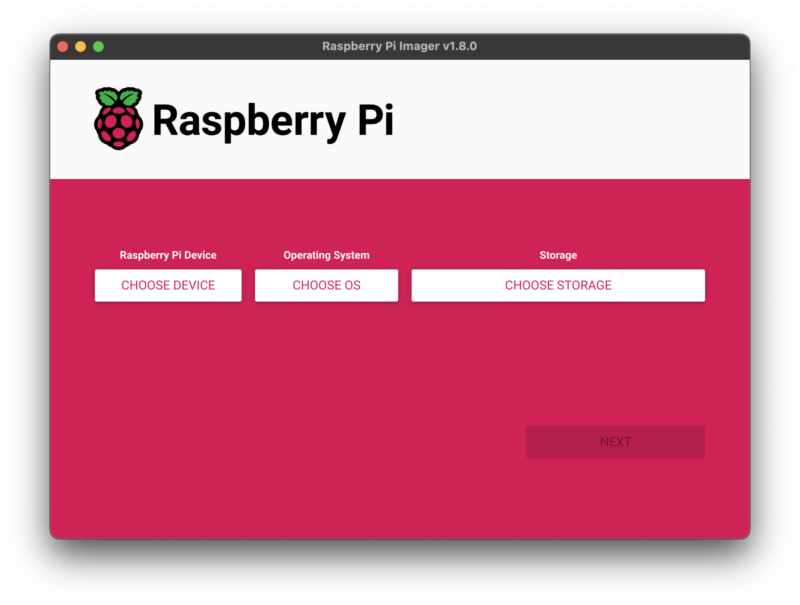
Your Raspberry Pi might come with a pre-loaded microSD card — in which case, you’re all set. Otherwise, you’ll need to get your hands on a decent microSD card (we recommend at least 16GB). You’ll also need another computer to get an operating system onto that SD card. If the computer you’re using doesn’t have an SD card slot, you’ll need an inexpensive USB SD card reader too. Then head over to our documentation and follow our step-by-step instructions to install an operating system with Raspberry Pi Imager, the free user-friendly software we provide for this.
Plug everything in and turn it on
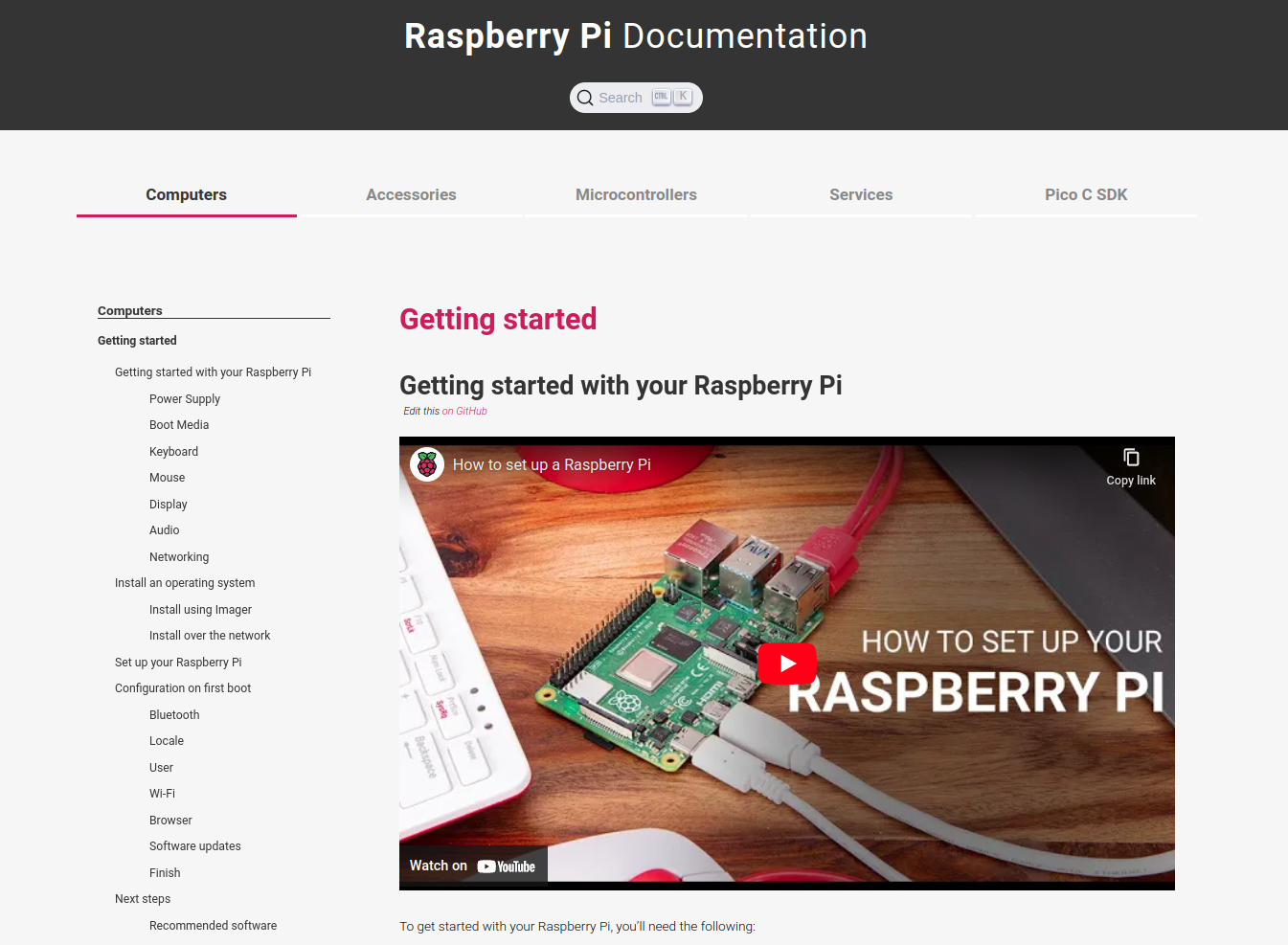
The rest is just like with a new desktop computer: connect a keyboard, mouse, display, and power supply, and turn on the power. The video up near the top of this post shows you what to do. The Getting started section of our documentation sets it all out in more detail.
Get hold of everything you need
Raspberry Pi Approved Resellers are a great place to buy any accessories you’re missing. If you need a power supply to use with your Raspberry Pi, make sure you get hold of the right one. Our power supplies include everything you might need to use with our hardware.
Find more help, and explore further
If you’d like a bit more help getting to know your Raspberry Pi and finding out what you can do with it, take a look at the The Official Raspberry Pi Beginner’s Guide, 5th Edition from Raspberry Pi Press.

If you’re up and running and you just want some project ideas, try our selection of tutorials. Or browse thousands more tutorials and project ideas in The MagPi, the official Raspberry Pi magazine. You can buy the latest issue instantly as a PDF, or download back issues for free.
See you in the New Year!
We’ll be getting back to our families, our festive telly, and our Christmas dinners now. We’re taking a break over the holidays, so you won’t see much of us before early January. We hope you all have lots of nice things to do between now and then, and we’ll be excited to say a proper hello again after our annual hibernation.



19 comments
NickMon68
I got one – thanks Santa and Raspberry Pi. Have a great Xmas.
Raspberry Pi Staff Ashley Whittaker
Santa is the BEST
Raspberry Pi Staff Liz Upton
He is not. He brought sea monkeys, a very bright torch and a thing that makes unexpected and terrifying Darth Vader noises for our kids.
fdufnews
Parents don’t always enjoy the same things as their children.
But Santa was aware that there already were Raspi at home so didn’t bring one more
Vejr3DK
I also got one – RPi5-8GB, so fast…….., thanks. Have a great Xmas.
Raspberry Pi Staff Ashley Whittaker
You too xxxx
Marco
Me too :-) Raspberry Pi4B 8GB. I just wrote this comment on it. :-))
theo
i agree, same model, same thing
W. H. Heydt
Kind of amusing…my pre-ordered Pi5-8GB…plus case and a pair of PSUs…arrived yesterday. (Not, you understand that I can be described as “new to Raspberry Pis”.)
Raspberry Pi Staff Liz Upton
Merry Christmas Hal! Sending all our love from an unseasonably warm Cambridge.
Mike rafone
Got one, pi 5 8gb. Great upgrade.
André Cocuccio
Writing this on an 8Gb RPi5. Speed bump is great, but I’m looking forward to pairing this with an NVMe over PCIe. Happy holidays all & thank you Raspberry Pi!
Seaume
Hello, I had a raspberry pi 4. I would have liked to try it but since I am at my aunt’s house, my aunt’s screen does not support HDMI :(. Happy Christmas 😀😀
W. H. Heydt
Check to see if it has a DVI connector. If so, a change of cable (or an adapter) should make the Pi happy to work with it.
VItaliy Markitanov
I call myself Santa -))).and this message from my new toy -)
jmart
Got it for Christmas, thanks Santa!!! Merry Christmas!
leoh
Received my pi400 for christmas Im so happy
Raspberry Pi Staff Ashley Whittaker
I’m scared if I paste the clapping emoji in that I will break this so… *clapping emoji*. My 400 is plugged into my TV. MOST useful.
Johannes
I got myself a little Zero 2 W and an Enviro+. Love the Pi Zero, not yet thrilled about the Enviro+ :-)
Comments are closed