Peltier Cooler for Raspberry Pi 5 | #MagPiMonday
We all know Raspberry Pi is cool but Ivan Kuleshov has created a striking way to keep the tiny computer even cooler. Thanks to David Crookes for this week’s belated #MagPiMonday post. (We still like to celebrate after a Bank Holiday Monday).
Raspberry Pi 5 boards can become hot and, if things become a little too roasty toasty – that is, if the temperature reaches 80°C under a sustained heavy load – the board will begin to throttle the processor. Since this limits the CPU speeds, the device won’t run at its best, so it’s always a good idea to try and avoid such a situation if you can.
The easiest and cheapest way to do this is to buy the official Raspberry Pi Active Cooler which costs less than a fiver. This single-piece anodised aluminium heatsink with an integrated blower keeps the idle temperature low, while springing into action when Raspberry Pi reaches a temperature of 60°C to help the device cope with high demands.
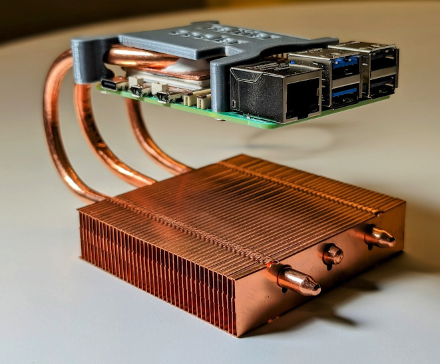
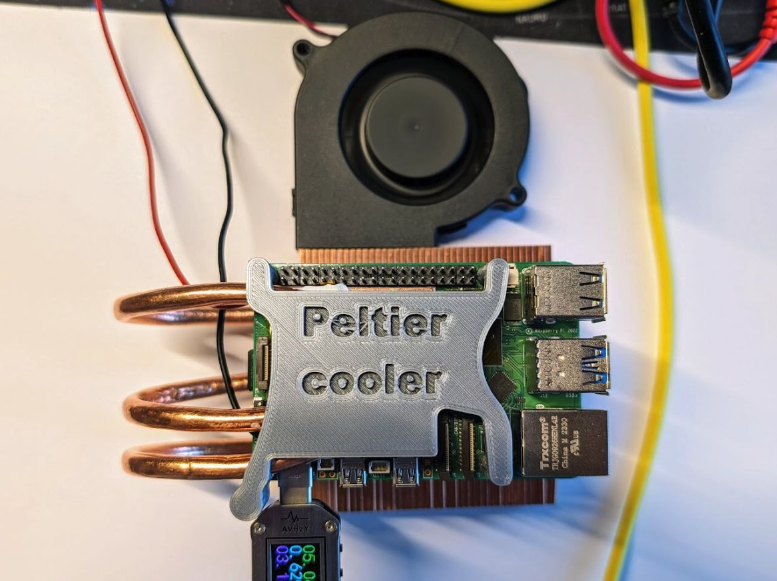
But if that seems like too simple a solution, you could follow the example of Ivan Kuleshov and create a cooler of your own. In this case, Ivan has produced a Peltier cooler – a solid-state active heat pump which passes electrical current through the device to transfer heat from one side to another. What’s more, he has managed to turn it into something of a work of art. This is a cooler that will look stunning on your desk.
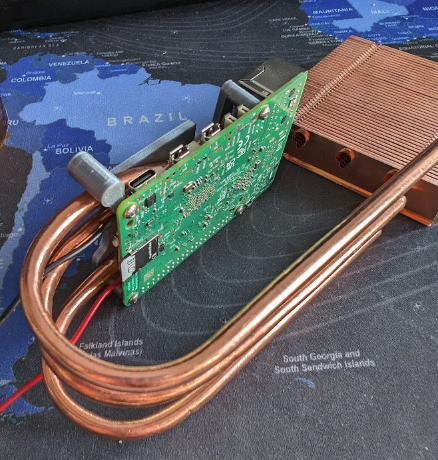
official Active Cooler is easier, there’s no denying that Ivan’s own cooler looks, well, cooler
A cool head
Ivan was inspired to create his Peltier cooler following the success of one of his previous projects: a Kubernetes cluster of four Raspberry Pi 4 computers with a similarly unique custom cooling system. He reckoned the Peltier cooler would enable him to overclock Raspberry Pi 5’s CPU and ensure it didn’t boil while creating something a little more out-of-the-ordinary.
“I originally wanted to make a unique cooling solution for an overclocked Raspberry Pi CPU and I didn’t want it to be trivial like water cooling,” he says. “I looked at what I had in stock from other projects as the basis for my inspiration and a concept was born. What could be cooler than transferring heat with electricity? I love unusual approaches, and this seemed like a very unusual technology, albeit requiring an awful lot of power.”
Ivan surmised that a custom system with thermal tubes and a Peltier element would prove to be the ultimate cooler. “It is potentially possible to reduce temperatures below 0°C although, due to condensation, this is impractical,” he says. At the same time, he wanted to create something that would turn heads. “It needed to generate interest and controversy,” Ivan adds. “I didn’t want a passing project with a banal appearance that people would see in their feeds on their phone and just think, ‘okay’”.
As such, Ivan was brave. He ‘delidded’ his Raspberry Pi 5’s CPU – a necessary process when looking to take overclocking of a processor to the extreme. It requires separating the metal integrated heat spreader from the top of the CPU and removing the stock thermal paste. It’s a bit like brain surgery but, by making use of a high-quality thermal paste or liquid metal instead, it helps to improve a system’s cooling performance. One wrong move, however, and you can wave goodbye to the CPU.
“It’s super easy if your hands aren’t shaking,” Ivan shares. “I used a sturdy kitchen knife which is a great tool but there are several elements on the processor under the cover that can be damaged besides the crystal. You have to be careful.”
Heat is on
Once the CPU was delidded and Ivan had exposed the Broadcom BCM2712 SoC with its four ARM Cortex-A76 CPU cores, he could move on to the next steps in his project. “I looked at what I
had in my drawer from other projects and envisioned what I could build from that,” he says. “There were no sketches, drawings or 3D models beforehand.”
Among the pieces he had to hand were copper heatpipes and a copper heatsink, both of which he had previously purchased very inexpensively from AliExpress. Although simple, the pieces also looked striking and Ivan’s idea was to connect the thermal tubes to the CPU and pull the heat from the element into the heatsink. To do so, he needed to bend the heatpipes, fasten them with thermally conductive glue and use the heatsink as a base.
“The unconventional positioning of the radiator at the bottom has been criticised and there have been more than a few questions and comments saying this solution won’t work,” he says. “But it works fine. It doesn’t really matter how and where the heat pipes go. They transfer heat from the hot section to the cold section, equalising their temperature. Simply put, there is a liquid inside at low pressure and a spongy structure which allows the capillary effect to transfer heat very efficiently. It’s orders of magnitude more efficient than just a piece of copper or aluminium.”
Clock ticking
When the project was complete, however, Ivan made a discovery which surprised him. Having spent many hours testing, he simply couldn’t find a way of overclocking Raspberry Pi 5’s CPU beyond 3GHz. “Overclocking is limited unless there is a way to get around this limitation,” he laments. “I really thought that extreme overclocking would require true extreme cooling. On Raspberry Pi’s Compute Model 4 IO Board, though, [which has a BCM2711 quad-core Cortex-A72 SoC running at 1.5GHz], I was able to achieve 3GHz at temperatures around 0°C.”
In that sense, the project doesn’t quite achieve its intended aim of keeping a stretched Raspberry Pi cool. “The Peltier element generates a lot of heat, much more than my Raspberry Pi computer,” Ivan adds. “To power it for minus-Celsius temperatures, you need probably about 50 to 70W of electricity and a small heatsink can’t cope with it.”
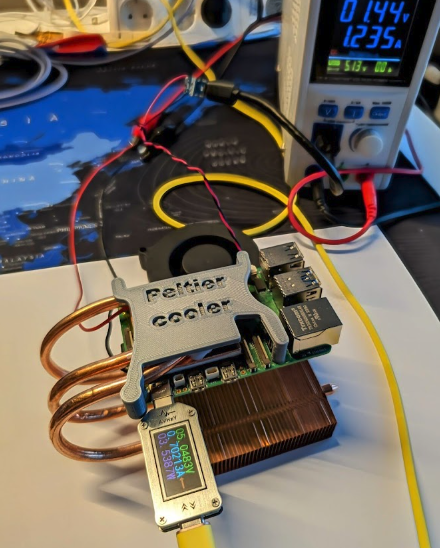
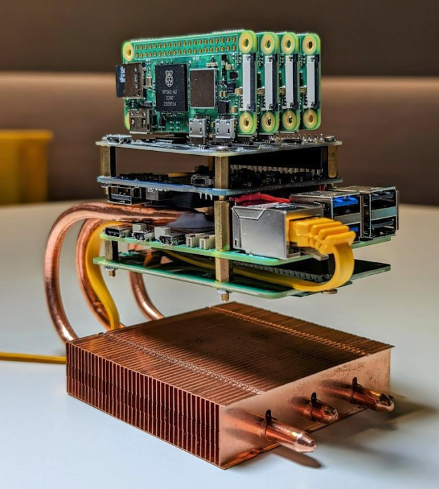
Yet it has been a success overall. “In quiet mode, about 15W, the Peltier element works well and keeps Raspberry Pi’s CPU around 40°C under full load,” he says. Even so, there are limitations. “The heatsink is very much blown out, because the heat from Raspberry Pi from the Peltier element goes to it.” Rather than become disheartened, though, Ivan has moved the project on. He’s added four Raspberry Pi Zero 2 W boards as a HAT, as well as an NVMe SSD and introduced custom passive cooling.
“In short, it’s been an interesting experience but it doesn’t make much sense in real life, especially because of the limitations of overclocking which is why I removed the Peltier element and converted the project to a new cluster,” he says. Even so, in either guise, it still looks very cool and that, in some respects, also matters greatly.
The MagPi #140 out NOW!
You can grab the brand-new issue right now from Tesco, Sainsbury’s, Asda, WHSmith, and other newsagents, including the Raspberry Pi Stores in Cambridge and Leeds. It’s also available at our online store which ships around the world. You can also get it via our app on Android or iOS.

You can also subscribe to the print version of The MagPi. Not only do we deliver it globally, but people who sign up to the six- or twelve-month print subscription get a FREE Raspberry Pi Pico W!




11 comments
Anders
Capturing energy by recycling some of the waste heat back to electricity by this Peltier effect in reverse might be an interesting follow up.
John
While it looks cool, I think it is upside down. Doesn’t the condensed liquid need to return to the hot side through gravity?
jo hawkins
it does help but the primary mover of the liquid is capillary action “wicking” the liquid back.
beta-tester
not only that, the air heat from the bottom goes up to the RPi that must be transported down again to cool the CPU.
so the RPi is permanently surrounded from heat that itself produces. and the fan must kick in earlier.
SamVimes78
Nothing against overengenering things for fun. But wouldn’t the heat pipe cooler be more than enough to keep the RasPi cool even without the peltier element?
Raspberry Pi Staff Ashley Whittaker
Yes: “The heatsink itself is actually enough to cool Raspberry Pi without the Peltier element being activated” [from the article]
Anders
0C with 50W and “40C under full load with 15W in quiet mode” won’t be achieved with just the heatsink.
Gordo
Ok, no denying the peltier Pi looks cool and could turn some heads.. But where are the lights? Computer cooling is synonymous with banks of multi-coloured LEDs
Dallin Michael Hunter
The Pi 5 can go over 3 GHz, but it needs custom firmware that removes the overclock limiter. It’s definitely not official, but it is possible. I’ve only seen figures as high as 3.15 GHz though, so it might not be worth it.
Joven Ruthford
It requires separating the metal integrated heat spreader from the top of the CPU and removing the stock thermal paste. It’s a bit like brain surgery but, by making use of a high-quality thermal paste or liquid metal instead, it helps to improve a system’s cooling performance. One wrong move, however, and you can wave goodbye to the CPU.
Ralph Hightower
Jeff Geerling was able to overclock his Raspberry Pi 5 past 3.14 GHz on National π Day. Check out his YouTube channel.
Comments are closed