This is the world’s first Raspberry Pi 5 tablet
Leepspvideo was having a whale of a time testing out Raspberry Pi 5, playing GameCube and Nintendo Wii games using the Dolphin emulator, as well as running his dual-screen setup. So far, so impressed — but then his mind wandered and landed on the question: “Will a Raspberry Pi 5 fit inside SunFounder’s RasPad 3?”
RasPad 3 is a tablet designed around Raspberry Pi 4, which has an Ethernet port on the opposite side of the board to Raspberry Pi 5. There were also questions around whether RasPad 3 could power the more powerful Raspberry Pi 5.
Tight fit
The project began with disconnecting the fan wires from the GPIO on Raspberry Pi 5 and unscrewing the standoffs. The Ethernet and USB 3 cables inside the RasPad are quite short, so they were a little more stretched than is ideal in order to reach the ports on Raspberry Pi 5. The slightly different layout of Raspberry Pi 5 also meant they had to cross over each other.

Once it was all connected, everything worked as normal in the Chromium browser. And the touchscreen was “nice and responsive” under the control of the super-speedy Pi 5. RasPad 3 is a touchscreen device, but there are plenty of ports for you to plug in wireless keyboard and mouse dongles, which Lee did to test out accessing his YouTube channel. We were pleased to see that everything loaded nice and quickly, and of course the Raspberry Pi 5 handled full-screen, high-resolution video with ease.

We’re officially crowning Lee as the creator of the first ever Raspberry Pi 5-powered tablet. A special prize goes to the creators of RasPad 3, SunFounder, of course.
Retrofit dreams with Raspberry Pi 5
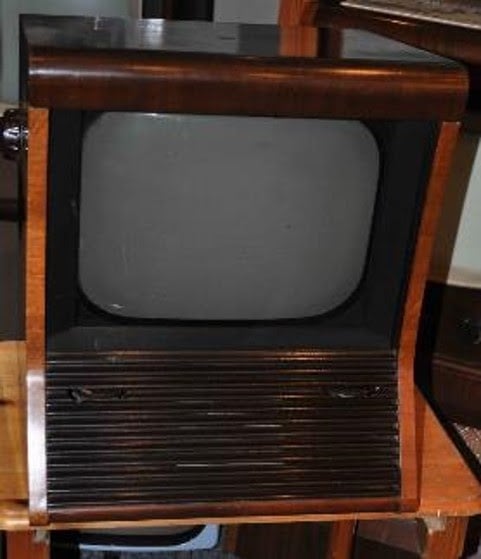
We cannot wait to see what weird and wonderful objects our newest board ends up inside. Eben is particularly keen to see someone using a 1950s TV as a display for Raspberry Pi 5, since, as he and James keep telling everyone, it can output an ancient TV standard. Of course, an old Pye would be the dream for this, both for our nearly-shared name and for our shared Cambridge heritage. We spent a happy interlude on eBay, and someone dug up this informative and also daunting page about restoring old 405-line TV receivers, before sighing wistfully, closing about a dozen tabs, and going back to what we were all supposed to be doing. So, if you happen to be pals with a retro TV enthusiast who’d relish the challenge, make sure you tip them the wink.


5 comments
Stephen Neal
I’ve already posted links to the VEC github code and the RP1 documentation so that the HackTV bods can see them. HackTV is an SDR application that generates PAL, SECAM, NTSC and 405 (and I think French 819 line) TV signals using a HackRF or FL2K SDR. It runs nicely on a Pi4B for 405/50 – have had a lot of fun with playing videos on a Sony 405/625 switchable portable TV.
Joe
My raspad has a screen that scratches super easy, and I had issued with the case fan screws Ann stripping threads, then the fan would rub up against the case grinding away.
Bob
Kinda annoying that they flipped the ports just to force people to buy new cases, which of course you can buy from them.
Raspberry Pi Staff Liz Upton
We did what to force people to who what now?
Have a look at the new components and at the board layout, and tell me how you’d have set things out differently; in particular how you’d have moved those ports. Bonus points if you do the routing too.
Other cases are available from other manufacturers too, of course.
R O
Just got a Pi5, and put it in a Kano case (last model made for RPi’s, with touch screen). I had to add a separate power supply/USB cable for the video/touch screen board. Also, I have not figured out a way to use the Kano battery as it does not seem to supply enough power for the PI5 and the rest of the components using power.
The 10″ touch screen seems to work fine with good viewing and and accurate touch. It handles resolution up to 1920×1080, but 1680×1050 is a bit easier on my old eyes.
The demanding power requirements are a bit of a challenge, but manageable with2 lines going into one of the case’s several access openings. An internal battery seems the biggest challenge to portability.
Comments are closed