This Amiga is not an Amiga | The MagPi #137
The name says it all. This project looks like an Amiga. It functions like an Amiga. But there’s a very different computer hidden inside.
Buying a used Amiga 1200 – a computer launched by Commodore in 1992 just two years before it filed for bankruptcy – is sure to leave a dent in your wallet. The 32-bit machine in its most basic form tends to sell for upwards of £300. Add a hard drive, memory expansion or an accelerator card and you may want to arrange a meeting with your bank manager.

You may then need to splash out more replacing the capacitors which are prone to leaking, potentially causing damage to the circuit board. Beyond that, you may find some keys don’t work or the disk drive is broken too. But if you still want to own an Amiga 1200 (maybe to play a host of amazing games or merely to tinker), there’s a cheaper option. You could build your own, based around Raspberry Pi.
Rob Fisher has done just that, making use of the PiMiga OS for Raspberry Pi, to create a modern-day Commodore machine. PiMiga requires an Amiga 1200 Kickstart ROM which can be purchased from amigaforever.com and it directly boots into an optimised emulator called Amiberry. This allows enthusiasts to enjoy a rather faithful Amiga experience, but Rob has gone further by making his project almost indistinguishable from the original.
Key components
One look at Rob’s machine and you wouldn’t know that it’s not actually powered by 1990s technology. The case is a replica, manufactured using injection moulding and made from UV-resistant plastic. Normally, people buy them to replace age-old, yellowing cases on their original Amigas, but Rob spied an opportunity.
“I’ve used a new replica case from A1200.net because it’s allowed me to get closer to the experience of having a brand new Amiga,” he says. Even so, it didn’t come with a keyboard leaving Rob to search for one online.
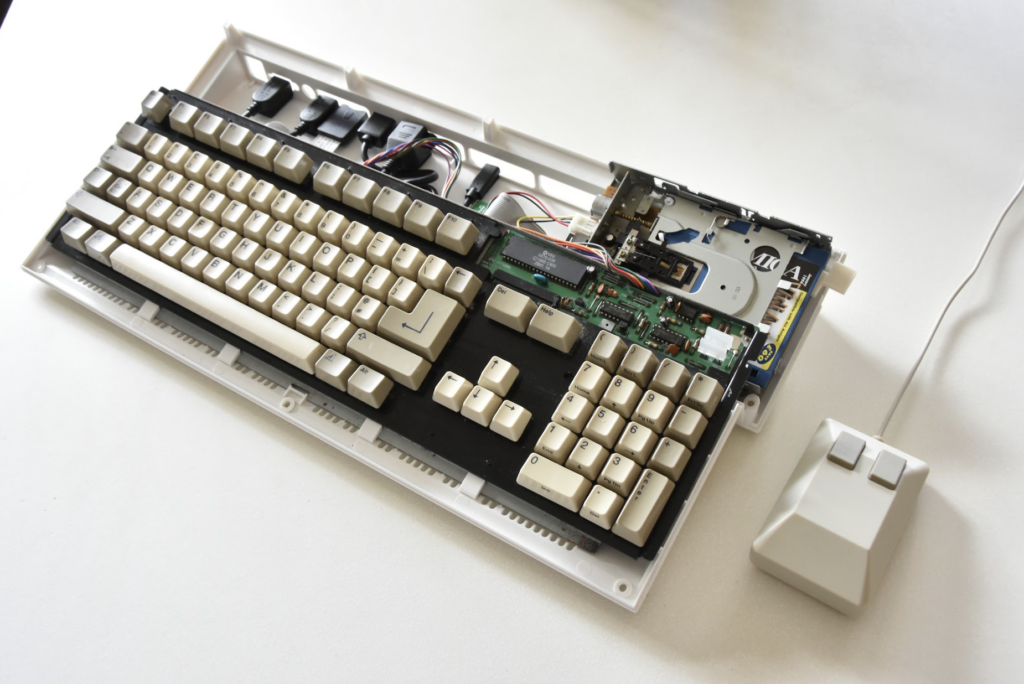
“Finding components was the main challenge,” he says. “Quite often, I would watch a YouTube video about an amazing new bit of kit, only to find that the production run was very small and they were all sold long ago. An example of this is the Keyrah board which has an interface for an A1200 keyboard, but I could not find one anywhere.”
It’s why Rob has ended up using a keyboard made for the Amiga 500 computer instead. “The A500 has a different connector and more circuitry on its own board, so is easier to talk to. Retro32.com had a ready supply of pre-built and configured Amiga 500 keyboard adapters, and I found an eBay seller who had several A500 keyboards for sale.”
Case open
There was an alternative. “I probably should have used an A500 case with my A500 keyboard, but the new A500 cases were not available in beige, and beige was important for nostalgia,” he says. Importantly, Rob found the A500 keyboard was easy to connect to Raspberry Pi 4. “The Arduino-based USB adapters for the A500 keyboard are plug-and-play,” Rob says. Despite that, a little bit of tinkering was needed.
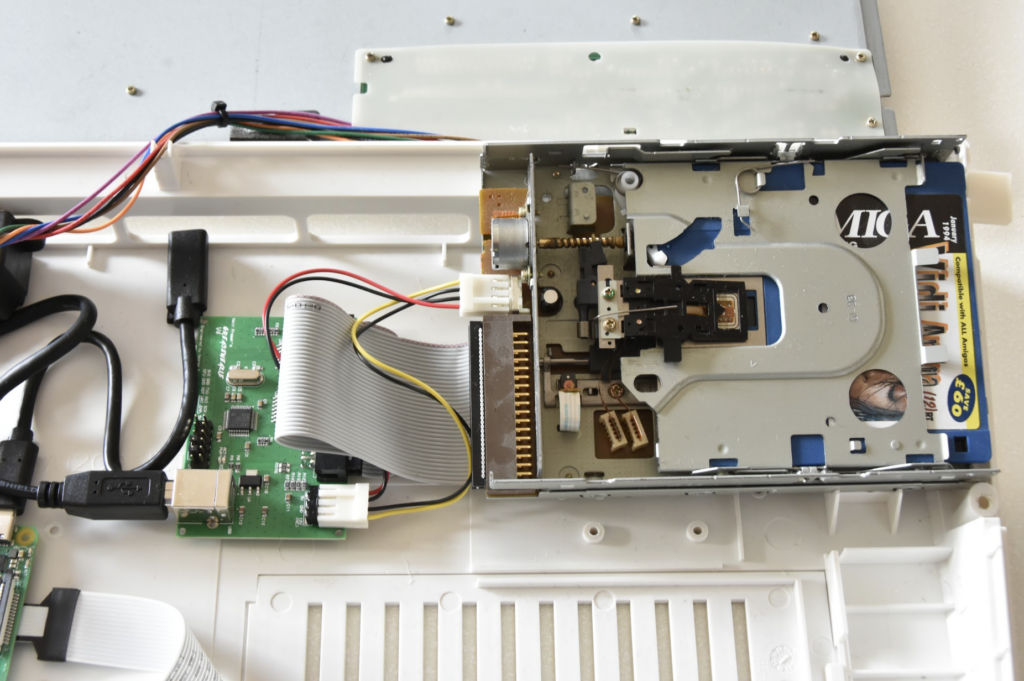
To allow the A500 keyboard to fit into the case, a couple of LEDs needed to be bent out of the way. Some small modifications were also made to the inside of the case. But then Rob became more ambitious and he decided that a replica Amiga based around Raspberry Pi should also have a 3.5-inch floppy disk drive. This would enable him to insert an Amiga-formatted disk and enjoy whatever was on it.
“Floppies were one of my main nostalgia-based requirements,” he says. “I remember the clicking sound and being amazed that the floppy was automatically detected when inserted, unlike when I was using my 6128 and 286 PC.”
Floppy success
To achieve this, Rob bought a Greaseweazle floppy adapter which connects between a Raspberry Pi computer and a PC floppy drive. “I thought that I would need a real Amiga for floppy disks, but I saw a video by the YouTuber Proteque-CBM installing Workbench from floppies using the Greaseweazle adapter and realised how much was possible with emulation.
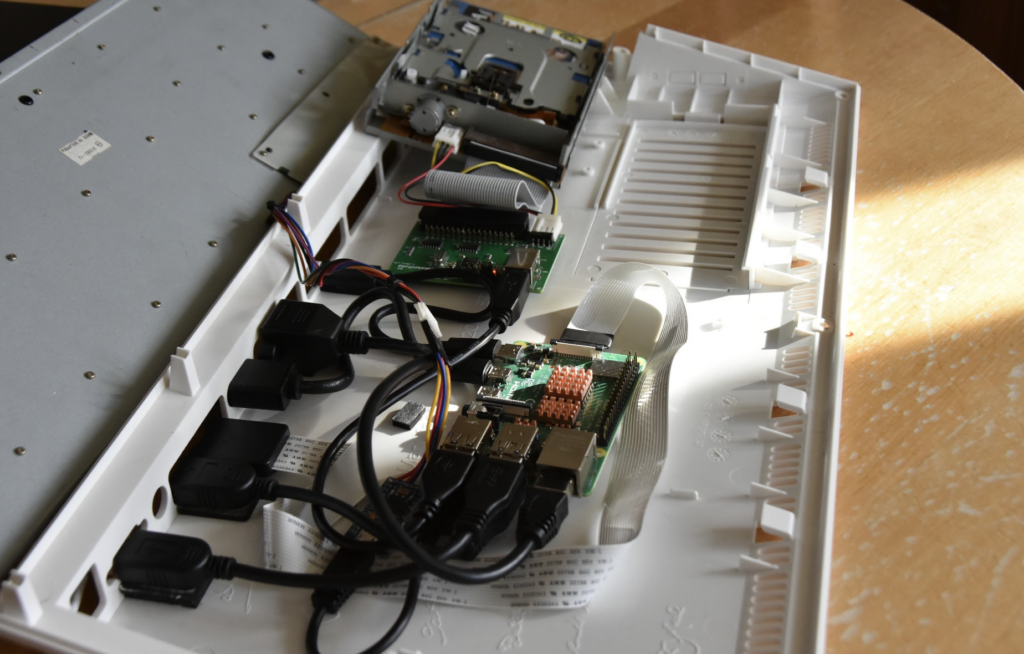
“The Greaseweazle V4 has a USB interface on one side and a floppy interface on the other. Unlike a traditional floppy controller, it gives complete control over the drive at the physical layer. So, with the right software, exotic disk formats can be read and written.”
As he discovered, it works really well. Rob mounted the drive so that it could be accessed via the right-hand side slot in the case and he created a 3D button so that the floppy disks could be easily released. “The software comes from Rob Smith, who integrated the Greaseweazle seamlessly into Amiberry. The combination acts like a real Amiga disk drive, clicks included!”
Sticking around
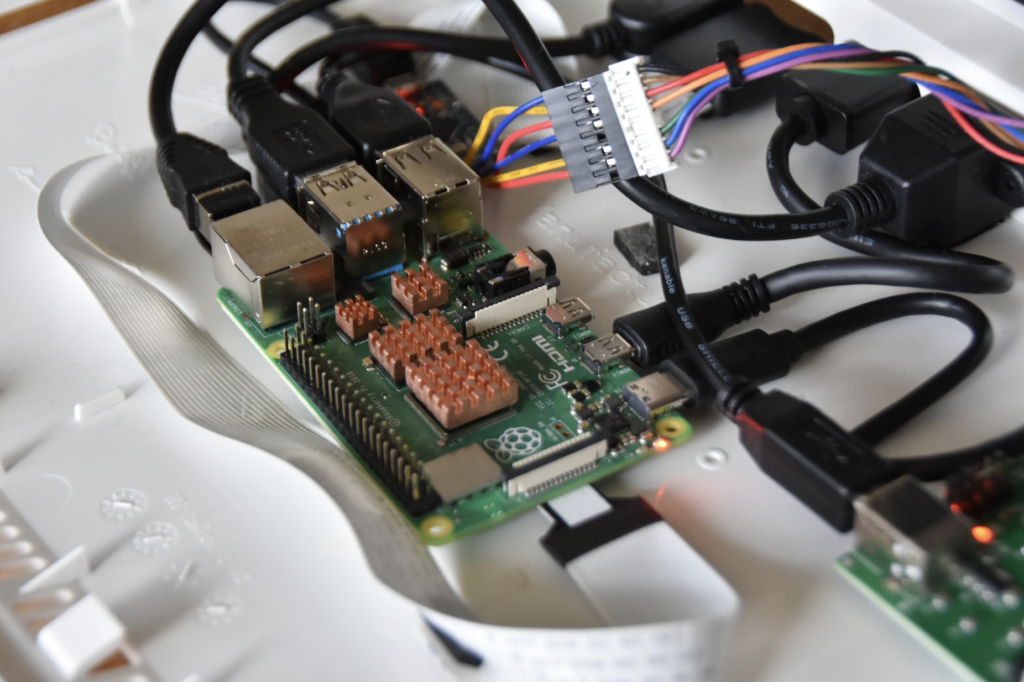
Mounting the different parts inside the case was the biggest challenge. Extensions were connected to Raspberry Pi 4 so that they could be accessible from the port holes in the case and they needed to be at the right heights and fixed sufficiently well.
“Apart from finding parts which had to come from lots of different suppliers, the hardest part for me was the physical assembly,” Rob says. “So far, 3D printing is not yet on my roster of hobbies and there don’t seem to be any ready-made brackets for mounting things, so I ended up arranging everything as well as I could and sticking it all down with 3M sticky pads. It’s honestly not very pretty or robust, but with the case on and not looking too closely at the back panel, the illusion is good enough!”
Even so, the build has done its job superbly, giving Rob a warm nostalgic glow. “I had friends who had Amigas and there was an Amiga at school for music, video titling, and playing Jimmy White’s Snooker at break-time,” he explains. “I think the Amiga has hit a certain sweet spot of being easy to emulate from an end-user perspective because of the excellent tools that are available and the large community of people involved. It’s also retro while still being modern enough to be a pleasant computer to use.”
As for the next steps, well, Rob still hasn’t given up hope of recreating an Amiga 500. “If A1200.net
came out with a beige A500 case then I might switch to that, as these were the Amigas I first remember, and the keyboard would fit better.
“I’d also like to get a real CRT display working somehow. I don’t know if I would need to switch to FPGA emulation to do this properly, though. And if anyone designs a set of brackets that fit my USB, Ethernet, HDMI, and microSD connectors, I’d be very interested to add those.”
The MagPi #137 out NOW!
You can grab the brand-new issue right now from Tesco, Sainsbury’s, Asda, WHSmith, and other newsagents, including the Raspberry Pi Store in Cambridge. It’s also available at our online store which ships around the world. You can also get it via our app on Android or iOS.
You can also subscribe to the print version of The MagPi. Not only do we deliver it globally, but people who sign up to the six- or twelve-month print subscription get a FREE Raspberry Pi Pico W!
The free PDF will be available in three weeks’ time. Visit the issue page for more details.


10 comments
Anders
There are loads of BBC Micro keyboard to USB conversions out there. Some are Pico based. A Pi inside a Model B case is quite a nice homage.
Peter moller
Wow, I have two A500’s but both of them the floppy drives are not serviceable. The 100’s of floppy games I still have are for A500 with workbench 1.3.
Yes I use UAE etc, but I would LOVE to use my original disks!!! Is this ever going to be possible?
Peter Moller
[email protected]
Australia
RetroKid
Hi Peter, It might be worth trying to source an external floppy drive
RetroKid
I already have my own A1200 and bought a Pi32 lite with a raspberry pi3a and prepped memory card from amigakit.com, they were the best when it came to price for most Amiga related items and arrived quickly. The raspberry pi is a real game changer! I’ve noticed on amigakit.com Keir Fraser has just released the v4.1 greaseweazle, looks good in purple and comes in a nice box with instructions, it seems like the new design has usb-c instead of the usb a-b port. Great to see the Amiga is being kept alive!
Chris Edwards
GLad you enjoy pimiga. the new version pimiga4 will be bootable from a single usb device on intel/amd and pi arm series processors. Coming soon late 2023 to early 2024
David
I’ve been thinking of doing this for a while now and there’s surprisingly few articles out there about it. I had planned to use FPGA so the comment about the floppy drive not being supported is useful, so thank you for that.
Rob may be interested to know that you can buy replacement keycaps for Amiga’s so he could have a pristine beige amiga with no yellowing, if he wants it.
Ben
Is the floppy drive actually compatible for track by track use, or is it as per Greaseweazles’s original intention of flux reading (aka disk imaging)? I.e. does it have to read the entire disk as an image and use the image in Amiberry, rather than act as a 100% compatible Amiga floppy drive?
Proteque
It is compatible track by track. But it is dangerous to say something is 100%. :)
Mark Norwood
Ah, The Treachery of Amigas – Ceci n’est pas une Amiga! Rob is the new Magritte :)
Rob Fisher
I’m late to the comments. But many thanks indeed to Chris Edwards for making all of this so much easier on the software side.
Yes, the floppy disk does behave exactly like a floppy disk in a real Amiga. It does not need to image the whole disk in one go.
David: Yes, I think replacement key-caps will be a good idea. I’ll look out for them!
Mark: indeed, nor is it a pipe!
Comments are closed