Run Ultralytics YOLO on Raspberry Pi with OpenVINO
Friends of ours from Intel and Ultralytics – Alexander Nesterov, Dmitriy Pastushenkov, Francesco Mattioli, and Nuvola Ladi – are here to teach you how to run YOLO on Raspberry Pi using OpenVINO.
This guide focuses on deploying Ultralytics YOLO computer vision models on Raspberry Pi with OpenVINO. We’ll cover how the runtime is installed, how models become deployment artefacts, how compilation and caching affect startup, and how builds become repeatable.
The standard OpenVINO deployment practices still apply. Convert the model when load latency matters, compile for the target device, cache compiled artefacts, and package the runtime explicitly.
This gives Raspberry Pi a clear role. It is not an exception to OpenVINO, but rather a small Linux Arm64 target to which the standard OpenVINO deployment model can be applied directly.
System setup at a glance
The recommended first path is as follows:
- Use Raspberry Pi OS (64-bit) on Raspberry Pi 4 or Raspberry Pi 5
- Create a clean Python virtual environment
- Install OpenVINO from PyPI
- Verify that OpenVINO sees the CPU device
- Install the Ultralytics Python package
- Prefer OpenVINO IR for deployment when startup time matters
- Enable model caching for services that restart often
- Move to source builds or cross-builds when you need control over OpenVINO runtime packaging, C++ integration, or repeatable release artefacts
Raspberry Pi is the target, OpenVINO is the deployment layer
Raspberry Pi is a common target for practical computer vision. It can sit next to a camera, inside a prototype, near a machine, on a lab bench, or in a small service that needs to run without a workstation nearby.
OpenVINO gives Raspberry Pi boards a standard deployment shape. As of June 2026, the current Raspberry Pi OS 64-bit image is a Debian Trixie–based system for Raspberry Pi 3 Model B and newer, including Raspberry Pi 4 and Raspberry Pi 5. OpenVINO 2026.2.0 publishes Linux Arm64 wheels on PyPI for CPython 3.10, 3.11, 3.12, and 3.13. The official installation flow follows the standard Python pattern: create a virtual environment, install the package, and check the runtime devices.
Raspberry Pi 4 and Raspberry Pi 5 have different performance envelopes and should not be treated as the same target. Raspberry Pi 4 features a quad-core Cortex-A72 processor at 1.8GHz and can be configured with up to 8GB of LPDDR4 memory. Raspberry Pi 5 moves to a quad-core Cortex-A76 processor at 2.4GHz and has memory options up to 16GB.
For deployment planning, Raspberry Pi 4 fits prototypes and light services, while Raspberry Pi 5 gives more room for sustained camera workloads and application logic around inference.
| Board | Hardware profile | Best OpenVINO fit | Considerations |
| Raspberry Pi 4 | Cortex-A72 at 1.8GHz, up to 8GB RAM | Prototypes, single-camera pipelines, lightweight services | Use a 64-bit OS and keep the first pipeline modest |
| Raspberry Pi 5 | Cortex-A76 at 2.4GHz, up to 16GB RAM | Sustained camera workloads, richer edge applications, repeatable packaging | Treat cooling and power as part of the design |
The graph below demonstrates that OpenVINO delivers strong performance compared to other frameworks on Raspberry Pi when deploying the YOLO26 model:
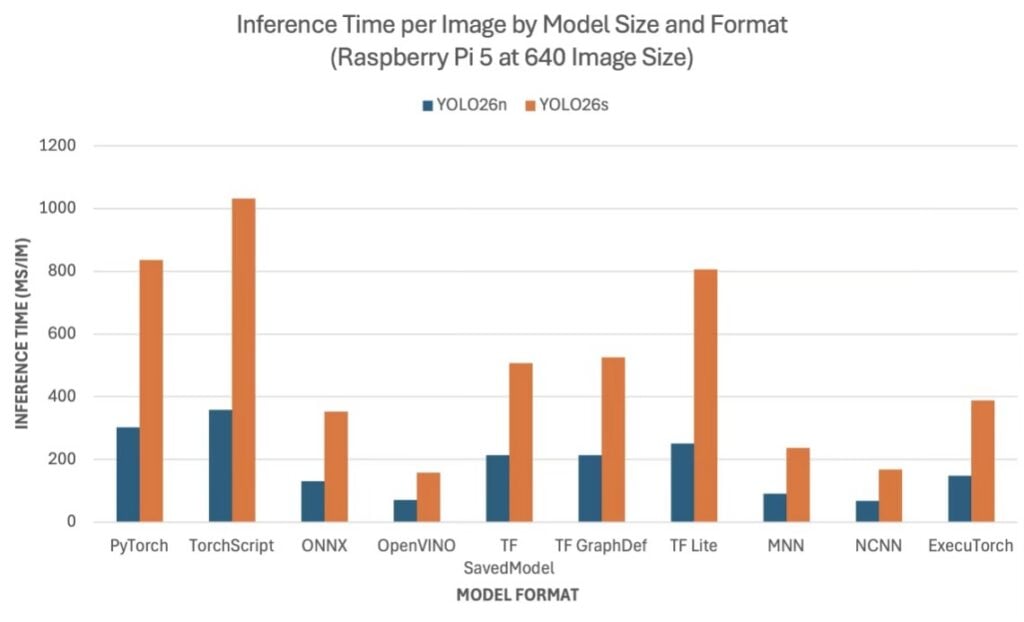
The practical question is no longer “Can OpenVINO run on Raspberry Pi?”, but rather, “Which OpenVINO deployment path gives this edge application the right runtime, startup, and maintenance model?”
How OpenVINO runs on Arm
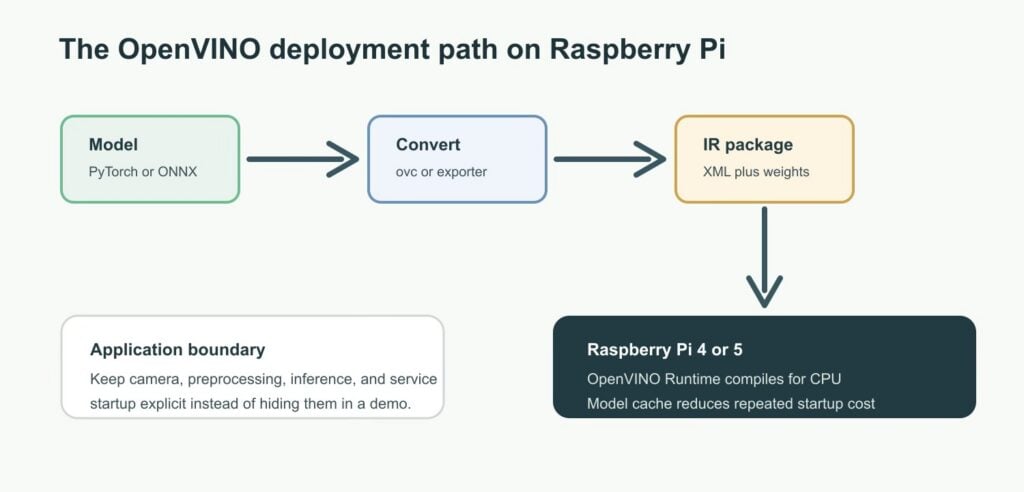
OpenVINO follows the same programming model on Raspberry Pi as other OpenVINO deployments. The application uses openvino.Core, discovers devices through available_devices, reads or converts models, and compiles a model for a device such as the CPU.
This consistency matters because it means the application does not have to become Raspberry Pi–specific. If it later moves between Raspberry Pi, an x86 laptop, an Intel GPU machine, or another edge system, the top-level OpenVINO pattern remains the same: create a runtime, choose or query devices, compile a model, and run inference.
When an application uses the CPU on Raspberry Pi, inference goes through a layered runtime path. The application does not call Arm Compute Library or KleidiAI directly; OpenVINO Runtime loads the model, prepares it for compilation, and passes it to the CPU plugin for the target CPU. The CPU plugin then selects an executor path for each supported operation based on operation type, shape, precision, layout, and available build features.
This distinction is important for both performance and troubleshooting. Seeing the CPU in available_devices means the OpenVINO CPU plugin is available — it does not mean every operation uses the same low-level library. A convolution, a fully connected layer, a transpose, and a fallback operation may use different executor paths inside the same compiled model.
There are two details that deserve special attention on Arm platforms:
First, precision requires explicit expectations. The OpenVINO CPU documentation says that Arm platforms execute quantised models in simulation mode, meaning the graph — including quantisation operations — runs in floating-point precision. Quantisation can still be useful when the same model workflow targets other devices, but an int8 export should not be presented as a guaranteed Raspberry Pi speed path.
Second, model caching is a deployment feature, not only a benchmarking option. Compilation can include target-specific work. If you enable cache_dir, OpenVINO can cache compiled artefacts and reuse them later. On a small edge device that starts as a service, reboots after power loss, or restarts after updates, the first few seconds of startup matter.
The computer vision model
Ultralytics is an AI company focused on making computer vision accessible through easy-to-use tools for building, training, validating, exporting, and deploying vision models. At the centre of this ecosystem is Ultralytics YOLO, a family of real-time computer vision models that can analyse images and video in a single pass to quickly identify and understand visual information. Ultralytics YOLO models are widely used because they balance speed, accuracy, and deployment flexibility, making them especially well suited for real-time and edge AI applications where latency, efficiency, and reliability matter.
Compared to many alternative model families, Ultralytics YOLO offers a unified workflow, strong documentation, simple Python and CLI interfaces, broad export support, and compatibility with many deployment targets, from cloud systems to embedded devices like Raspberry Pi. YOLO models support key computer vision tasks, including object detection, instance segmentation, image classification, pose estimation, oriented bounding box detection, and tracking. When used with Raspberry Pi and OpenVINO, Ultralytics YOLO models can be optimised for efficient on-device inference: Raspberry Pi provides a compact, affordable edge platform, OpenVINO helps convert and optimise models for faster execution on supported hardware, and Ultralytics simplifies the export and deployment process.
Compiling or exporting models into a target-specific format is essential, as edge devices have limited compute, memory, and power; optimisation steps such as graph conversion, precision adjustment, and quantisation help the model run faster, use fewer resources, and perform reliably on the target device.
Ultralytics YOLO models are available under the AGPL-3.0 licence by default, supporting open collaboration and transparency. Developers using Ultralytics YOLO must either open-source the entire project under AGPL-3.0 or obtain an Ultralytics Enterprise License for proprietary, internal, commercial, R&D, or edge deployments. Learn more on the Ultralytics licensing page.
Quick start with OpenVINO Runtime and the Ultralytics Python package
The most practical first setup keeps the OpenVINO environment explicit:
sudo apt update

sudo apt install -y python3-venv python3-pip git libglib2.0-0 libgl1

python3 -m venv ~/venvs/ov-rpi

source ~/venvs/ov-rpi/bin/activate

python -m pip install --upgrade pip

python -m pip install openvino onnx

python -c "from openvino import Core; print(Core().available_devices)"
If the output includes CPU, OpenVINO is installed, and the CPU plugin is visible to the runtime.
The next decision is model format. OpenVINO can read ONNX models directly, which is convenient during development. For deployment, converting to OpenVINO IR is preferable when load latency matters:
ovc your_model.onnx --output_model your_model_ir

Install the Ultralytics Python Package that provides all the tools and interface to download and operate Ultralytics YOLO models.

python -m pip install ultralytics
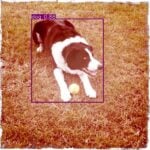
In this example, YOLO26 gives the runtime path a visible workload. For the first OpenVINO run, export the smallest reference model without extra precision options:
from ultralytics import YOLO

model = YOLO("yolo26n.pt")

model.export(format="openvino", imgsz=640)
This keeps the first result easy to validate. Ultralytics exposes half, int8, dynamic, nms, and other export arguments for OpenVINO, but those belong after the plain model path is verified on the board.
Use OpenVINO Runtime directly when the application needs explicit control:
import openvino as ov

import openvino.properties as props

core = ov.Core()

print("Available devices:", core.available_devices)

core.set_property({props.cache_dir: "./ov_cache"})

model = core.read_model("yolo26n_openvino_model/yolo26n.xml")

compiled_model = core.compile_model(model, "CPU")

print("Compiled for:", compiled_model.get_property("EXECUTION_DEVICES"))
The important part is the deployment pattern: discover devices, enable caching, read the model, compile for CPU, and keep the inference service explicit.
Three OpenVINO deployment paths
Start with PyPI for the first working deployment. It lets you verify the model, preprocessing, camera path, and service logic on the board before changing OpenVINO itself. As the deployment matures, the requirement becomes repeatable for rebuilds, packaging, transfers, verifications, and updates without creating a board-specific setup.
The PyPI path is the application path. Use it when your product is a Python application and the OpenVINO package can be treated like any other dependency. See the OpenVINO PyPI installation documentation.
The native source-build path is the runtime-control path. It makes sense when OpenVINO itself is part of what you are validating: C++ integration, custom build options, local wheel generation, or debugging a platform-specific runtime issue. It’s straightforward, but it uses Raspberry Pi CPU time and memory. See the OpenVINO documentation on building OpenVINO for Raspberry Pi.
The cross-build path is the release-engineering path. Use it when you need Linux AArch64 OpenVINO artefacts for Raspberry Pi, but do not want every build to happen on the board itself. It’s suitable for CI, reproducible releases, and desktop-based contributors. See the OpenVINO cross-compilation guide.
Details that make deployment reliable
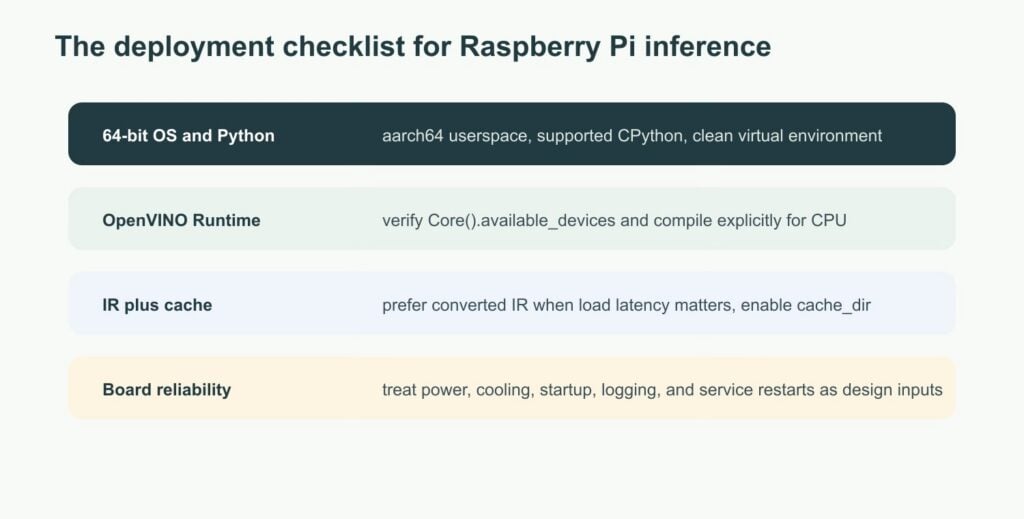
The visible part of edge AI is the model. The part that determines whether a deployment remains reliable is often the runtime and packaging work around the model.
Check the architecture first. If uname -m does not return aarch64, the default assumptions in this article do not apply.
Check the Python version. OpenVINO 2026.2.0 was released in June 2026. It requires Python 3.10 or newer, and its Linux Arm64 wheels are published for CPython 3.10, 3.11, 3.12, and 3.13 with the manylinux_2_35_aarch64 tag. Check the current PyPI wheel list before choosing a Python version for a fresh image. In practice, wheel install failures on Raspberry Pi are often about user-space age or Python version rather than OpenVINO not supporting the board.
Keep startup work out of the hot path. OpenVINO can load ONNX models directly, but IR plus model caching is often better for services. Convert the model once, package the converted model, and let the application startup focus on loading and compiling for the target device.
Be explicit about the device. On Raspberry Pi, use CPU when the CPU is the target, and use AUTO for deliberate multi-device portability. For a fixed Raspberry Pi deployment, explicit CPU selection makes behaviour easier to verify.
Treat power and cooling as runtime dependencies. Sustained inference, camera capture, storage, networking, and logging can all run at the same time on a small board. Raspberry Pi 5 especially should be designed with cooling and power headroom in mind.
Contribute to OpenVINO and Ultralytics
OpenVINO and Ultralytics are open-source projects, and contributions from the community directly improve the ecosystem for everyone, including Raspberry Pi users. If this article helped you deploy a model on a Raspberry Pi, please consider contributing to OpenVINO and Ultralytics, whether that’s by fixing a bug you found, improving the documentation, or implementing a missing operation for the Arm backend.
There are several ways to get involved:
- Pick a good first issue: the ‘Good first issues’ board tracks tasks designed for newcomers; Arm-specific issues are labelled with
platform: arm. - Report issues from real deployments: if you encounter a problem with OpenVINO, open an issue.
- Improve the documentation: if something in this article or in the official docs was unclear when you set up your Raspberry Pi, let us know — that’s a valid contribution target.
- Join the community: OpenVINO’s GitHub Discussions page is the place to go for design questions and feature proposals. Curious about Ultralytics? Discover their licensing options to bring computer vision solutions to your projects. Visit their GitHub repository and join the community.
The CPU plugin source that runs on Raspberry Pi lives in src/plugins/intel_cpu. Every improvement there — a new JIT emitter, a performance fix, better test coverage for Arm, et cetera — directly benefits the Raspberry Pi deployment path described in this article.
Go forth and build
Raspberry Pi remains the concrete edge target: it’s small, familiar, and easy to place near sensors. YOLO26 remains the concrete model example: it’s visual, recognisable, and easy to export. The technical focus is OpenVINO itself.
The same runtime model, conversion flow, CPU selection, caching behaviour, and packaging choices can support a Raspberry Pi deployment without turning it into a platform-specific exception. Build the application around the OpenVINO deployment model: clean environment, converted model, explicit device, persistent cache, and a packaging path that matches the release process.

2 comments
Jump to the comment form
Glenn Jocher
It’s awesome to see performance coupled with low power, this really expands the potential of computer vision to a wider audience.
petro
beside ultralytics(AGPL) there is also libreyolo(MIT) nowadays with quite strong performance and OpenVINO export: https://www.libreyolo.com/