Robot Etch A Sketch
What maker Micah Tilton lacks in drawing skills, he more than makes up for in robotics know-how. So rather than spend years learning how to create a masterpiece of illustration, he automated an Etch A Sketch with a Raspberry Pi 4.
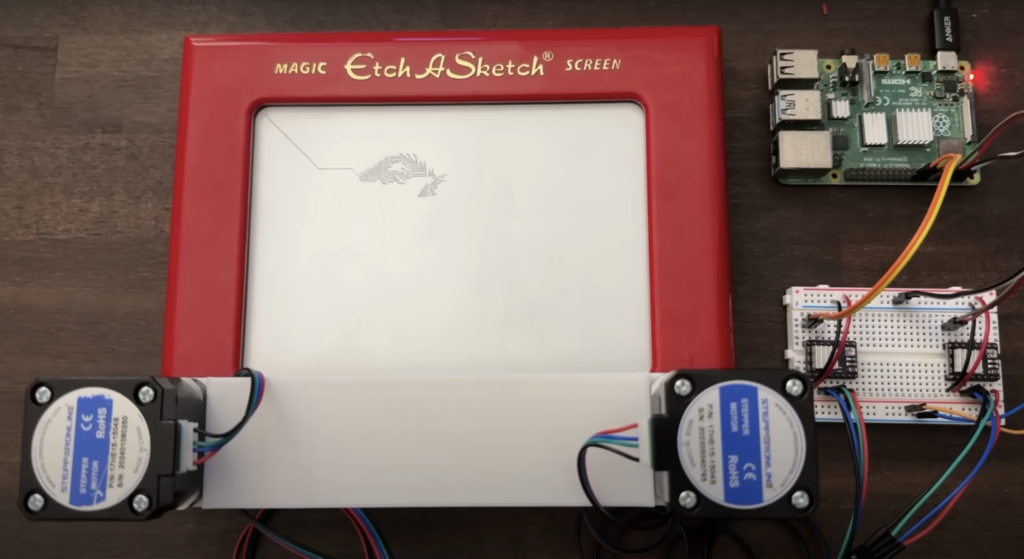
Much like the iconic Rubik’s Cube, Etch A Sketch toys foxed me, so I don’t harbour much nostalgia for them. On the other hand, I do like an over-engineered solution to a problem, so Micah still gets points from me.
Extra-strength stepper motors
Two stepper motors are connected to the dials on the Etch A Sketch with 3D printed adapters, which took seven attempts to get right. Micah also had to wait for stronger motors to be shipped because his first lot weren’t strong enough to turn the dials.
How does it draw?
The first step is to resize an image to fit the toy’s screen before converting it from colour to black and white pixels. The black pixels form the image itself, while the white ones are the background and will be left undrawn. A pathfinding algorithm determines the best route for the Etch A Sketch’s dials to steer in order to trace the all black pixels in the image. This path is fed to the Raspberry Pi, which then tells the stepper motors what to do.


In the build video, you can watch Micah’s creation take about two minutes to draw a dog. It’s a noisy little thing, but I quite like the mechanical ASMR sound the vibrating stepper motors make.

Micah went on to have the Etch A Sketch draw a YouTube play button to celebrate hitting 1000 YouTube subscribers, and this is now proudly displayed on his wall.

No comments
Comments are closed