Raspberry Pi Zero 2 W revives iconic red telephone | #MagPiMonday
Dial M for Miles – Rob Miles to be exact. And when you do, don’t be surprised if he answers you on an iconic 20th century landline telephone. Happy #MagPiMonday people!
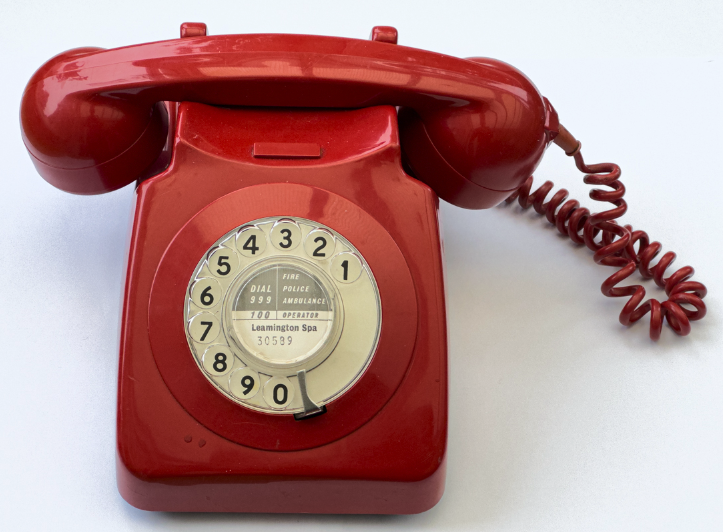
In the 1970s, people either headed for a phone box to make calls or signed a telephone contract with the General Post Office. If they did the latter, they’d invariably end up renting a shiny GPO 746 Rotary telephone available in a variety of colours. Callers would stick their fingers into the number holes, turn the dial anti-clockwise until it reached the finger stop, and let go. After the right number of digits, their call would connect.
Until button-press phones arrived this method was standard, and Rob Miles loved it. “The old phones were a huge part of my life when I was younger,” he says. “Everybody had one. And everybody had the same one.” He recently spotted one in a shop called Sellit & Soon in Beverly, England, and snapped it up. “I bought it on sight,” he says. “Once I got it, I had to do something with it, so thought about putting a Raspberry Pi inside.”
Holy moly!
Rob bought a red phone, not unlike the one used in the 1960s Batman television series. “I think the style is timeless,” says Rob, who initially only aimed to make the bell ring. “I wanted it to sound exactly like the phones I remembered and I initially used a Raspberry Pi Pico to do it.”
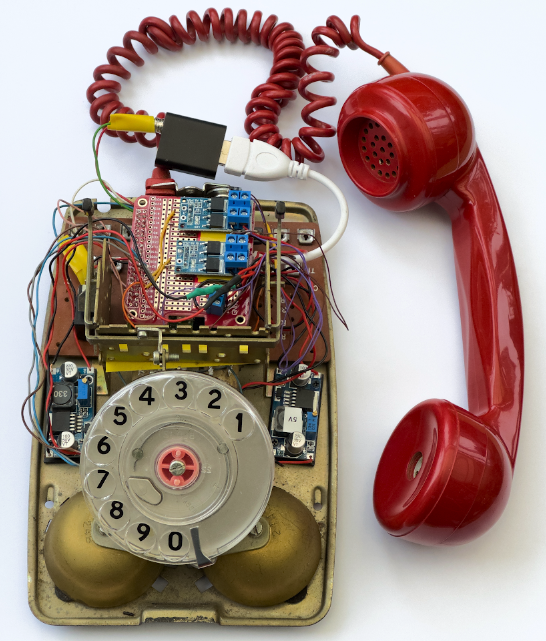
The idea was to get the bell to chime whenever the receiver was picked up and put down. Rob also wanted to be able to make the phone ring after dialling a number – and for the ringing to continue until the receiver was picked up. This entailed opening up the phone, stripping the internals and connecting Pico to a pair of MOSFET switches which sent high-voltage signals to the bell coils
“Just making the bell ring posed all kinds of problems with power supplies but, because I wanted other folks to be able to build the thing with the minimum possible danger from high voltages, I worked out how to do it with a 35 volt supply rather than the 70 volts normally used.”
Once Rob had the bell ringing, he decided to swap out Raspberry Pi Pico for Raspberry Pi
Zero 2 which, he says, gave the phone some serious processing power. Since he wanted a dial tone to play in the receiver, he had another idea. “I figured I had enough to do something that could read messages,” he says. The phone was being turned into a robotic personal assistant.
Who’s calling?
To allow the phone to receive messages and alerts, Rob used JavaScript running in the node environment to interact with the hardware. “Everything is controlled by a lump of JavaScript which runs under nodejs,” he explains. “The program runs when Raspberry Pi boots and attaches event handlers to all the inputs – the handset switch and the two dial signals. It then waits for something to happen.

“At the same time it spins up an Express-powered website and announces itself on the local network so users can find it. Local actions – picking up the phone and dialling numbers
– are handled directly by JavaScript. Remote actions such as ringing the phone speaking messages are assigned routes on the website to trigger the appropriate response.” Rob can now type messages on a web page, have the phone ring and, when the receiver is picked up, have the messages read out. There’s much potential here. “I can play back sound effects, which is how I get the dial tone to work, so we could have a lot of fun with this,” he teases.
The MagPi #140 out NOW!
You can grab the brand-new issue right now from Tesco, Sainsbury’s, Asda, WHSmith, and other newsagents, including the Raspberry Pi Stores in Cambridge and Leeds. It’s also available at our online store which ships around the world. You can also get it via our app on Android or iOS.
You can also subscribe to the print version of The MagPi. Not only do we deliver it globally, but people who sign up to the six- or twelve-month print subscription get a FREE Raspberry Pi Pico W!


9 comments
Martin
You turn the dial clockwise, not anti-clockwise, as my youngest just pointed out! It returns anti-clockwise during which time it creates the “pulses” which do the dialing (one for 1, ten for 0).
If you still have a “proper” phone line, chances are that an old phone will still work. We do, and ours does. It also “tinkles” just before a call comes in, when the exchange picks up the line to send Caller Line Identity to more modern handsets.
Of course, you can’t use it to navigate those awful call services where you have to “press 1 for yes” or whatever, but that can actually be a bonus – some (by no means all) will recognise a problem and put you straight through to a Real Person(tm)
AndrewS
Yeah I remember that our family’s first “button phone” had a switch to change it between pulse-dialling and tone-dialling.
Bill
Here in the US, my home phone is now provisioned over the cable TV coaxial network. There is a VOIP terminal in my basement – where I disconnected my home phone wiring from the old copper line entrance and plugged it into the VOIP terminal. I am able to enjoy lots of modern digital features without changing anything. I was surprised to learn that the VOIP terminal accepts both DTMF and repertory pulse signaling. That means I can still use the Western Electric phone made in the 1920s, which is here on my desk, for dialing and receiving calls. Now that’s milking old school technology for extra time!
Raspberry Pi Staff Ashley Whittaker
I had a lovely big red plastic phone in my old house as the mobile signal was so terrible there work couldn’t reliably get hold of me. Gave me a heart attack every time it rang though!
Peter
A fantastic project … is this published in any more detail? I have an old “bat phone” and would love to do similar!
Raspberry Pi Staff Ashley Whittaker
You have the bat phone?! You *must* retrofit it.
Peter
Yes the same rotary dial GPO 746 as in this article. It’s in the back of the shed!
It still all works, I have an old office PABX that uses pulse dial that I rigged it up on. But after the BT21 century project and the move to digital only lines neither now work on the system.
Would be great to add it to a VOIP interface so it could still be used as a landline though.
Raspberry Pi Staff Ashley Whittaker
If you ever find the time to build it, drop me an email and I’ll see if I can work it up into a blog: ashley [at] raspberrypi [com]
Bsimmo
Peter, just email Rob, nice chap and would be happy to help.
I would assume contact details are in the magazine so buy it or wait for the pdf release.
(he does have a website, well a blog site of ramblings and he’s a bit ‘crazy’ on github too.)
Ashley, there is an error in the blog, the town it was purchased in is spelt Beverley not Beverly.
Comments are closed