Raspberry Pi SSDs and SSD Kits on sale now
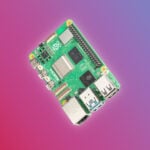
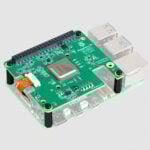
To help you get the best out of your Raspberry Pi 5, today we’re launching a range of Raspberry Pi-branded NVMe SSDs. They are available both on their own and bundled with our M.2 HAT+ as ready-to-use SSD Kits.

When we launched Raspberry Pi 5, almost exactly a year ago, I thought the thing people would get most excited about was the three-fold increase in performance over 2019’s Raspberry Pi 4. But very quickly it became clear that it was the other new features – the power button (!), and the PCI Express port – that had captured people’s imagination.
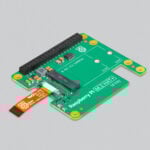
We’ve seen everything from Ethernet adapters, to AI accelerators, to regular PC graphics cards attached to the PCI Express port. We offer our own low-cost M.2 HAT+, which converts from our FPC standard to the standard M.2 M-key format, and there are a wide variety of third-party adapters which do basically the same thing. We’ve also released an AI Kit, which bundles the M.2 HAT+ with an AI inference accelerator from our friends at Hailo.


But the most popular use case for the PCI Express port on Raspberry Pi 5 is to attach an NVMe solid-state disk (SSD). SSDs are fast; faster even than our branded A2-class SD cards. If no-compromises performance is your goal, you’ll want to run Raspberry Pi OS from an SSD, and Raspberry Pi SSDs are the perfect choice.

The entry-level 256GB drive is priced at $30 on its own, or $40 as a kit; its 512GB big brother is priced at $45 on its own, or $55 as a kit. Both densities offer minimum 4KB random read and write performance of 40k IOPS and 70k IOPS respectively. The 256GB SSD and SSD Kit are available to buy today, while the 512GB variants are available to pre-order now for shipping by the end of November.
So, there you have it: a cost-effective way to squeeze even more performance out of your Raspberry Pi 5. Enjoy!
44 comments
wulu
This is good news. This way, selecting an SSD for Raspberry Pi 5 won’t require too much consideration. Just choose the official product. Will there be options for 1TB or even larger storage in the future?
Helen McCall
Likewise, I welcome this launch, and hope that a 1TB version comes soon. With SSDs, elements in the grid fail after so many writes, and so the onboard circuitry bypasses the failed elements. This means that the overall useable volume will shrink over time. So it is a good policy to have double the maximum storage that you are likely to need. I use Raspberry Pi as my desktop workstation, aand so need a maximum useable volume of about 512GB. I have been doing this for a number of years with my 4B and a 1TB WDgreen ssd. I keep a very large library of e-books, manuals, documents, and musical scores on my main drive. So far, I am using a quarter of a TB, and so could safely transfer it to a 512GB nvme drive, but really want a 1TB drive so that I can expand my library if I choose to.
Anders
Yes, I agree. When the HAT+ first appeared I tried getting an SSD out of my parts bin, it didn’t work reliably (WD Black). I had to do a bit of research to select and purchase one that is rock solid (Sabrent).
Having a curated option should save that bother.
Anton
That is not Pi 400!
Raspberry Pi Staff PhilE
That’s a bit philosophical for this time of the morning. Ceci n’est pas une pipe!
Anton
I meant that on the second picture, the backside of the computer looks different than the usual Pi 400…
Alastair Stevens
That’s just the regular RPi official keyboard! It has a USB hub built into it – I wish all keyboards did!
Helen McCall
I suppose you could try shoe-horning a Pi5 into your Pi400’s case. Or better still, wait for a Pi500 to be announced.
fanoush
It is normal Pi keyboard with usb hub, not Pi500.
Anton
I completely forgot about the keyboard, my bad! I guess I want 500 so much I see it everywhere!
Anton
And thanks for the SSDs!
fanoush
What is the power consumption (max current draw)?
How many pci-e lanes the SSD has?
The product brief https://datasheets.raspberrypi.com/ssd/raspberry-pi-ssd-product-brief.pdf is really very brief :-)
James Hughes
The M.2 HAT is connected via a single lane PCI, so when use on a Pi the SSD will be single lane.
fanoush
Thanks, but that was not the question. People could use this SSD with other devices too (e.g. SteamDeck), there are not that many good 2230 SSDs.
Helen McCall
Dear Famoush,
The images of the 512GB SSD show that it is rated at 3.3V 2.0A. This makes it a nice low current consumption, and hopefully easy to keep cool. This keeps it well within the power budget for the Pi5.
Raspberry Pi Staff Ashley Whittaker
From Threads:
“How well would that work as a NAS?
What’s the durability/lifetime of that nvme with lots of reads after an initial large set of writes?
Thanks”
Murph
Reads should not have an impact on the lifespan of a SSD. It’s only writes which cause permanent physical wear of the flash, so any NVMe which sees only a low write rate but a high read rate should last for a very long time.
Alastair Stevens
Excellent stuff – I was going to buy an RPi SD card, but perhaps I’ll go all out with this now. Is it time to try, once more, installing this ultra low energy kit as a ‘good enough’ secondary PC for the family, for basic desktop use? We tried a few years ago with a Pi 4, which couldn’t quite stretch to it; but I suspect an 8GB Pi 5 with an M.2 SSD actually could!
James Hughes
I’d say yes. Certainly good enough for web browsing, YouTube, Google Drive etc. In fact, despite being biased, I am always impressed how fast an NVME equipped Pi 5 is.
aBUGSworstnightmare
https://www.raspberrypi.com/products/ssd/ states the drives are PCI gen3 compliant. Does this statement imply that the work out of the box at Gen3 speed? Is there now an overlay for the M.2 HAT+ which will enable that or is it still up to the user?
Has somebody used pibenchmarks (https://pibenchmarks.com) on these drives so users get an idea what performance the drives give on Pi5?
AndrewS
You can also enable PCIe Gen3.0 speeds using raspi-config https://www.raspberrypi.com/documentation/computers/raspberry-pi.html#pcie-gen-3-0
aBUGsworstnightmare
just noted that comments get’s removed… may I ask what is causing this?
Raspberry Pi Staff Ashley Whittaker
We bin spam accounts and bad swears so as to keep all the fun nice and clean.
Arnauld
Hi,
What about heat when installed in the official Pi5 case? Can the heat damage the ssd?
Thank you.
Helen McCall
The Product Brief (https://datasheets.raspberrypi.com/ssd/raspberry-pi-ssd-product-brief.pdf) warns against having the cover on the case when using the nvme ssd.
Helen McCall
The perfect answer is to use the new Raspberry Pi Bumper to hold your Raspberry Pi.
mrlinux2u
I’ve noticed that the product brief doesn’t mention MTBF or TBW – will these figures be made available at some point please?
Andrew Waite
I am hoping to see the return of full sized HDMI connectors on the Raspberry Pi 6.
AndrewS
Don’t forget the bottle-opener ;-)
https://www.raspberrypi.com/news/we-let-the-social-media-team-design-their-own-frankenpi-5-and-it-is-beyond-horrendous/
Helen McCall
Dear Andrew,
The micro-HDMI sockets are there to allow room for two of them, along with other sockets for the RTC battery and the UART. Why would you want to lose these functions just to have a big plug on your HDMI cable?
Charles Godwin
I’d really like to see an official NVME and Poe HAT+
Brian Beuken
Nice to see this, I will certainly get my order in soon, but just curious how the hat fits when I have an active cooler in the standard Pi5 case?
Mike
Please publish memory type (MLC, TLC, etc..) and durability ratings (maximum number of writes before wearout) for all of your storage products.
mashoodmast
Wondering if creators of raspberry pi would make powerful mini graphics card 🤣… it’s a possibility
Edwin
Hope they will work on this for pi4
James Hughes
The Pi 4 does not have a PCIe connector, so this cannot work on it.
Pieter
Can it be mounted at the other side also leaving space for the (active) heatsink?
Benjamin k
Please add a case with a lid, in which a pi, m2, and cooler will fit :)
Helen McCall
Dear Benjamin,
If you read the product brief, it warns against using this SSD with a case lid on. You need adequate cooling. This is why they have launched the very nice Raspberry Pi Bumper which works properly with the Active Cooler and the M2 Hat to provide the best cooling. I have added a silicone GPIO dust cover to protect the GPIO pins.
Rodney Navratil
You can use 2280 ssd sticks on this hat. Just use a tie-wrap that fits into the two empty holes on the back of the hat to hold down the nvme ssd. I noticed that the system temp is a few degrees cooler with the RPI hat. Other adapters tend to run a wee bit hotter.
Adam
with all due respect, how did you possibly believe this?
“But very quickly it became clear that it was the other new features – the power button (!), and the PCI Express port – that had captured people’s imagination.”
these are the two of the things the community has been loudly begging for, for a decade nearly.
Nzola
When are you planning to introduce wireless modem router with sim card slot hat for raspberry pi’s?
Tim Bodin
what is not mentioned (unfortunately) is the NVME kit blocks the GPIO pins completely. There is a stacking block to extend the pins but when mounted, the pins are flush with the kit surface. If you want to access the pins to add sensors / whatever, you need to buy a stacking block with longer pins. RPi has great products but this problem could have been anticipated and communicated.
Smiley
Are these SSDs going to be supported by the CM5 IO Board?
Comments are closed