Raspberry Pi product series explained
As our product line expands, it can get confusing trying to keep track of all the different Raspberry Pi boards out there. Here is a high-level breakdown of Raspberry Pi models, including our flagship series, Zero series, Compute Module series, and Pico microcontrollers.
Raspberry Pi makes computers in several different series:
- The flagship series, often referred to by the shorthand ‘Raspberry Pi’, offers high-performance hardware, a full Linux operating system, and a variety of common ports in a form factor roughly the size of a credit card.
- The Zero series offers a full Linux operating system and essential ports at an affordable price point in a minimal form factor with low power consumption.
- The Compute Module series, often referred to by the shorthand ‘CM’, offers high-performance hardware and a full Linux operating system in a minimal form factor suitable for industrial and embedded applications. Compute Module models feature hardware equivalent to the corresponding flagship models but with fewer ports and no on-board GPIO pins. Instead, users should connect Compute Modules to a separate baseboard that provides the ports and pins required for a given application.
Additionally, Raspberry Pi makes the Pico series of tiny, versatile microcontroller boards. Pico models do not run Linux or allow for removable storage, but instead allow programming by flashing a binary onto on-board flash storage.
Flagship series
Model B indicates the presence of an Ethernet port. Model A indicates a lower-cost model in a smaller form factor with no Ethernet port, reduced RAM, and fewer USB ports to limit board height.
| Model | SoC | Memory | GPIO | Connectivity |
|---|---|---|---|---|
 Raspberry Pi Model B Raspberry Pi Model B | BCM2835 | 256MB, 512MB | 26-pin GPIO header | HDMI, 2 × USB 2.0, CSI camera port, DSI display port, 3.5mm audio jack, RCA composite video, Ethernet (100Mb/s), SD card slot, micro USB power |
 Raspberry Pi Model A Raspberry Pi Model A | BCM2835 | 256MB | 26-pin GPIO header | HDMI, USB 2.0, CSI camera port, DSI display port, 3.5mm audio jack, RCA composite video, SD card slot, micro USB power |
 Raspberry Pi Model B+ Raspberry Pi Model B+ | BCM2835 | 512MB | 40-pin GPIO header | HDMI, 4 × USB 2.0, CSI camera port, DSI display port, 3.5mm AV jack, Ethernet (100Mb/s), microSD card slot, micro USB power |
 Raspberry Pi Model A+ Raspberry Pi Model A+ | BCM2835 | 256MB, 512MB | 40-pin GPIO header | HDMI, USB 2.0, CSI camera port, DSI display port, 3.5mm AV jack, microSD card slot, micro USB power |
 Raspberry Pi 2 Model B Raspberry Pi 2 Model B | BCM2836 (in version 1.2, switched to BCM2837) | 1 GB | 40-pin GPIO header | HDMI, 4 × USB 2.0, CSI camera port, DSI display port, 3.5mm AV jack, Ethernet (100Mb/s), microSD card slot, micro USB power |
 Raspberry Pi 3 Model B Raspberry Pi 3 Model B | BCM2837 | 1 GB | 40-pin GPIO header | HDMI, 4 × USB 2.0, CSI camera port, DSI display port, 3.5mm AV jack, Ethernet (100Mb/s), 2.4GHz single-band 802.11n Wi-Fi (35Mb/s), Bluetooth 4.1, Bluetooth Low Energy (BLE), microSD card slot, micro USB power |
 Raspberry Pi 3 Model B+ Raspberry Pi 3 Model B+ | BCM2837b0 | 1GB | 40-pin GPIO header | HDMI, 4 × USB 2.0, CSI camera port, DSI display port, 3.5mm AV jack, PoE-capable Ethernet (300Mb/s), 2.4/5GHz dual-band 802.11ac Wi-Fi (100Mb/s), Bluetooth 4.2, Bluetooth Low Energy (BLE), microSD card slot, micro USB power |
 Raspberry Pi 3 Model A+ Raspberry Pi 3 Model A+ | BCM2837b0 | 512 MB | 40-pin GPIO header | HDMI, USB 2.0, CSI camera port, DSI display port, 3.5mm AV jack, 2.4/5GHz dual-band 802.11ac Wi-Fi (100Mb/s), Bluetooth 4.2, Bluetooth Low Energy (BLE), microSD card slot, micro USB power |
 Raspberry Pi 4 Model B Raspberry Pi 4 Model B | BCM2711 | 1GB, 2GB, 4GB, 8GB | 40-pin GPIO header | 2 × micro HDMI, 2 × USB 2.0, 2 × USB 3.0, CSI camera port, DSI display port, 3.5 mm AV jack, PoE-capable Gigabit Ethernet (1Gb/s), 2.4/5GHz dual-band 802.11ac Wi-Fi (120Mb/s), Bluetooth 5, Bluetooth Low Energy (BLE), microSD card slot, USB-C power (5V, 3A (15W)) |
 Raspberry Pi 400 Raspberry Pi 400 | BCM2711 | 4GB | 40-pin GPIO header | 2 × micro HDMI, 2 × USB 2.0, 2 × USB 3.0, Gigabit Ethernet (1Gb/s), 2.4/5GHz dual-band 802.11ac Wi-Fi (120Mb/s), Bluetooth 5, Bluetooth Low Energy (BLE), microSD card slot, USB-C power (5V, 3A (15W)) |
 Raspberry Pi 5 Raspberry Pi 5 | BCM2712 (2GB version uses BCM2712D0) | 2GB, 4GB, 8GB | 40-pin GPIO header | 2 × micro HDMI, 2 × USB 2.0, 2 × USB 3.0, 2 × CSI camera/DSI display ports, single-lane PCIe FFC connector, UART connector, RTC battery connector, four-pin JST-SH PWM fan connector, PoE+-capable Gigabit Ethernet (1Gb/s), 2.4/5GHz dual-band 802.11ac Wi-Fi 5 (300Mb/s), Bluetooth 5, Bluetooth Low Energy (BLE), microSD card slot, USB-C power (5V, 5A (25W) or 5V, 3A (15W) with a 600mA peripheral limit) |
For more information about the ports on the Raspberry Pi flagship series, see the Schematics and mechanical drawings.
Zero series
Models with the H suffix have header pins pre-soldered to the GPIO header. Models that lack the H suffix do not come with header pins attached to the GPIO header; the user must solder pins manually or attach a third-party pin kit.
All Zero models have the following connectivity:
- a microSD card slot
- a CSI camera port (version 1.3 of the original Zero introduced this port)
- a mini HDMI port
- 2 × micro USB ports (one for input power, one for external devices)
| Model | SoC | Memory | GPIO | Wireless Connectivity |
|---|---|---|---|---|
 Raspberry Pi Zero Raspberry Pi Zero | BCM2835 | 512MB | 40-pin GPIO header (unpopulated) | none |
 Raspberry Pi Zero W Raspberry Pi Zero W | BCM2835 | 512MB | 40-pin GPIO header (unpopulated) | 2.4GHz single-band 802.11n Wi-Fi (35Mb/s), Bluetooth 4.0, Bluetooth Low Energy (BLE) |
 Raspberry Pi Zero WH Raspberry Pi Zero WH | BCM2835 | 512MB | 40-pin GPIO header | 2.4GHz single-band 802.11n Wi-Fi (35Mb/s), Bluetooth 4.0, Bluetooth Low Energy (BLE) |
 Raspberry Pi Zero 2 W Raspberry Pi Zero 2 W | RP3A0 | 512MB | 40-pin GPIO header (unpopulated) | 2.4GHz single-band 802.11n Wi-Fi (35Mb/s), Bluetooth 4.2, Bluetooth Low Energy (BLE) |
Compute Module series
| Model | SoC | Memory | Storage | Form factor | Wireless Connectivity |
|---|---|---|---|---|---|
 Raspberry Pi Compute Module 1 Raspberry Pi Compute Module 1 | BCM2835 | 512MB | 4GB | DDR2 SO-DIMM | none |
 Raspberry Pi Compute Module 3 Raspberry Pi Compute Module 3 | BCM2837 | 1GB | 0GB (Lite), 4GB | DDR2 SO-DIMM | none |
 Raspberry Pi Compute Module 3+ Raspberry Pi Compute Module 3+ | BCM2837b0 | 1GB | 0GB (Lite), 8GB, 16GB, 32GB | DDR2 SO-DIMM | none |
 Raspberry Pi Compute Module 4S Raspberry Pi Compute Module 4S | BCM2711 | 1GB, 2GB, 4GB, 8GB | 0GB (Lite), 8GB, 16GB, 32GB | DDR2 SO-DIMM | none |
 Raspberry Pi Compute Module 4 Raspberry Pi Compute Module 4 | BCM2711 | 1GB, 2GB, 4GB, 8GB | 0GB (Lite), 8GB, 16GB, 32GB | dual 100-pin high density connectors | optional: 2.4/5GHz dual-band 802.11ac Wi-Fi 5 (300Mb/s), Bluetooth 5, Bluetooth Low Energy (BLE) |
For more information about Raspberry Pi Compute Modules, see the Compute Module documentation.
Pico microcontrollers
Models with the H suffix have header pins pre-soldered to the GPIO header. Models that lack the H suffix do not come with header pins attached to the GPIO header; the user must solder pins manually or attach a third-party pin kit.
| Model | SoC | Memory | Storage | GPIO | Wireless Connectivity |
|---|---|---|---|---|---|
 Raspberry Pi Pico Raspberry Pi Pico | RP2040 | 264KB | 2MB | two 20-pin GPIO headers (unpopulated) | none |
 Raspberry Pi Pico H Raspberry Pi Pico H | RP2040 | 264KB | 2MB | two 20-pin GPIO headers | none |
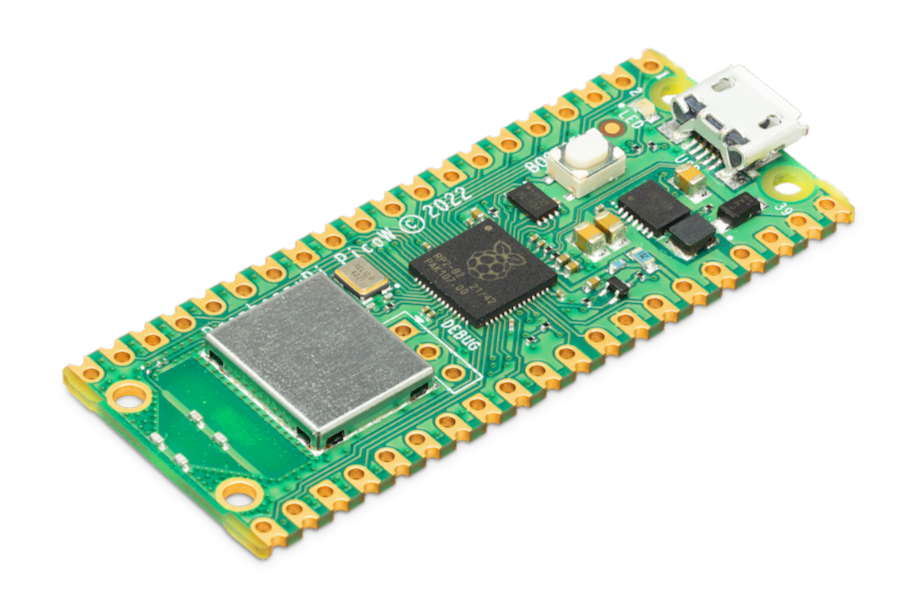 Raspberry Pi Pico W Raspberry Pi Pico W | RP2040 | 264KB | 2MB | two 20-pin GPIO headers (unpopulated) | 2.4GHz single-band 802.11n Wi-Fi (10Mb/s), Bluetooth 5.2, Bluetooth Low Energy (BLE) |
 Raspberry Pi Pico WH Raspberry Pi Pico WH | RP2040 | 264KB | 2MB | two 20-pin GPIO headers | 2.4GHz single-band 802.11n Wi-Fi (10Mb/s), Bluetooth 5.2, Bluetooth Low Energy (BLE) |
 Raspberry Pi Pico 2 Raspberry Pi Pico 2 | RP2350 | 520KB | 4MB | two 20-pin GPIO headers (unpopulated) | none |
For more information about Raspberry Pi Pico models, see the Pico documentation.
If you’re interested in schematics, mechanical drawings, and information on thermal control, visit our documentation page.

27 comments
rpiMike
Oh, i’ve got all of these except for the DIMM style compute modules!
Anders
I used to collect everything . I gave up when the unobtainable coloured PCBs appeared.
Laurent
Is the Raspberry Pi Zero 2WH official?
It seems to have been silently released, without announcement.
Charles
No that’s the Raspberry Pi Zero WH in the table.
Charles
As it’s only the Raspberry Pi 5 2GB version that is officially documented to use the new BCM2712D0 stepping, are there any plans for this silicon to show up on the 4GB and 8GB models? (presumably when stock of the original has depleted).
tracey
I want to buy a starter set for a 14 year old. Not understanding all this jargon what is a good starter that can be increased and built upon?
AndrewS
The Raspberry Pi 400 Computer Kit is a pretty good starting place https://www.raspberrypi.com/products/raspberry-pi-400/
W. H. Heydt
Check the page on where to buy Pis and pick one you like. You can probably get a kit that contains everything you need to get started.
That said… Assuming you have a spare keyboard, mouse and monitor around, the basic things you need are: a Pi. Best to get the current top model, the Pi5. Either 4GB or 8GB will do to start with. A micro-SD card. These days, I usually use a 32GB one and you can get Raspberry Pi branded ones now. Getting two is better, so you can make a backup of your system and get it up and running immediately if you do something drastic to the working card. You will need a power supply (aka PSU). Get the official one. It can save you endless headaches. You will probably need a video cable. The Pi5 connector is micro-HDMI. Unless you have a really old monitor, it should have either HDMI or DVI, so you’ll need either a micro-HDMI to HDMI or a micro-HDMI to DVI cable.
Joseph Alway
While a Raspberry Pi 4 would do, buying new a Raspberry Pi seems like it would be well worth it. The latest Pi I have is a Pi4 and booting it from a USB 3.0 device is so much better than booting it from the built-in SD-Card reader. I would highly recommend a Pi5 bundle with an m.2 adapter and drive. You would be surprised at how much the performance of the SD-Card feels like an old HDD vs the m.2 drive being a snappy SSD.
W. H. Heydt
While I generally go for all things official, and I have 4 Pi5s equipped with the official M.2 HAT+ and NVMe SSDs here are some good points to Pi Hut’s Pineboard Nano M.2 adapter, which I’m using on one Pi5. For one thing, you can put the official case lid on when it’s installed. Being fair, there are two downsides to the Nano. One being that the FFC latch rotates instead of pulling out (not an actual *problem*, but if you’re used to RPT gear, it’s an unwelcome surprise), and the retention nut for the SSD requires inserting the screw from the underside of the board, so if you want to swap drives, you also have to removing the boards mounting screws. Again, not an overwhelming problem, but a bit of a nuisance.
Helen McCall
Dear W. H. Heydt,
If you are using the nut to secure the M2 SSD on the Pineboards hat, you must have got theassembly all wrong. Thepart with the screw that the nut fits, is inserted from the top, and the nut screwed in at the bottom. This leaves an M2.0 threaded hole at the top for the little M2.0 screw to secure the SSD. This screw is a little fiddly to use, but you can find nice knurled M2 screws to fit, whcih then makes it as easy to change SSDs as with the official hat.
W. H. Heydt
The table lists the fan connector on the Pi5 as 4 pin. I believe that it is actually a 3-pin connector. For completeness, one might want to note that the connector for the RTC battery is 2 pins.
AndrewS
Fan connector is 4-pin: https://www.raspberrypi.com/documentation/computers/raspberry-pi.html#fan-connector-pinout
UART connector is 3-pin.
RTC battery connector is 2.pin.
Craig
Please, please, please make your posts/tables mobile compatible!
ross bledsoe
Im trying to learn about R PI and then I came across this page. I was looking at SC0192(9) on Digi key website but I dont see that model listed here
fdufnews
In the description of the product it is indicated Raspberry Pi 4 Model B which you can find in the table above.
see here https://www.digikey.fr/fr/products/detail/raspberry-pi/SC0192-9/18634938?s=N4IgTCBcDaIMoGEAMBGAnGAFGglCAugL5A
AndrewS
https://www.digikey.co.uk/en/products/detail/raspberry-pi/SC0192-9/18634938 says “Description
RASPBERRY PI 4 B 1GB” which *is* described in the tables above.
rpiMike
That DigiKey code appears to be a Pi4 1GB which is listed.
David Parsonage
At last, a comparison page for Pi’s.
But can we have it a spreadsheet please!
Thanks
Dave
Helen McCall
Dear David,
If you want to enter these tables into your spreadsheet package, just use cut-and-paste.
Joseph Alway
I meant to say buying a new Raspberry Pi 5 seems to be worth it.
Postnetwork Academy
This is an incredibly detailed and well-organized breakdown of the Raspberry Pi product line! Having all this information laid out clearly makes it so much easier to understand the differences between each series and model. Thank you for putting together such a thorough guide—this will be invaluable for anyone trying to choose the right Raspberry Pi for their projects. Your effort is truly appreciated!
wulu
Raspberry Pi 4 is known as 4B, while Raspberry Pi 5 with a network port is simply called Raspberry Pi. It’s truly confusing.
Martin
I have a Pi3 Model B that I need to fit a power down module, if there is such a thing, because it corrupts the OS when I switch off. Thanks
Helen McCall
Dear Martin,
If you have a terminal attached to your Pi then just type in the command: sudo shutdown -h now
If it is headless and without ssh, then wire a shutdown button to the gpio, and write a srpt to do the shutdown.
The instructions for this are to be found here: https://forums.raspberrypi.com/viewtopic.php?t=334857
xeny
Where possible, could each product’s name have a link to the launch announcement news post? Would give a little more context to how the product was envisaged to fit into the ecosystem.
No name
Now we await Raspberry Pi Compute Module 5. How about before Christmas? Would be on my wish list.
Comments are closed