New Raspberry Pi 500 and Monitor: reviews, teardowns, builds
After a bumper autumn of product launches, we thought why not go full Santa as we head towards our winter break and give you all another double product launch? On Monday, we released Raspberry Pi 500 and the Raspberry Pi Monitor into the world. Here’s what some of your favourite YouTubers did with them.
VEEB Projects
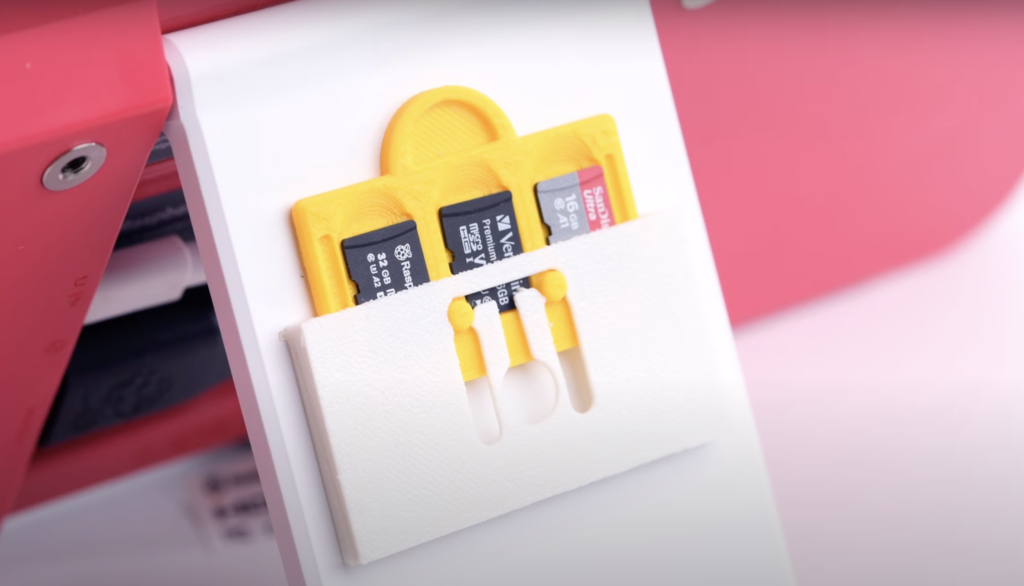
VEEB get major points for their impossibly simple yet genius idea, leaving us at Pi Towers wondering “why didn’t I think of that?” They mounted an SD card holder on the back of the Raspberry Pi Monitor’s kickstand, making it super easy to switch them out and giving them access to three different PC systems at their fingertips — a desktop PC, a retro gaming centre, and a music streamer.
NetworkChuck
Chuck asks the question that Mad Men‘s Don Draper — actually, no, copywriter extraordinaire Peggy — would begin with: “who is this for?” Adorable cameos from The Littles in his review answer it for him, with the very littlest ably assisting in the plug-and-play set up of her new desktop PC before settling in to play some Roblox.
He also gives us a handy side-by-side comparison with his Raspberry Pi 400.
Jeff Geerling
Jeff gets straight to the point: “the keyboard is the computer”. He also wins the prize for most avant-garde presentation of the Monitor and Pi 500 side by side in the above video thumbnail.
And while Jeff proper has decorum and self restraint, Level 2 Jeff couldn’t help himself, going right ahead and cracking his Pi 500 open to see what’s inside.
Kevin McAleer
Kevin could not wait until his usual Sunday night livestream, and went live with a detailed demo of Raspberry Pi 500 and the Raspberry Pi Monitor the day after launch. If deep dives are your bag, grab snacks and settle in for this hour-long opus.
Kev’s a professional YouTuber, though, so if you haven’t the time, he obviously also rolled out a succinct six-minute video on our latest creations.
leepspvideo
And if you can’t get enough destruction, leepspvideo also did a nice teardown of Raspberry Pi 500, and tested the audio output on the Raspberry Pi Monitor, checking that it works great with his Raspberry Pi 5. Furthermore, he is accompanied by an excellent cat for the majority of the review.
Gary Explains
We really liked Gary’s straightforward “what is it, what does it do, how much does it cost?” approach. He too pops the hood to give you a nice clear look inside Raspberry Pi 500.
ETA Prime
We know where ETA Prime’s heart lies when they proclaim Raspberry Pi 500’s gaming possibilities right at the start of their review and teardown. In preparation for their gaming bonanza, a little overclocking is tested and some benchmarks run, but you’ll need to subscribe to ETA Prime’s channel to keep up with the promised gaming videos.
Did we miss anyone? These were all the videos we’d seen at the time of writing, but we’re 89% sure we’re horribly behind the times already. Drop a link to more reviews and leave a comment if you have an idea for a Raspberry Pi 500 project you’d like to see.


38 comments
Serdal
Will there be a Pi500 with an M2 slot and POE?
Helen McCall
Dear Serdal,
If you need an M2 slot and PoE, you are looking at the wrong Raspberry Pi. The Pi 5B and the CM5 are the ones you should be looking at. The other Pi’s such as the Zero 2, the Pico 2, and this Pi 500 do not have them.
SimonFD
Hmm. I don’t think people are going to let this one go…
Helen McCall
Dear Simon,
It does get a bit tedious when they keep asking the same question after it has been answered. I can imagine them buying groceries at their local shop, being told that the kind of baked beans they were asking for were not available, and so staying at the counter repeatedly asking for the same unavailable baked beans!
NETeagle
So why there are some unpopulated M2 slot and POE component inside the new Raspberry Pi 500 ?
Is there any plans to release a future M2 and POE version Pi 500 ?
Helen McCall
Dear NETEagle,
If you listen to what is said in the videos above, you will find that the reviewers have asked RPL about the spaces on the board, and have learnt that no plans are being announced for adding PoE or M.2 functionality. The Pi 500 remains a very excellent basic affordable computer. It is ideal for use as an educational computer. An example of good educational use would be for studying online courses. This might include courses in basic grammar and syntax providing skills which are vital for clear writing of English, and also vital if you want to learn to program computers.
Jacob
I think the real question is whether they will include CXL and DIN rails to the next version
Helen McCall
Dear Jacob,
There might well be a market for ruggedised, rack-mounted affordable terminals for data centres. You should get busy with kicad and design the necessary opto-coupled interface and rugged DIN rack-mount case, and then add in a cannabilised Pi 500 motherboard and keyboard. Then test out your prototype, and do some careful marketing research, before negotiating with Raspberry Pi Ltd for OEM supplies of the necessary Pi components. And may I congratulate you for being the first to recognise this amazing opportunity?
Josh
awesome
ThinkPad X61s
i wonder if its possible to put an m.2 slot in the pi500
MW
Yes, definitely, it would look very nice sitting there on the board as a decorative item, but you will need much more than just a M2 connector, which you would of found out by investigating yourself before posing this question.
Helen McCall
Dear Thinkpad,
The Jeff Geerling videos above, show how to get started on doing this. You should definitely give it a try yourself. Jeff gave up after fitting the socket, and realising there were lots of other components missing. You could go down in the annals of Raspberry Pi history by succeeding where Geerling failed. Just get yourself a CM5 IO board, and identify the components in the positions having blank pads on the Pi 500. Then you can carefully remove those components from the CM5 IO board, and fit them in the corresponding positions on the Pi 500 board. Try to do better soldering than Geerling does in his video, or else you are likely to end up with two completely ruined Raspberry Pi systems. Remember to video every stage in the operation so that you can post the project on Youtube; otherwise your valiant efforts might go unrecognised.
W. H. Heydt
Did you read the other comments on this blog post?
Gordon77
“and have learnt that no plans are being announced for adding PoE or M.2 functionality. ”
Not a no then ..
John
Does the monitor work with ddcutil? For example, can it be turned off?
Helen McCall
Dear John,
If you read the Monitor section in the official documentation (https://www.raspberrypi.com/documentation/accessories/monitor.html) you will find that it details the resolutions which can be selected through DDC. It also details what happens when there is no HDMI signal. I think that should answer your question. When new products are announced on this blog, it is always useful to read the documentation for the product.
John
Dear Helen,
Thank you for your reply. Yes, I should have read through the documentation first. In my defense, I am an American and was raised to open my mouth before opening my eyes. I should have also phrased my question better. I was wondering more so if one can put the monitor into standby or change the brightness and volume through the DDC-CI. Your replies in particular are some of my favorites on this blog.
dom
Yes, see https://forums.raspberrypi.com/viewtopic.php?p=2249982&hilit=ddcutils#p2249982
There are a number of controls, that include volume, brightness, contrast and standby.
John
Awesome. Thank you very much for the link!
Allan Vázquez
My brother want to buy a computer, I can’t recommend Rpi500 because I can get double read/write speeds with Rpi5 NVME. The only thing I will miss about Rpi500 is the neatly packed case and heat sink for the same price.
Allan Vázquez
What I mean is that for me the Rpi#00 series isn’t just about ease of use, they solve an important issue I have had with Raspberry products about casing. I ended buying an extra (not cheap) full metal enclosure for my Rp4’s, which ultimately affected wifi and bluetooth reception. Therefore I have a great need for a cheap, good looking case that works with the M.2 hat and the active cooler. Thank you.
Helen McCall
Dear Allan,
The neatest, and most compact case I have my Pi 5B workstation in, is the Raspberry Pi Bumper. I have the Pi with active cooler along with a Pineboards Piano NVME M2 hat with integral audio card. I also have a 5B in a Pi Hut Layer Case with the active cooler and the official NVME M2 hat. Both of these cases are neat, and protect the hardware whilst keeping the Pi 5B running nice and cool. They both also leave me with plenty of space for the RTC battery, and for accessing all the ports. However I wouldn’t rule out the Pi 500 for your brother because the new Raspberry Pi SDs are very much faster than other SDs on the Pi, and should last a lot longer.
Allan Vázquez
Hi Helen, thank you for your reply.
My brother is an adult with no knowledge of Linux or hardware, he used mainly his phone for everything but recently found that a computer could allow him more precise control. For me to see the Rpi5 in a bumper or layer case is cool, what he sees is an accident hazard or transport inconvenience. Also the easiest way to get a case would be to buy it from an Aproved Reseller with everything else and save on shipment. We live in Mexico and I think PiHut doesn’t ship here. Amazon do (eww) but most cases are either expensive, ugly or don’t fit a M.2 hat.
Raspberry Pi product specification says that their SD card in Raspberry Pi 5 has random 4KB read/write performance of 5k/2k IOPS, and SSD has 50k/90k IOPS. Seems like a lot.
Kieron
I think was the right move going for SD over nvme. my dream is for every school across the country to have a dozen pi 500’s.
Helen McCall
Dear Kieron,
I would like to see the Government be serious about supporting British Industry, and also about cutting unnecessary state spending, by banning all government departments from buying expensive PCs for desktop computers and servers, and requiring them to use Raspberry Pi products instead. This should apply also to local government and schools.
We should all write to our MPs to demand this action.
nafanz
Please add Russian keyboard layout.
Stephen
There has been some fantastic reviews out there, and I really appreciate the tear-downs too. Always good to see what’s inside.
However, I hope Raspberry Pi sent out review units to Christopher Barnatt at Explaining Computers. Really looking forward to his review of the new hardware.
CAB
I was disappointed to read that Christopher Barnatt at Explaining Computers wasn’t supplied with review units of the new hardware at the same time as these other YouTubers. I always enjoy his take on things, and I hope he’s put on the list for future releases.
Jordan Haisley
He already made his own version that is arguably better.
Csaba
Why don’t you have a 16 GB RAM model?
That is what I need for general purpose computing.
8 GB is not enough for my style of web browsing.
Dave
Ok. I bought the 500. Trying it out. Works fine with the Pi OS but will not boot correctly with Ubuntu or any alternate OS. Ubuntu boots to the flash screen and stops. Can enter terminal (ctrl + Alt+ F2) but cant login. Used both Imager and the Network install at boot up and no luck. Is this teething problems with the 500? I updated the Eeprom and all sorts of storage to no avail. Am I missing
MW
It is down to the developers of alternative Operating Systems to fix the issues, nothing to do whatsoever with RPL. Raspberry Pi Bookworm ARM64 Operating System latest point release is fully supported by RPL.
Helen McCall
Dear MW,
It is looking like OpenWRT will be the first alternative OS to be successfully ported to the Pi 5, because they have a beta-testing version working on Pi 5, which is about to be released. Other OS’s such as RISCOS, Ubuntu, and FreeBSD do not claim to work on the Pi 5, and FreeBSD seems to have given up work on porting to Pi’s after getting it to work on the Pi 2B!
Now that the Raspberry Pi OS is fully 64bit, I can’t see any significant advantage in using Ubuntu on a Pi. However it would be nice to see RISCOS, OpenWRT, and FreeBSD working on it, but this is dependent upon there being sufficient volunteers able to work on the porting.
rclark
As for me, I think my RPI 500 will work great as a GUI test system. Most all of my RPIs run headless. It will sit on the shelf in a box until needed. Takes up little space. I fired mine up when I got it and everything works.
For those you want a ”faster’ disk, just attach a bootable SSD drive instead of whining about NVME. I’ve got several RPI-4s, RPI-5s that work great with external 500GB, 1TB, and 2GB Samsung T5/T7 drives.
Robert
Thanks for the tip with extern SSD to Rpi.
Sincerely
Old Bob, Sweden
rclark
That’s 500GB, 1TB, and ‘2TB’ drives.
David Jones
I am very pleased with the R Pi 500 and R Pi Monitor combination. The setup is compact, light and easy to move around. The Pi SD card gives decent performance if you just get on with using the system. It does depend on what you want to do – running Scratch, Thonny and Libre Office in my case.
Captain Redshift
There are questions:
Why use micro HMDI when there seems to be space for full-sized ports?
Does the sister monitor come with a micro HDMI cable?
Why, why, why is there an incomplete M.2 slot at all?
It was important enough to make that far into product. What happened?
How could it get released this way?
Moving onto the product page for it. Let’s talk Expectations vs Reality. The page describes the Pi 500 with subjective, exaggerated, ambiguous words:
– A “fast and powerful” computer.
Is it, though? This creates unrealistic expectations from new users.
– Featuring “advanced hardware”.
Compared to what? A 486, or a Ryzen 9 with an RTX 4090?
– Designed for “optimal performance”.
Except for that missing NVMe drive, huh? Optimal for what?
– A “superb desktop experience” for work, leisure, and “beyond”.
That “beyond” is the most egregiously vague promise. Calling it a superb experience is quite a stretch. Compared to what? Windows 11? Mac OS?
When I first heard about this product, as with all past Pi models, I came to the product page expecting to see photos of the circuit board. Instead, the product page features a cutaway image half the circuit board hidden by a keyboard. The half with the missing M.2 slot. It’s suspiciously covered. When has there ever been only a partial board shown?
In short: Unsuspecting new buyers are going to feel misled. Existing users are going to feel their trust eroded from what feels like a holiday cash grab.
Comments are closed