M.2 HAT+ on sale now at $12
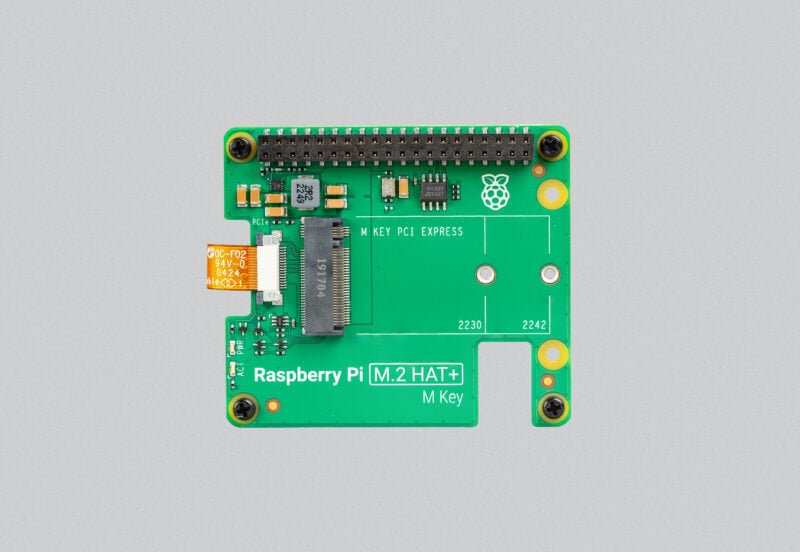
The Raspberry Pi M.2 HAT+ enables you to connect M.2 M-key peripherals, such as NVMe drives and AI accelerators, to your Raspberry Pi 5. It provides fast (up to 500 MB/s) data transfer to and from these peripherals, and is available to buy today, from our network of Approved Resellers, priced at just $12.
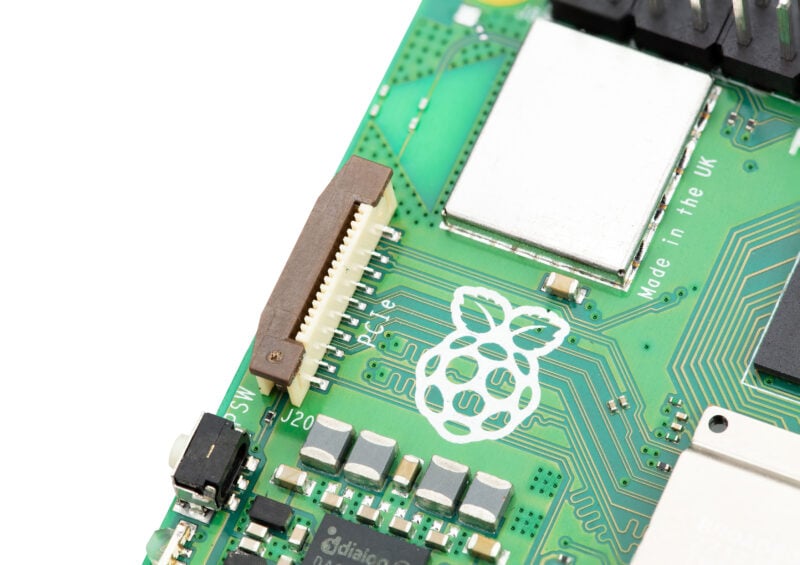
Raspberry Pi 5 launched back in September last year with an exciting new feature on board. No, not the power button. Or the battery-backed real-time clock. We’re talking about the PCI Express (PCIe) expansion connector: this small 16-way FFC (flexible flat cable) connector, positioned at the extreme left of the board where the MIPI display connector lives on older Raspberry Pi boards, carries a single-lane (one transmit pair, one receive pair, and one clock pair) PCIe 2.0 bus.
When we launched Raspberry Pi 5 we also showed off a prototype HAT+, which bridged between our FFC connector and the standard M.2 M-key form factor used by NVMe drives and many other small PCIe devices. After several revisions, simplifications, and a whole lot of testing, that prototype became the product you see today.
Developing great products takes time
Launching a new generation of Raspberry Pi computers is a huge effort, absorbing the attention of our whole engineering team. Raspberry Pi 5 was a particularly complex (and expensive!) program, featuring three new custom chips (the Broadcom BCM2712 application processor, Dialog/Renesas DA9091 PMIC, and our own RP1 I/O controller); new production processes (intrusive reflow for connectors, and routed board singulation); and a completely redesigned production test system.
So while in an ideal world we would have launched the M.2 HAT+ at the same time as Raspberry Pi 5, it was important not to rush things. There were still a few unresolved questions, notably around the two “spare” pins on the 16-pin FFC connector. While these pins carried I2C signals in our earliest prototypes, in the end the Raspberry Pi PCIe Connector specification allocates them to fixed functions: one as a power enable for downstream device power, and one as a board detect and wake signal.
And we wanted to make sure that our product really was a HAT+, which in turn meant we had to resolve a few last wrinkles in the Raspberry Pi HAT+ specification. Raspberry Pi specifications, like our 40-pin GPIO connector and our three-pin debug connector, often become de facto standards for the rest of the industry, and we have a responsibility to get them right first time.
Extensive drive compatibility
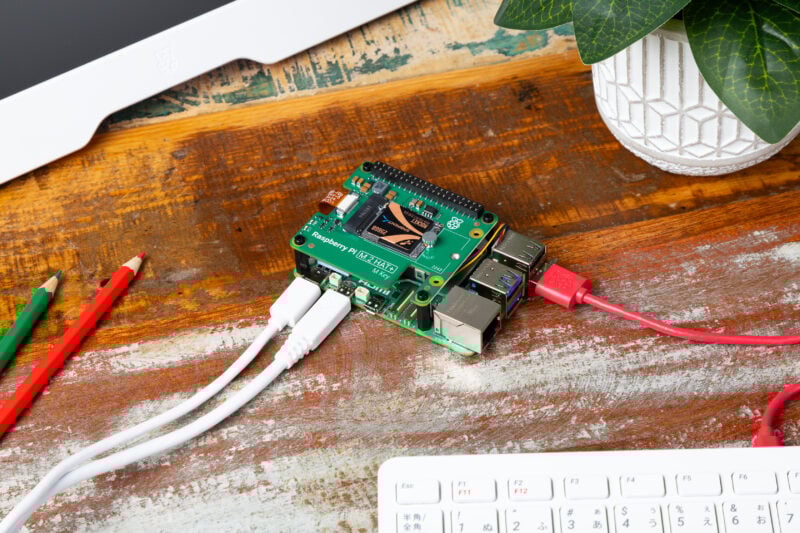
While we were doing all this, we took the opportunity to test a wide variety of NVMe drives and other peripherals, and to investigate the various issues we found. In one case we worked with a manufacturer to develop a fix for a drive that didn’t work correctly; this one turned out to be a startup timing issue in the drive firmware, preventing the PCIe controller inside BCM2712 from recognising the drive.
And of course it takes time to write firmware, and to build the production processes, material pipeline, and test systems required to build tens of thousands of units of a product each and every month. But with all this done, we’re pleased to be in a position to launch. If your Raspberry Pi 5 has up-to-date firmware, and an M.2 HAT+ attached, an installed PCIe device will be probed at power on and, if it’s an NVMe drive, it will be available as a boot source.
Schematics
A nice side-effect of launching of the M.2 HAT+ a bit later has been a profusion of third-party products, like the NVMe Base from our friends at Pimoroni. We want to make it easier to build high-quality PCIe accessories for Raspberry Pi 5, and so we’re publishing our schematics as a reference design. You can also browse our documentation for the M.2 HAT+.


51 comments
aBUGSworstnightmare
Well done! Can’t wait to pull the trigger for buying some.
Will you release a list of the NVMe drives used during compatibility testing/vaidation?
aBUGSworstnightmare
Is it possible to add the dimensions of the two holes next to the M.2 (right side of the board), as well as the position of the M.2 mounting holes to the drawing? Would like to make an adapter for mounting 2280 NVMe.
Phil
Will it fit in the standard case?
If not, are there any plans for an official case in which it will fit?
tenroku
https://www.cytron.io/p-raspberry-pi-md2-hat-plus-for-raspberry-pi-5
Jeff Geerling
Yes, it fits in the official case (though you need to remove the fan that comes with the case—use an Active Cooler instead).
Linkin
nice
Jon Poe
Does it fit in the official case with the official top attached? Correct me if I’m wrong here, but it seems to me that the the official hat+ specification, https://datasheets.raspberrypi.com/hat/hat-plus-specification.pdf seems to generate hats that can’t fit in the official case with the top on. The spec allows for 65.0 mm long hats and the case has a 65.0mm long hole, but that leaves zero room for the official case’s cap to clip down.
Anders
Thank you, mine is ordered and on the way.
Looking forward to discovering important information like how is fits together with Active Cooler and official case.
Garry Hayne
Good news, but I am very disappointed that there is no 2280 support.
NTN
What do You mean? If it fits, it fits…
aBUGsworstnightmare
How to fix it if there is no mounting provision for a drive of that size?
Anders
Blu Tack
aBUGsworstnightmare
Should be easy to add 2280 support in a similiar way like I did here https://forums.raspberrypi.com/viewtopic.php?p=1997112&hilit=waveshare+nvme#p1997112.
That’s why I’ve asked for the additional dimensions to be added to the M.2 HAT+ drawing.
Andrew
It looks like there are no Australian re-sellers. Is that something that will change in the future?
Mike
Hi Andrew, stock will be on its way to our resellers in Australia later this week. We will get their links live in the next 24/48 hours
Ray Allen
Congrats, ordered. It would be nice if you were able to offer a cheap Pi-branded SSD for this, say, just a 16GB, 32GB, or 64GB in the 2230 form factor, so we can tinker and have the speed. Sometimes we don’t need to have 512GB or 1TB; just a bunch of small NVMe SSDs would be great.
HankB
I agree that small NVME SSDs would be useful for this application. I don’t recall seeing any smaller than 128GB and these can be had (on Amazon US) for a couple dollars more than the cost of this HAT+. (Not so long ago they were about the same price, but flash storage prices are increasing.) Unfortunately one that worked at first stopped working after an RpiOS update. I haven’t retested to see if that has been fixed.
I suspect the chance of getting a smaller SSD is vanishingly small. I don’t think there is sufficient market to make it cost effective if the smaller flash chips are even available from the foundries.
Robbie
What is the goal of this component, when talking only about storage? I can start my RPI from an SD-Card, and there are a lot of them including with large storage sizes. Why is this NVMe option better than a large-sized SD card? There is no mention whether this will fit inside the official case, which is a downgrade from my current configuration.
Sorry for the basic question, I am learning about software and hardware from my bootcamp.
HankB
NVME storage is going to be a lot faster and likely more durable than SD cards.
Bret
It does fit inside the official case, though you’ll need to remove the case fan to accommodate it, causing a slight bump in temperatures. As Jeff’s mentioned below, however, the official active cooler will fit below it, albeit still choked off a little in terms of airflow.
If you have a suitable drive, an NVMe drive will offer you around 850MB/s throughput and much lower latency, compared to around 80MB/s on some of the better microSD cards. It may not be important to your use case but faster, more reliable storage is a great option at this price point!
IanS
Since it sits above the Pi, what effect does it have on the heat dissipation? Does the active cooler still fit, and get enough airflow?
Jeff Geerling
The Active Cooler (and some of the other similar coolers and heatsinks from other vendors) fits nicely underneath; though there’s not as much airflow through the top of the board (I think only the HackerGadgets M.2 HAT has a cutout for fan airflow in the PCB above where the fan sits).
Harry Hardjono
Doesn’t that negate the purpose of Active Cooler? Well, I’m sure someone will do a thorough investigation on the subject! 😉
I’ll just wait for Pi500 with built-in NVME! 😁
James Adams
With 16mm spacers (as supplied) there is plenty of space for the blower to suck air in, even when underneath the M.2 HAT.
Anders
The 52Pi NVMe M.2 HAT also has the big hole for the active cooler.
I think I may end up losing the case, or drilling holes in the sides to help airflow. Even if the Active Cooler works. I expect that the fan will need to be active for more of the time.
Anders
There is a 52Pi one with a hole cutout too.
Harold
Does the M.2 HAT+ monopolize the GPIOs or is this a passthrough where can we had headers on top to stack other HATs on the M.2 HAT+ ? Or plug male jumper cables in to access the GPIOs ?
rclark
That is my question too. I liked over at pi-shop to see what they say on the product but no mention, nor does the picture show pins going through… GPIO is why I buy the RPIs :) . I know there is a header that has both right angle and up pins that would probably work, allowing access from the side. So can be done… But still wondering :)
James Adams
The connector on the M.2 HAT+ is a ‘pass through’ type. The stacking header in the box is designed to be flush with the top of the pass through connector when used with 16mm standoffs/spacers. If you purchase a longer header you can use it to access the GPIO (only the HAT EEPROM is connected all other GPIO are free).
Peter P.
Well, first of all congrats!! Budget friendly and fantastic addition to the Pi 5! But to be honest i gotta say i’m a tad disappointed, was expecting an official BOT (bottom) NVMe to be presented as well. My Pi 5 has an “armoured” case, dual fan setup on top. I cannot, for the life of me, find a way to attach the HAT version to my Pi, not enough space and not enough FFC for the stretch. Any chance it will be release a BOT version with perhaps 2280 NVMe? I know, i know there are vendors selling this type of PCB but i would much rather have an official BOT from the Pi Foundation.
Nonetheless, good-freakin’-job!
MO
Do you need a M.2 HAT+ if you have the pimoroni NVMe Base for Raspberry Pi 5 ?
Bret
You wouldn’t need one, no, as they’re performing the same function and using the same PCIe connection on your Pi 5. This is just the official Raspberry Pi 5 version of what you already have!
André Costa
Thanks for making the schematic available as a reference design!
James Adams
You’re welcome!
Bret
Awesome! Seeing it at Embedded World was nice, having it in my hands tomorrow will be nicer! :D
Brian Beckett
Congratulations, Pi team – this looks great!
In the Pi 5 announcement post (https://www.raspberrypi.com/news/introducing-raspberry-pi-5/) you wrote:
> From early 2024, we will be offering a pair of mechanical adapter boards which convert between this connector and a subset of the M.2 standard, allowing users to attach NVMe SSDs and other M.2-format accessories. The first, which conforms to the standard HAT form factor, is intended for mounting larger devices. The second, which shares the L-shaped form factor of the new PoE+ HAT, supports mounting 2230- and 2242-format devices inside the Raspberry Pi 5 case.
Is the plan still to release a second M.2 board, or has the process of iteration combined both into one?
Jakub Cermak
Can it be combined with a PoE hat?
Jon Poe
This is a great question, I hope someone who knows something will answer it.
James Adams
Yes, when the upcoming Pi5 PoE+ HAT arrives it will be able to stack / work with this.
Jon Poe
Woo hoo! Good news! Will this work? active cooler + PoE hat + M.2 hat all inside the official case (with the top on)?
Anders
I don’t think they will fit inside the official case currently on sale, it’s barely sufficient for the M.2 HAT+.
Marcel
Any ETA for the POE+ HAT?
Mike O
Any ETA yet on when the PoE+ hat will be coming out?
Peter Nikolow
That was game changer… now i have a valid reason to order RPi 5 with this hat.
Graeme
Received mine today and works perfectly and straight away – great work!
Only questions I have are:
– It fits in the official case but the screws provided are not long enough to go through the case into the stand-offs – any advice on those?
– The top of the case doesn’t seem to want to stay down – maybe the screws will help, but should it grip the HAT?
Thanks again!
Screw Loose
Forgive the naive question, but would this allow, via a m.2 m key to PCIe adapter, to be able to strap a video card such as a 3090 to it (with the video card being powered by a separate power supply of course)?
Matthew Lawrence
Disappointed this is not built into the RPI mainboard like some of the other PI clone’s/SBC already have done. And when do we change out the mini hdmi connectors to usb-c with data/video out?
rclark
I like the idea of modality. Add if needed/wanted. Hats as needed for a particular use case. Bottom line I think RPI’s compromise was/is a good idea.
As for the hdmi connectors, why does it matter? I’ve got several RPIs running 24×7 and none even use the interface. All run headless. Even the times where I’ve hooked up a monitor, it isn’t for any intensive graphics tasks. Or other times just use RD or VNC is more than adequate. In fact reduce to one HDMI would be sufficient and space for another exposed interface for a maker to exploit :D .
Robert Ward
Ok, so the hat is good and it works which is brilliant. I followed a YouTube video and the setup was a breeze.
However…. the plastic legs and screws are just rubbish and haven’t been manufactured to a good standard. the screws are not long enough to work the official case. They dont reach through the official case so you can’t attach the board to the case and use the legs as a bolt to hold the lot in,
I think there should have been four long screws, four shorter screws (if you dont want to use the official case) which go on the bottom and four of a different colour which go on top. I know that would have added some cost but I thought the idea was to make things easy and plug and play for users.
As it stands I will need to head to the local hardware to try to find some long M2.5 screws which are not always easy to find.
Delighted and disappointed in equal measure on this one.
Raspberry Pi Staff Helen Lynn
We’ve identified the same issue with the screws and spacers that you’ve encountered, and we’re replacing the mounting hardware in units that will be sent to customers from now on. If you get in touch with the Raspberry Pi Approved Reseller that you bought your HAT+ from, they should be able to send you a set of replacement mounting hardware.
Pismo
Can someone provide the technical explanation for why a blank nvme ssd can’t be imaged after being installed into an up and running nvme hat? It appears to me that the ssd must be imaged via some external means prior to installing into the hat. e.g.
Thanks
Comments are closed