Google Pigweed comes to our new RP2350
We love Google Pigweed! Pigweed is an open source project launched by Google in 2020. We love it because it helps programmers and teams of developers build great software for embedded devices that use microcontrollers like our new RP2350 and its predecessor, RP2040. We are also partial to funny product names around here; we are thrilled that our Pico W has gone down in the community’s vernacular as “pie cow”.

We’ve been working with the Pigweed team for almost a year now. Last month they upstreamed Bazel support into our Pico SDK, and will continue to maintain it going forward.
Bazel is an important part of the Pigweed project, and the team believes it’s going to be the future of embedded software development, making it easier for large, professional embedded development teams to build prototypes and products on top of RP2350. Head over to Bazel’s launch blog post to learn more about the benefits of Bazel for embedded.
The Pigweed team has built a great demo for you to try on your Raspberry Pi Pico 1 or Pico 2. This demo shows off lots of complex stuff handled and enabled by Pigweed, including:
- Hermetic building, flashing, and testing through Bazel
- Fully open-source Clang/LLVM toolchain for embedded that includes a compiler, linker, and C/C++ libraries with modern performance, features, and standards compliance
- Structuring your codebase around sensible, hardware-agnostic C++ through Pigweed’s extensive collection of libraries
- Communicating with your Pico over RPC
- Viewing Pico logs and sending commands to the Pico over an interactive and customizable REPL
- Authoring in Visual Studio Code with C++, Starlark code intelligence, and Bazel command integration
- Cross-platform builds and toolchains, development on macOS or Linux (Windows support is on its way)
- Device simulation on your host computer
- Continuous building and testing with GitHub Actions
Some hardware fun
We first met this great team of Pigweed folks at Maker Faire Bay Area 2023, when they came to say hi and show off their Game Boy-alike badge, which uses RP2040. This Kudzu badge is a fun example of what you can build with the Raspberry Pi microcontroller and the Pigweed software libraries.
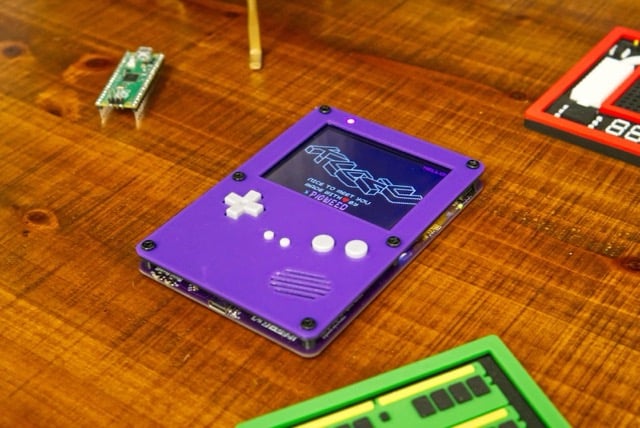
The Pigweed team have open-sourced their design, and it has some cool features like a QVGA touchscreen, a six-axis IMU, and a LiPo battery and charger. With great demos and examples to start from, we are really looking forward to seeing what everyone makes with our expanded line of Raspberry Pi microcontrollers and Google Pigweed.
4 comments
Jack
Consider the “out of the mainstream” people. Big story about Bazel support fpr Pico. But no basic description of what it is, just how to install. A little help please.
Charles
It’s the build system.
The setup is about 3 clicks into the demo linked to above:
https://pigweed.dev/docs/showcases/sense/tutorial/setup.html
Ray
“Bazel is an open-source build and test tool similar to Make, Maven, and Gradle. It uses a human-readable, high-level build language. Bazel supports projects in multiple languages and builds outputs for multiple platforms. Bazel supports large codebases across multiple repositories, and large numbers of users.”
re:
https://bazel.build/about/intro
Richard
This is going to be exciting adoption. Bazel is a seamless, easy language build system. Can we also try Zephyr RTOS on RP 2040 along with Pigweed?
Comments are closed