Compute Module 5 on sale now from $45
Today we’re happy to announce the much-anticipated launch of Raspberry Pi Compute Module 5, the modular version of our flagship Raspberry Pi 5 single-board computer, priced from just $45.

An unexpected journey
We founded the Raspberry Pi Foundation back in 2008 with a mission to give today’s young people access to the sort of approachable, programmable, affordable computing experience that I benefitted from back in the 1980s. The Raspberry Pi computer was, in our minds, a spiritual successor to the BBC Micro, itself the product of the BBC’s Computer Literacy Project.
But just as the initially education-focused BBC Micro quickly found a place in the wider commercial computing marketplace, so Raspberry Pi became a platform around which countless companies, from startups to multi-billion-dollar corporations, chose to innovate. Today, between seventy and eighty percent of Raspberry Pi units go into industrial and embedded applications.

While many of our commercial customers continue to use the “classic” single-board Raspberry Pi form factor, there are those whose needs aren’t met by that form factor, or by the default set of peripherals that we choose to include on the SBC product. So, in 2014 we released the first Raspberry Pi Compute Module, providing just the core functionality of Raspberry Pi 1 – processor, memory, non-volatile storage and power regulation – in an easy-to-integrate SODIMM module.
Compute Modules make it easier than ever for embedded customers to build custom products which benefit from our enormous investments in the Raspberry Pi hardware and software platform. Every subsequent generation of Raspberry Pi, except for Raspberry Pi 2, has spawned a Compute Module derivative. And today, we’re happy to announce the launch of Compute Module 5, the modular version of our flagship Raspberry Pi 5 SBC.
Meet Compute Module 5
Compute Module 5 gives you everything you love about Raspberry Pi 5, but in a smaller package:
- A 2.4GHz quad-core 64-bit Arm Cortex-A76 CPU
- A VideoCore VII GPU, supporting OpenGL ES 3.1 and Vulkan 1.3
- Dual 4Kp60 HDMI® display output
- A 4Kp60 HEVC decoder
- Optional dual-band 802.11ac Wi-Fi® and Bluetooth 5.0
- 2 × USB 3.0 interfaces, supporting simultaneous 5Gbps operation
- Gigabit Ethernet, with IEEE 1588 support
- 2 × 4-lane MIPI camera/display transceivers
- A PCIe 2.0 x1 interface for fast peripherals
- 30 GPIOs, supporting 1.8V or 3.3V operation
- A rich selection of peripherals (UART, SPI, I2C, I2S, SDIO, and PWM)
It is available with 2GB, 4GB, or 8GB of LPDDR4X-4267 SDRAM, and with 16GB, 32GB, or 64GB of MLC eMMC non-volatile memory. 16GB SDRAM variants are expected to follow in 2025.

Compute Module 5 is mechanically compatible with its predecessor, Compute Module 4, exposing all signals through a pair of high-density perpendicular connectors, which attach to corresponding parts on the customer’s carrier board. Additional stability is provided by four M2.5 mounting holes arranged at the corners of the board.
There are a small number of changes to the pin-out and electrical behaviour of the module, mostly associated with the removal of the two two-lane MIPI interfaces, and the addition of two USB 3.0 interfaces. A detailed summary of these changes can be found in the Compute Module 5 datasheet.
Accessories accessorise
But Compute Module 5 is only part of the story. Alongside it, we’re offering a range of new accessories to help you get the most out of our new modular platform.
IO Board
Every generation of Compute Module has been accompanied by an IO board, and Compute Module 5 is no exception.
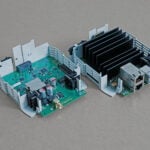
The Raspberry Pi Compute Module 5 IO Board breaks out every interface from a Compute Module 5. It serves both as a development platform and as reference baseboard (with design files in KiCad format), reducing the time to market for your Compute Module 5-based designs.

The IO Board features:
- A standard 40-pin GPIO connector
- 2 × full-size HDMI 2.0 connectors
- 2 × 4-lane MIPI DSI/CSI-2 FPC connectors (22-pin, 0.5mm pitch cable)
- 2 × USB 3.0 connectors
- A Gigabit Ethernet jack with PoE+ support (requires a separate Raspberry Pi PoE+ HAT+)
- An M.2 M-key PCIe socket (for 2230, 2242, 2260 and 2280 modules)
- A microSD card socket (for use with Lite modules)
- An RTC battery socket
- A 4-pin fan connector
Power is provided by a USB-C power supply (sold separately).
IO Case
As in previous generations, we expect some users to deploy the IO Board and Compute Module combination as a finished product in its own right: effectively an alternative Raspberry Pi form factor with all the connectors on one side. To support this, we are offering a metal case which turns the IO Board into a complete encapsulated industrial-grade computer. The Raspberry Pi IO Case for Raspberry Pi Compute Module 5 includes an integrated fan, which can be connected to the 4-pin fan connector on the IO Board to improve thermal performance.

Cooler
While Compute Module 5 is our most efficient modular product yet in terms of energy consumed per instruction executed, like all electronic products it gets warm under load. The Raspberry Pi Cooler for Raspberry Pi Compute Module 5 is a finned aluminium heatsink, designed to fit on a Compute Module 5, and including thermal pads to optimise heat transfer from the CPU, memory, wireless module and eMMC.
Antenna Kit
Wireless-enabled variants of Compute Module 5 provide both an onboard PCB antenna, and a UFL connector for an external antenna. Use of the Raspberry Pi Antenna Kit (identical to that already offered for use with Compute Module 4) with Compute Module 5 is covered by our FCC modular compliance.


Development Kit
The Raspberry Pi Development Kit for Raspberry Pi Compute Module 5 comprises a Compute Module 5, an IO Board, and all the other accessories you need to start building your own design:
- CM5104032 (Compute Module 5, with wireless, 4GB RAM, 32GB eMMC storage)
- IO Case for Compute Module 5
- Compute Module 5 IO Board
- Cooler for Compute Module 5
- Raspberry Pi 27W USB-C PD Power Supply (local variant as applicable)
- Antenna Kit
- 2 × Raspberry Pi standard HDMI to HDMI Cable
- Raspberry Pi USB-A to USB-C Cable
Early adopters
Today’s launch is accompanied by announcements of Compute Module 5-based products from our friends at KUNBUS and TBS, who have built successful products on previous Raspberry Pi Compute Modules and whom we have supported to integrate our new module into their latest designs. Other customers are preparing to announce their own Compute Module 5-powered solutions over the next weeks and months. The world is full of innovative engineering companies of every scale, and we’re excited to discover the uses to which they’ll put our powerful new module. Try Compute Module 5 for yourself and let us know what you build with it.
63 comments
Arav Jain
Great news!!
Good time to be awake until 2 AM in the US…
Jeff Geerling
2 a.m. is certainly better than 4 a.m.! But glad to see this finally come to market. I’m excited to try my hand at an actually-useful GPU dock for the CM5!
Frank Haferkorn
Greetings from Munich, Germany to Jeff.
You are doing a great Job!
Yours,
Frank.Haferkorn , Inventor
Esbeeb
Awesome! Kudos!
Jeppe Kollerup
Amazing! Such great work putting all these features on the tiny board.
Robert
Fantastic! The 16GB version is exactly what I’ve been waiting for – it’s a perfect upgrade!
Raspberry Pi Staff Gordon Hollingworth
For what? It’d be interesting to understand what is going to use all that memory efficiently?
zook
Containers… maybe vm (but I don’t try vm jet)
Harry Hardjono
Ram disks comes to mind. I can only get 300MBps performance on microsd, but can get full 3GBps performance on ram disk!
Mark Tomlin
I use the 8GB, and I would use the 16GB for web servers. Pi hosting is like $100USD a year and they are rock solid. The main server sits around 8GB RAM usage with everything going on in the background, I have a bunch of system daemon processes that expose web sockets to the web client so on a busy day we get around the 8GB of RAM use mark.
Basil Bourque
What Pi colo vendor do you use?
Jeff Geerling
Well… from the realm of silly but fun—I think Forza Horizons 4 will run on the Pi 5 / CM5 with 16 GB of RAM (along with a number of other games that balk at 8 GB, like Cyberpunk 2077)…
deathpotato.exe
Is that a prediction for the Pi 5 16GB model?
Helen McCall
Hello Gordon,
Perhaps Robert doesn’t like using for-loops or while-conditions in his programs! This might start a new fashion for strictly linear programming. ;-)
Chris Albertson
What would use all that RAM? 8GB is not much. The Pi5 is going inside a robot to handle autonomous navigation.
Velko Spasov
I am looking forward to knowing if I will be able to upgrade my Home Assistant Yellow with that beauty once the 16 GB RAM version airs out.
Anders
Hopefully 16GB percolates to other products…..
My Raspberry PI Postgres server will definitely benefit.
Raspberry Pi Staff Gordon Hollingworth
Does postgresql speculatively cache everything in memory to improve performance, a bit like the browsers do?
Anders
Keep the most hit pages in buffer cache of course. RAM is quicker access than disk. Why wouldn’t you?
We’ve had this discussion here before, there are plenty of use cases for more RAM.
Or does nobody need more than 640k?
Anders
It’s not speculative. The first pages that are accessed are cached in RAM and in continues until RAM is used then the least hit pages are sacrificed
for new pages.
Jamesa
Just in time for my Birthday :) :) :) Needed upgrade to our development drones which all use CM4’s!
Awesome!!!
Vimes
Thanks. This was on my wishlist on monday – you work fast! Just the job!
Naveen
Will it work with the CM4 carrier boards?
Jeff Geerling
For many, yes; I’ve been testing CM5s on a bunch of the carrier boards I have on hand, and most of them have worked without any tweaks. A few won’t power on, so I’m guessing the power circuits on some aren’t adequate for CM5.
Hopefully manufacturers can somehow indicate compatibility with different CM generations at some point.
Naveen
Thanks! It would be helpful to list the carrier boards you have tried.
Adam B Figueroa
I have the Deskpi super6c fully populated and running MPI4PY. Works great! I would love to upgrade to the pi5 but really would need to know if it will work.
Qaz
You can check IO Board compatibility from https://www.raspberrypi.com/documentation/computers/compute-module.html
Qaz
crumble
Have you changed the RAM bus to 64Bit for the 16GB version?
Peter Jakobi
The datasheet linked (version updated TODAY) lists some usb3 signals, but otherwise claims only support for usb2, not usb3. It also mentions that pcie gen3 is possible with restrictions, but officially unsupported.
@RPI: Please have another round at updating the datasheet.
Thx Peter
PS: 16GB Ram sometime next year. FINALLY! :-)
Raspberry Pi Staff Gordon Hollingworth
On PCIe, it is not fully conformant with Gen3, but for example we tested the AI kit hard with it before using Gen3.
Peter Jakobi
Edith says: the inofficial statement wrt pcie gen3 is similar to rpi5 itself. She kind of digs this part.
Amit Kumar
Really looking forward to this! Any ideas when it will be back in stock?
Compute modules have been notoriously hard to come by.
Mike Buffham
Hi Amit, you should have no problems at all sourcing CM4 or CM4S (has been in free supply most of 2024)
CM5 has already started shipping so if you need stock please visit one of our Industrial Resellers and they should be able to help you
NGUYỄN TUẤN ĐẠT
Hope raspberry pi 6 comes out soon, with 16Gb and 32GB ram options, I really need it for advanced AI models
Helen McCall
RPi6!!! The Raspberry Pi team have been doing a wonderful job, and so surely we shouldn’t be impatient and chivvying them along. I was doing research on Machine Learning back in the early days, and produced my “advanced AI models” on a 1989 Sun Sparcstation 1 which had a 20MHz processor, 64MB of RAM, and a 1GB SCSI 1 hard disk. After paying out for this highest specification Sparcstation, we had no money left in the project budget for any software for it. So I had to write all the image processing and analysis software, along with the modelling software using the SunOs system C compiler. Fortunately we had a site-wide licence for SAS and Interleaf TPS. which I could use. The RPi5 is so vastly superior to that!
crumble
16GB is the largest RAM chip available for 32bit bus. So I guess that we don’t get 32GB RAM.
But maybe we are lucky. 64bit shall be faster and the 16GB chips are much cheaper than their 32bit version.
Peter
Do you we get a Raspberry Pi 5 with 16GB RAM too? I need this for my server setup, where RAM is more important than CPU. Have a lot of Docker containers idling most of the time, but need RAM if the running services are used.
Thank you.
MW
This is a CM5 release announcement, not a RPi 5 announcement.
Ryan P Grainger
I can finally say this now that the CM5 is public.
Thank You for putting USB 3.0 on the Module!
CharlestonMike
“Clickbait”…Yet again resellers are jacking the price up from $45 to $70 (plus taxes and shipping).
Raspberry Pi Staff Helen Lynn
Tell us where you’ve seen this and we’ll take a look. Note that there are 24 Compute Module 5 variants on sale with different wireless, RAM, and eMMC flash options, at different price points ranging from $45 (no wireless, 2GB RAM, no eMMC) to $95 (wireless, 8GB RAM, 64GB eMMC). If you download the product brief from the Compute Module 5 page you’ll see it includes a table that shows the list price for each variant, so you can check you’re paying what you should expect to pay.
Adam
The only official Raspberry Pi reseller in Luxembourg has jacked up prices for Raspberry Pi items.
* Raspberry Pi 5 4GB: 79.99 Euros (https://www.electronic-shop.lu/product/193004)
* Compute Module CM5, 4GB RAM/32GB eMMC, Wireless CM5104032: 94.99 Euros (https://www.electronic-shop.lu/product/196758)
* Compute Module CM5, 8GB RAM/64GB eMMC, Wireless CM5108064: 124.99 Euros (https://www.electronic-shop.lu/product/196763)
and the list goes on.
(Luxembourg VAT is 17%, lower than Germany’s or France’s VAT for that matter.)
Aman Tsegai
Bravo! Can’t wait to run models on the 16GB variant.
Andrew Waite
I would like a standard Raspberry Pi 5 with full size HDMI ports.
Helen McCall
Dear Andrew,
The lack of space on the credit-card format means that to have full sized HDMI ports you would have to lose something else. I am a severely disabled, little old lady with deteriorating co-ordination and very limited eyesight. But with these disadvantages, I am still able to safely and easily use the micro-HDMI ports. If you absolutely must have full sized HDMI ports, then this Compute Module 5 with its standard IO board would be your best choice because it has sufficient acreage for the full sized HDMI ports. It also will provide you with several other advantages such as; RAM up to 16GB, 2280 sized M2 slot, stylish metal case, and an external WiFi/BT aerial. What more could you ask for?
Anders
There are complete enclosure and auxiliary board solutions that present the HDMI with full size connectors.
They are a bit pointless just for that purpose though, when you could just choose the correct cable.
Electro eBooks
This sounds amazing looking forward to some custom carrier boards 😍
Nathan Mason
Is it planned to release a Compute Module 5S as well? Meaning the SODIMM sized module?
beta-tester
the measurement values in the “Raspberry Pi Compute Module 5 IO Board product brief” PDF, at page 4, looks odd to me.
in the top measurement values of 36 and 18 looks to me way too small – compared with the values and distances at the bottom.
Helen McCall
Hello Beta Tester,
I have just compared the diagrams in the Product Brief, and in the Datasheet. There are some errors in the diagram of the Product Brief: the line going from the centre of the first DSI socket to the centre of the header – should go between the centres of the two DSI sockets. The line showing on the Product Brief as going between the centres of the DSI sockets, should go between the centre of the first DSI socket to the centre of the Power Button. I haven’t checked all the measurements, but someone needs to re-draft the diagram in the Product Brief to fix all the errors. The quick way to edit it would be to simply pull in a copy of the diagram in the Datasheet.
beta-tester
how to inform the document maker about the errors?
Raspberry Pi Staff Helen Lynn
We believe we have fixed this now; it was a copying error.
Abe
Is there no support for a SIM card like in the CM4? Or an eSIM? Or maybe a SIM card slot in a separate module?
MW
The CM4 does not have Sim /eSim and neither does the CM4 development board, and the CM5 and development board likewise do not have Sim / eSim.
Maybe you have a CM4 3rd party carrier board ??
beta-tester
i wished the Raspberry Pi Compute Module 5 IO Board would not waste the space between the CAM ports and the 40 pin header. i would move the position of the SSD to that free space to make the Raspberry Pi Compute Module 5 IO Board a bit smaller.
James Hughes
The CM5IO board is intended for developers when working on CM5 software, not as a final product. Its size is simply what is best for that purpose.
Anders
That would have been a test for KiCad.
Helen McCall
Dear Beta Tester,
The more compact that a board becomes, the more layers are needed. I am sure that the Raspberry Pi designers have concentrated, as usual, on maintaining high quality whilst minimising the cost. It has occurred to me that the official CM5 IO Board and case are just the right size to sit on top of an 8 port Ethernet Switch if using the CM5 as an OpenWRT router.
Dan Bell
ECC memory is a welcome surprise. My current home server is a Pi5 which boots from NVME in a RAID1 ZFS pool. The boogey man of ZFS has always been scrubs with non-ECC memory, in theory you could corrupt your pool if you have memory bit errors. I haven’t ever heard of this happening to anyone, but it still concerns me.
Glad the CM5 solves this issue. Thank you Pi folks!
ihavmad(ThinkPadX61s)
will it be able to run beam.ng drive with an external gpu?
just askin
DragAN P.
Our readers would like to see PoE++ support which can power both USB C monitor and DigiAMP+ HAT.
802.3bt
https://www.reichelt.com/de/en/shop/product/raspberry_pi_-_compute_module_4_compatible_io_board_poe-364257?q=%2Fraspberry-pi-compute-module-4-compatible-io-board-poe-rpi-cm4-io-poe-p364257.html
https://www.reddit.com/r/Surface/comments/16ssttu/is_it_possible_to_have_power_delivery_and_video/
Martijn
Are there shortages again?
I ordered CM5s from Reichelt.com (official reseller) with them listing the CM5 as “in stock, delivery 2-3 days” and I’ve been waiting for a month now. The only updates Reichelt give me is: on backorder, delivery time unknown.
Brendan ONeill
Its not $45USD any more in Canada???
-Where is it $45USD and available???
Comments are closed