Valve’s Steam Link on Raspberry Pi
Earlier this year we released Raspberry Pi Connect, which lets you access your Raspberry Pi from anywhere, either through a remote shell interface or by screen sharing. But perhaps, occasionally, you might need to screen share some other computer; what if you want to screen share your big PC, with its gaming graphics capabilities, around your house? Is it possible to use it to play your games from anywhere? Happily, thanks to Valve’s hugely popular Steam Link product, the answer is yes. With Steam Link, our kids can — OK, we can — play PC games on any computer in the house, without having to lug the PC around. And now, you can run Steam Link on your Raspberry Pi 5!
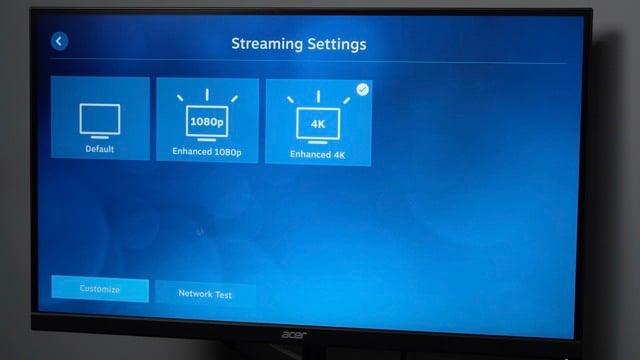
Steam Link is actually tackling some quite difficult challenges to enable us to play graphics-heavy games remotely. Firstly, screen sharing is not normally optimised for sending high quality images, since you have to work quite hard to keep both the bitrate and the latency down; you also don’t normally transmit audio as well as video, and you need to do a bit of magic to talk to game controllers. So the smart folks at Valve have successfully solved quite a few hard problems to bring this into being.
Even better, Sam Lantinga from Valve — who is also the developer of SDL, a simple multimedia programming library — has been working for a little while on getting Steam Link to run on Raspberry Pi 5. The previous method used to run Steam Link on Raspberry Pi OS no longer worked very well after we moved away from the closed-source Broadcom multimedia libraries, and with Wayland, a different approach was needed. Sam has been working with the Raspberry Pi software team to use our hardware in the most efficient way possible.
Valve’s announcement of Steam Link v1.3.13 shows that Sam has been able to get Steam Link working at some amazing rates on Raspberry Pi 5, including 4kp60 and even 1080p240 (obviously you’ll need a suitable monitor for that!).
To install Steam Link yourself, grab yourself an up-to-date Raspberry Pi OS image and type:
sudo apt updatesudo apt upgradesudo apt install steamlinksteamlinkEnjoy!




10 comments
ThinkPad X61s
will it still be able to run beamng drive
Name
Can you Computer run bean drive.
IF, so yes.
ThinkPad X61s
also can you get it to run on pi4
MW
There is a link in the Blog to Valves Steam Client announcement.
Lx8000
This is an excellent development, but why does the description of the article only mention Pi 5? Initial tests show 4K on a Pi4 at 30fps works very very well and surprisingly not peaked temperatures that much which was the main reason for this so that I can run AAA games fanless in the living room. I also see that I can access the Windows 11 desktop as well as Steam but the keyboard is a little laggy. Very pleased to have something with better support than Moonlight (which was excellent too).
Raspberry Pi Staff Gordon Hollingworth — post author
Yes, it will run on Pi 1,2,3,4,5 with great performance, but previously it did not support Pi 5…
Now it does, next up will be getting HEVC 4kP60 HDR working as well…
Gordon
Arthur
Linux desktop on Pi 1, 2 and great performance is the mother of all incongruities.
gus3
Because, the first “congruity” of Raspberry Pi was price, not performance.
Arthur
Yes, we all know that. The performance comments was addressing Gordon’s claim.
Tommy Pendley
It always says slow connection even in fedora, well it ran a little better on 4 gb of ram and AMD Radeon Graphics. but when i was playing slender threads: prologue when i went inside a door it went black screen.
Comments are closed