Raspberry Pi USB 3 Hub on sale now at $12
Most Raspberry Pi single-board computers, with the exception of the Raspberry Pi Zero and A+ form factors, incorporate an on-board USB hub to fan out a single USB connection from the core silicon, and provide multiple downstream USB Type-A ports. But no matter how many ports we provide, sometimes you just need more peripherals than we have ports. And with that in mind, today we’re launching the official Raspberry Pi USB 3 Hub, a high-quality four-way USB 3.0 hub for use with your Raspberry Pi or other, lesser, computer.

Key features include:
- A single upstream USB 3.0 Type-A connector on an 8 cm captive cable
- Four downstream USB 3.0 Type-A ports
- Aggregate data transfer speeds up to 5 Gbps
- USB-C socket for optional external 3A power supply (sold separately)
Race you to the bottom
Why design our own hub? Well, we’d become frustrated with the quality and price of the hubs available online. Either you pay a lot of money for a nicely designed and reliable product, which works well with a broad range of hosts and peripherals; or you cheap out and get something much less compatible, or unreliable, or ugly, or all three. Sometimes you spend a lot of money and still get a lousy product.
It felt like we were trapped in a race to the bottom, where bad quality drives out good, and marketplaces like Amazon end up dominated by the cheapest thing that can just about answer to the name “hub”.
So, we worked with our partners at Infineon to source a great piece of hub silicon, CYUSB3304, set Dominic to work on the electronics and John to work on the industrial design, and applied our manufacturing and distribution capabilities to make it available at the lowest possible price. The resulting product works perfectly with all models of Raspberry Pi computer, and it bears our logo because we’re proud of it: we believe it’s the best USB 3.0 hub on the market today.
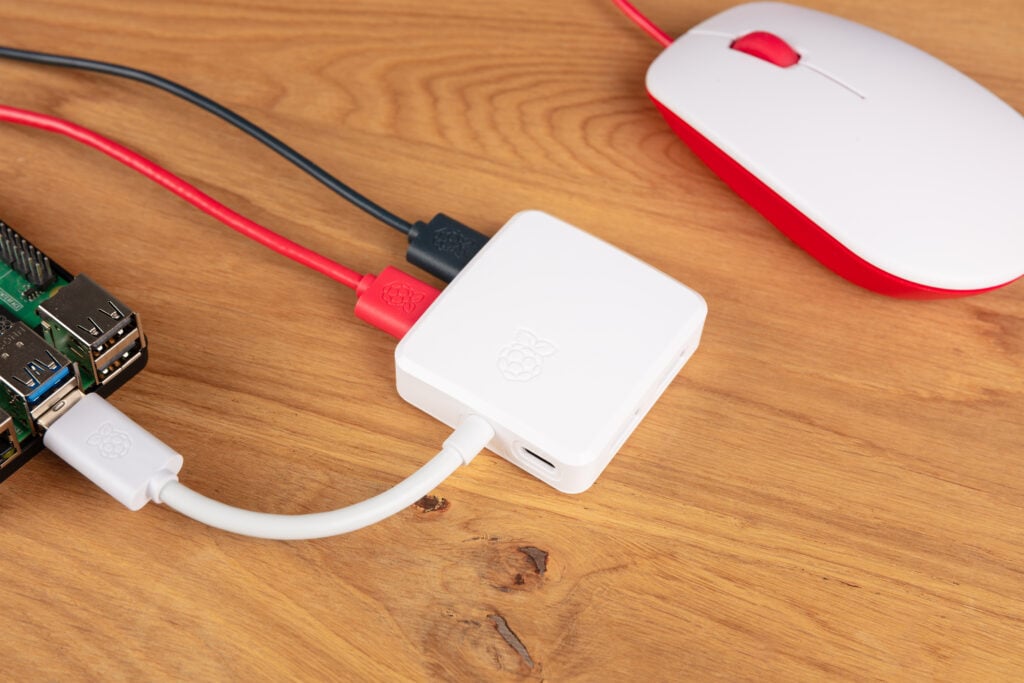
Grab one and have a play: we think you’ll like it.


46 comments
Jonathan Pallant
Does it have a single Transaction Translator, or multiple ones? In other words, can I get 480 Mbps out of every downstream port in USB 2.0 mode, or am I limited to an aggregate 480 Mbps across all four?
It might also be nice to record the VID and PID, and the USB Strings, in the datasheet. So we can verify one is the real deal.
And does it support USB BC, and if so how much current can you pull from each downstream port?
Helen
A Transaction Translator is only valid for the USB 2.0 part of the hub and its to convert the low (1.5Mbit/s) and full (12Mbit/s) speed data to the high speed (480Mbit/s) signal.
According to the datasheet of the chip used it has 4 individual Transaction Translators for all 4 ports.
They can’t convert the 480Mbit/s USB2.0 to the 5gbit/s USB3 standard because they are completely separate buses.
fanoush
Sadly what you want is impossible. There is no standard way how could you translate usb 2.0 traffic to USB 3.0 (in the hub) and then back to 2.0 (in the host controller) so the software would think it came via USB 2.0.
Amethyst
Converting USB 2.0 to USB 3.0 is not impossible. The Valve Index does so internally with the VL670 IC, designed specifically for this purpose. I was also hoping for something that could do this :(
Dominic
As I understand it the VL670 and the VL671 are end of life. Fresco logic also had the FL6000 if I remember correct which is also no longer available
Esbeen
Thank you very much for inventing that. I have a much older one like it, dreading it dying one day, because I knew it was going to be annoying to get something that good-quality, yet inexpensive, ever again.
Matt
It’s always encouraging to see products designed with user needs in mind! I’m curious, what specific testing or compatibility measures were taken to ensure that this Hub works seamlessly with a wide range of peripherals? like how does the hub handle power distribution when multiple high-draw peripherals are connected? & for users who want to connect devices like external hard drives alongside other peripherals, what considerations should we keep in mind regarding the optional external power supply? Thanks!
James Hughes
All Pi engineers were given one to try out, plus beta testers. I’ve had one on my desk for months and it’s had all sorts plugged into it, including 4 flash drives that pull quite some current when in use. We’ve not had any reports of problems.
Ivo Clarysse
Does it support per-port power control with uhubctl ?
James Hughes
What runes would I need to throw to test this? I have a hub here and uhubctl installed.
James Hughes
Ah, it does NOT support PPPS.
fanoush
there is UUGear Mega4 hub (targeted for Pi4) which claims to support PPPS and fits right under the Pi board, but is about twice the price
Some One
Sad. Then it’s just a random USB HUB again. per-port power control is the one feature that makes a good HUB stand out.
Other One
Indeed!
From the datasheet, CYUSB3304 only supports ganged power switching.
Was this correctly wired in the hub, i.e., can you switch off power for all ports?
fanoush
When googling cyusb3304 I only get datasheet for CYUSB3304-68LTXC and I see:
Vendor-Command Support to Implement a USB-to-I2C Bridge
❐ Firmware upgrade of an external ASSP connected to HX3 through USB
❐ In-System Programming (ISP) of the EEPROM connected to HX3 through USB
• Ganged or individual power switch enables for DS ports
It says “or individual power” maybe this can be enabled via configuration/firmware update?
fanoush
Oh, got it, there is table near the end
CYUSB3304 – Ganged
CYUSB3314 – Individual and Ganged
So no, it would need different chip.
Ray Allen
This looks nice, your right. You cannot get a good-quality USB 3.0 hub. I have had a few over the years, and only one or two worked well.
My question is, as this has a USB-C power input, let’s say you have two Pi4 15w USB-C power supplies and you have a Pi5 and used a 15-watt instead of the 27-watt. Of course, this would trigger the ‘This power supply is not capable of supplying 5A power to peripherals and will be restricted.”
If you’re using the other 15-watt in the hub, can the Pi5 detect it’s using the Pi hub with the official 15-watt power supply and then stop this message?
Would using the 27-watt on the hub cause any issues if you didn’t have the 15-watt to hand?
James Hughes
Using the 27W PS would not cause problems, but the hub does not do PD negotiation, so you will only be using it at 3A. Best to use it on the Pi 5.
Andrew W.
I would also welcome a Pi usb 3 hub which could use fully the 5A Pi power supply. Even better with PPPS.
NB The CSUSB3304 supports battery charging BC 1.2, which can (in theory) supply 1.5A per port, so you need to engage brain when you only have 3A available for 4 ports!
Would also welcome a power led, especially if this indicates the external PSU is on.
The current hub is on my Christmas list.
solar3000
hhhmmmm….Guess I’ll pick one up when they become available probably at microcenter….along with the new display.
Will
Last night my Pi was in tears with current surging up a USB-A port from a cruddy powered hub. Thanks for the much needed help!
Mike Bryant
Might have been nice to have some clips or something to mount it solidly under a normal size Pi.
andrum99
Congrats on the new product release 😊 If I hadn’t already bought two of the aforementioned expensive USB 3 hubs I would definitely buy this. I’m sure this will be a big help to folks. The majority of USB 3 hubs are pretty awful, so good to see another decent one launch 👍
Kerry Woodbury
Are schematics for the new CYUSB3304 hub available???
If not is there a way to request them through the RPi Foundation??? Newbie in the RPi world.
James Hughes
No, I doubt we would be releasing schematics for this.
W. H. Heydt
I feel your pain about trying to find a decent, but not horribly expensive USB 3 hub. I’ll probably pick up some at some point (I don’t have any immediate need for more USB ports than my Pis have).
That said…You’ve managed to make the mistake that I’ve railed at for *years* when it comes to USB hubs. That being…with a spec’d PSU, your hub can’t supply specified current (900mA) to ALL ports at the same time. This hub *should* be spec’d to output 3.6A (4*900mA).
So…it’s a welcome addition to the Pi ecosystem, but it falls just short of the mark it should hit.
W. H. Heydt
Historical note… I used to see a lot of 4-port USB 2 hubs that used 1A power supplies. I warned people away from them. A 4-port USB 2 hub should have *at* *least* a 2A supply, and a 2.5A would be better (and expected).
I would have expected a 4-port USB 3 hub to either come with or recommend a 4A PSU.
James Hughes
4A would be above the USB-C specification for the input current as the device does not do USB-PD so would be limited to 5v3A.
W. H. Heydt
That is understood. It just means that comes down to three choices:
1. Device will not provide full specified power to every port simultaneously. People need to be warned that this is the case.
2. Device would need to do PD and request 4+A.
3. Device power connection would have be something other than USB 3 (so as not to create confusion over why a given PSU wouldn’t provide enough current for all 4 ports).
Given the history of RPTL devices, I will hold out for a new version some day that implements option 2, as that would work with the Pi5 PSU.
Helen McCall
Dear W.H. Heydt,
This hub is obviously intended to be an inexpensive USB3 hub to work safely with any model of Raspberry Pi. The power input is obviously designed to use the Raspberry Pi 3A power supply, which is not expensive, and which many people upgrading to RPi5 now have as surplus kit. All the calls in these comments for additional features would just make the hub very much more expensive, and require a more expensive power supply. The design is a very good one for the purpose.
Noxmiles
Black, please.
Froggy
+1
rpiMike
+1
Helen McCall
Black please, for me too :-)
Glen Kelly
+1
PhotoBooth backdrops
This is a nice additional to the family!
Question: Why is the UBC-C for power only? a USB-C for data would be nice as well.
LostShadowGD
This is why I will not be buying one sadly. 😭😭😭
Dominic
It wouldn’t plug into a Pi if it had a TypeC plug.
S288
Does the Master port have a diode to prevent the 5v rail from going backwards into the master device if the hub has its own power supply? I ran into a problem with this with a powered hub I bought a while back. While it wouldn’t power the pi, it did do something and would prevent things like a reboot it would cause the pi to hangup requiring a full power cycle of the pi and the hub.
Also, would be great if the foundation made an official USB hub that. Maybe even using the PCIe. Not all of us desire NVMe or AI.
Dominic Plunkett
It doesn’t have a diode, but it does have circuity that prevents back powering.
S288
*Made an official hub hat…
Stephen
Nice to see more official Raspberry Pi accessories!
It can be difficult to find a good quality USB hub these days but I have found that those made by Ugreen have been pretty reliable. I’m sure I have a few made by Belkin from a while back also.
I’ll certainly give this one a try the next time I need a usb hub, especially if it’s an important part of a Raspberry Pi project.
Jeff Geerling did a teardown of the hub, and from what I could see, it looks well made.
Angelo Amatruda
Hi All, what is the current rating on a single port. When powered.
Thanks
Shripathi Kamath
Are there photos that show the hub all the way around?
Like all the ports?
Mike B
Ah, this takes me back. I spent countless hours about eight years ago torturing old Raspberry Pis and USB hubs, and the situation was awful. An old writeup at https://captainunlikely.com/blog/2016/05/26/the_boat_computer_a_tragedy_in_six_parts/ – seems I had 3 UUGear 7 port hubs and 17 devices connected. Don’t try this at home.
Helen McCall
Dear Mike B,
I am always impressed by those people willing to risk blowing up their Raspberry Pis by pushing them to extreme limits to see what happens. Perhaps there should be a Raspberry Pi Valour award to officially recognise their bravery and sacrifice for knowledge.
Comments are closed