Raspberry Pi Touch Display 2 on sale now at $60
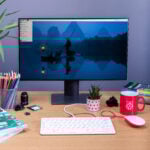
Way back in 2015, we launched the Raspberry Pi Touch Display, a 7″ 800×480-pixel LCD panel supporting multi-point capacitive touch. It remains one of our most popular accessories, finding a home in countless maker projects and embedded products. Today, we’re excited to announce Raspberry Pi Touch Display 2, at the same low price of $60, offering both a higher 720×1280-pixel resolution and a slimmer form factor.

Key features of Raspberry Pi Touch Display 2 include:
- 7″ diagonal display
- 88mm × 155mm active area
- 720 (RGB) × 1280 pixels
- True multi-touch capacitive panel, supporting five-finger touch
- Fully supported by Raspberry Pi OS
- Powered from the host Raspberry Pi
Simple setup
Touch Display 2 is powered from your Raspberry Pi, and is compatible with all Raspberry Pi computers from Raspberry Pi 1B+ onwards, except for the Raspberry Pi Zero series which lack the necessary DSI port. It attaches securely to your Raspberry Pi with four screws, and ships with power and data cables compatible with both standard and mini FPC connector formats. Unlike its predecessor, Touch Display 2 integrates the display driver PCB into the display enclosure itself, delivering a much slimmer form factor.

Like its predecessor, Touch Display 2 is fully supported by Raspberry Pi OS, which provides drivers to support five-finger touch and an on-screen keyboard. This gives you full functionality without the need for a keyboard or mouse. While it is a native portrait-format 720×1280-pixel panel, Raspberry Pi OS supports screen rotation for users who would prefer to use it in landscape orientation.
Consistent with our commitment to long product availability lifetimes, the original Touch Display will remain in production for the foreseeable future, though it is no longer recommended for new designs. Touch Display 2 will remain in production until 2030 at the earliest, allowing our embedded and industrial customers to build it into their products and installations with confidence.
We’ve never gone nine years between refreshes of a significant accessory before. But we took the time to get this one just right, and are looking forward to seeing how you use Touch Display 2 in your projects and products over the next nine years and beyond.

60 comments
Anders
Will be very interested to see enclosure designs incorporating Active Cooler.
Daniel
Does it support changing the display brightness? What is the brightness range?
DaveS
Yes, it supports brightness control through the normal kernel /sys/class/backlight device control, with max_brightness being 31 (ie range 0-31).
Raspberry Pi Staff Gordon Hollingworth
The brightness can be adjusted from 0 to 250 cd/m2
Max brightness in the driver is 31, so 50% brightness would be:
echo 15 | sudo tee /sys/class/backlight/11-0045/brightness
The 11-0045 will change depending on which DSI port your plugged it into…
AndrewS
You can also change the backlight brightness using the ‘raindrop’ Screen Configuration tool included in the latest Raspberry Pi OS.
Richard
I’m a sucker for small RPi displays. :) Stop making them. LoL ;)
My current favourite is the Pimironi hyper pixel 4.0 square.
Is there a standard for these displays for fitting to industrial cabinets for an HMI? I ask as the metal shield looks off centre, wondering why.
The foundation should look at making an HMI sdk using the GPU. So many companies use a port of LVGL but that only uses the GPU for compositing, it’s slow. So much unused potential that can make the lower end RPi’s still viable for HMI’s. An HMI running at 60FPS is a beautiful thing to use.
James Hughes
The display will use the same HW acceleration as the HDMI ports. Any display adhering to the KMS/DMA API we use will do so.
John
Available in the US…When?
Raspberry Pi Staff Eben — post author
Sparkfun have them in stock right now, as do several other resellers:
https://www.sparkfun.com/products/26685?src=raspberrypi
solar3000
……and it’s gone.
Out of stock.
CooliPi
Does it correctly support backlight power saving, but with touch interface on? Home info displays don’t need to be on all the time. During the night, it’s disturbing.TNX
W. H. Heydt
I use the original version for my alarm clock. At night (through cron) I turn the backlight down so that it can be read in a dark room, but doesn’t light up the room.
Me
What’s the viewing angles like? Last one didn’t have great viewing angles
Raspberry Pi Staff Gordon Hollingworth
Top 50
Bottom 70
Left 70
Right 70
Note, your comparison with the previous display will depend on when you bought it. The first iteration of the display had a more restricted viewing angle (especially when upside-down)
horace
Since it’s a portrait format panel the top 50 sounds a bit unfortunate if you would like to use it in landscape mode. :/
Raspberry Pi Staff Gordon Hollingworth
It depends how you orient it, if you have it on a table you don’t care about top…
So, just invert the display and put it upside down!
Ed
Square pixels, yay! 1280:720 = 155:88 (to the nearest millimetre at least). Looks like a winner to me.
Stavros
Still waiting for a 5 inch one…
W. H. Heydt
I’m still waiting for the 10″ one.
AndrewS
Are we talking about screens or pizzas? ;-)
ellip
It would have been great when sizes and mounting holes where same specs and places, so no direct replacement is possible!
New: 189.32 mm × 120.24 mm
Old: 192.96 mm × 110.76 mm
Ed
I imagine they had to change the dimensions to use a standard aspect ratio with square pixels, which is undoubtedly the cheapest option nowadays and the most readily available. Big disadvantage of the old version (in my opinion) is that it doesn’t have square pixels, so e.g. circles look like ellipses. I think at the time that was the cheapest available option because it was a ubiquitous screen used in portable DVD players. You don’t see those anymore.
Harry Hardjono
I think that’s important. I have a Rastipi case lying around waiting for a display, and this thing won’t fit.
Please post an update later when all the cases are updated so I can update the casing for my Raspi5.
Harold
What is the reason behibd the new display only supporting 5-fingers multitouch when the previous display supported up to 10 points ?
stan423321
The usecases for more than 5 points, while certainly existent, must be relatively limited given the screen size. Were you thinking about something in particular?
My baseless speculation is that economy of scale made it cheaper this way this time.
Tahar
Will it support the old stands from the predecessor? Will they fit?
John
I think I finally found one that fits (printing now). The problem is that that they oriented the tabs for the screws 90 deg. so most of the legs for the old model don’t fit.
Mr. Nielsen
Raspberry Pi 15.6″ Monitor with hdmi ?
Andre Costa
Can someone clarify why this is a “vertical native” display? What makes it vertical native?
solar3000
Where do you see vertical? I cannot find it.
AndrewS
It’s “vertical” in the sense that Touch Display 2 is using a portrait panel (720×1280 pixels, i.e. it’s taller than it is wide), whereas Touch Display 1 is using a landscape panel (800×480 pixels, i.e. wider than it is tall).
Richard Ash
The display is composed of 1280 lines, each of 720 pixels, rather than a landscape display which would be 720 lines of 1280 lines. The difference is pretty important in terms of sending the correct pixels to the frame buffer!
Andre Costa
Ah ok, it’s just a display driver thing.
Mentioning it was a portrait native display got a lot of people confused thinking it was only to be used vertically.
AndrewS
It can be rotated in software, just like any other screen :-)
https://www.raspberrypi.com/documentation/accessories/touch-display-2.html#change-screen-orientation
stan423321
Well, normal Raspberry Pis are framebuffer-based systems, so they can just rotate the picture. But if you managed to connect the screen to something else – not that it would be easy since DSI specs seem secret – it may very well be the case that only the signal-corresponding orientation would work, or that the others have a notable performance cost.
James Hughes
The DSI specification isn’t secret. What can be difficult to find is the timings of specific panels, which is down to the panel manufacturer to publish. From a SW point of view, all the drivers are in the Linux kernel so open source. All Pi panels are supported in open source software.
horace
no, it’s not only a display driver thing. the viewing angles aren’t symmetrical. top 50°, bottom left right 70° (specified in the default portrait mode). also the rgb subpixels would be rotated but probably that’s not noticable.
Dante
Another great release! I’d love to get this for Christmas!
Waka
The bezels could be narrower
Shinmen
Hi, this is great, but I am saving up to buy the raspberry Pi display that was shown in Embedded World 2024, with speakers and all. Will that be launched any time soon?
Rick
Nice to see this getting some love, the old one was starting to feel a bit dated.
Quick question, is there a reason/need for the very thick bezel as it looks like its just decorative? Just wondering how feesible it would be to remove it and just put a clear glass screen protector on the panel as it does add an awful lot of unnecessery bulk.
Mike Redrobe
No stand ? How it the screen in the picture held up ?
I now have one here, and have actually 3d printed a stand – but feel rpi could have spent the extra $1 to include a minimal piece of plastic to hold it up so you can use it straightway…
Anders
It’s just a screen component, without any enclosure on the back. You should expect a stand to be part of any case that encloses the back.
Sage
Would be much more interested in a much cheaper non-touch display and keyboard with the same form-factor as the display with integrated mouse track point. Make it 30 – 40 bucks for the set and you have fully functional PC with all necessary periphery.
KenD
Really excited to see this news as the resolution of the old display is really cramped. Will this new display fit existing cases made for the old one? I have a couple KKSB cases that would love to have a higher resolution panels installed in them!
KenD
To be specific: are the dimensions and mounting holes the same as in the original screen? Really love the KKSB case and it would be so nice if these updated screens still fit.
Elia
Is there any display stand compatible with this new version?
Michael Horne
Pimoroni have done a lasercut one:
https://shop.pimoroni.com/products/pibow-frame-for-raspberry-pi-touch-display-2
Photo Booth Rental
Very nice! the old screen was definitively outdate. 480p is almost useless. I can see myself using this new screen to display photos at my events. or used as a digital picture frame in my home. we’ll see what I come up with.
KenD
Unfortunately I may have answered my own question. The page for Pimoroni.com’s Pibow show the note:
This frame won’t fit the original Raspberry Pi 7″ Touchscreen Display, the dimensions are different.
😒
Konstantin
Can I connect this display to RPI 4 with POE Hat? I would like to use it like screen for CCTV monitoring. But I do not see button “on/off”…
Tom
Would have been nice if the new Pi HATs had a connector for the power supply. With a Pi 5, cooler, and Pi HAT it appears as if soldering is the only way to provide power to the display.
mrface12
im exited to use this in a project
Iain White
Check out my 3D printable case for this:
https://www.printables.com/model/1078765-raspberry-pi-touch-display-2-case-for-raspberry-pi
John
Has anybody found some simple printable legs that work with the new design? Unfortunately they have rotated the tabs 90 deg so legs designed for the old model don’t fit.
John
Is there a pen that works with this? My fat fingers are having problems with the UI. A sharp object doesn’t do it (capacitive touch?).
Donald Hamilton
Did you resolve the issue you had with finding a pen that works with the Touch Screen?
Adam
Anyone know of compatible cases?
Bernt Kristiansen
RPi 4 and Home Assistant
Does anybody have experience using this display to operate Home Assistant, typically wall-mounted?
Thanks !
William Strand
Can the Touch Display 2 be powered without using the GPIO pins (I am trying to use a DAC hat with this display and there seems to be a problem with power).
Comments are closed