M.2 HAT+ Compact on sale now at $15
Today, we’re excited to announce the launch of a new, smaller variant of our low-cost M.2 HAT+ for Raspberry Pi 5: M.2 HAT+ Compact allows you to squeeze a 2230-format (30mm long) M.2 PCI Express card inside our official case, nestled neatly between the fan and the USB connectors. Bring your own PCI Express device or pair it with one of our 2230-format Raspberry Pi NVMe SSDs.
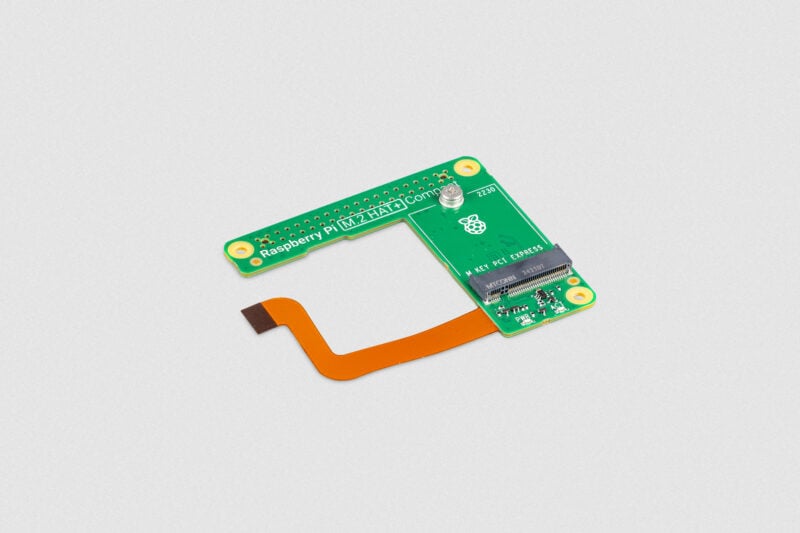
When we launch a flagship product, it can be hard to know exactly which new feature will catch people’s imaginations. Raspberry Pi 5, which turns two years old next week, is our first product with a PCI Express interface, exposed on a small FPC connector. Soon after launch, we saw a variety of third-party peripheral boards, as well as adapters to allow users to connect their own M.2 form-factor PCI Express cards.
Our own standard, square (ish) form-factor M.2 HAT+ launched in May last year and formed the basis for our AI Kit and SSD Kit products. It’s a great solution when using your Raspberry Pi 5 uncased or in a larger enclosure, but while you can use it with our Active Cooler, it doesn’t fit into the official case with the fan installed.
To help us fit into the incredibly tight available space, the Compact variant replaces the FPC cable and socket with a single flex-rigid PCB; this is the first time we’ve used this technology, and we’re rather pleased with how it’s turned out.
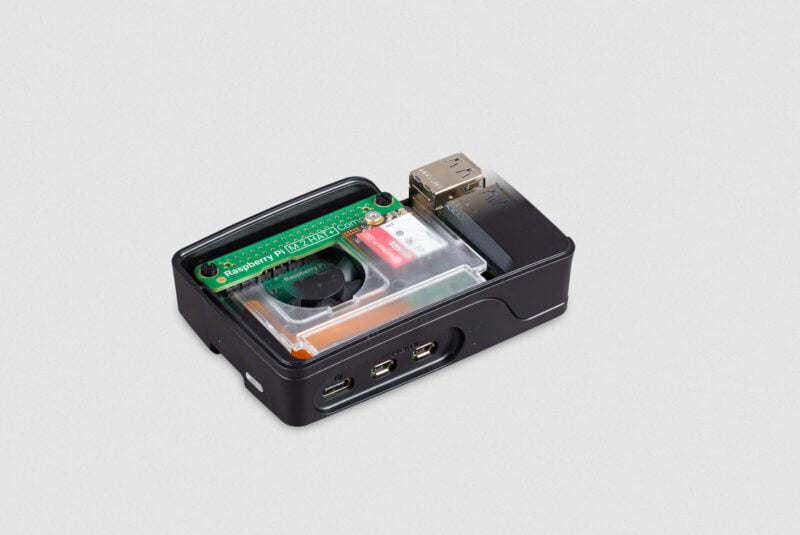
The new M.2 HAT+ has been a firm personal favourite since I got my prototype unit earlier in the year. A cased Raspberry Pi 5, with even faster I/O performance, and without compromising aesthetics: we hope you like it.


40 comments
Jacques
Does the M.2 HAT+ Compact fit in the official case with the active cooler?
Raspberry Pi Staff Gordon Hollingworth
No,
The active cooler is not design to be used inside the Raspberry Pi case (and never was!). That’s why the case has a fan.
Gordon
DistroEx
See the Post from 4th Oct 2023, Heating and cooling Raspberry Pi 5, https://www.raspberrypi.com/news/heating-and-cooling-raspberry-pi-5/ First questions and answers from the author.
Raspberry Pi Staff Helen Lynn
Well, yes, but doing so requires removing the integrated – note, integrated – fan from the case; that is to say, you can do it and maybe you can even get the lid on, but it’s not what the Active Cooler was designed for. We’re massive supporters of people using products in new, interesting and unforeseen ways, but with off-piste adventures come exciting challenges and sometimes hazards.
DistroEx
Thanks! The integrated fan is designed to be removable. Also there is a comparison integrated fan vs. active cooler, both in the case, lid on and off, on ExplainingComputers. Christoper tested and measured all cooling solutions since at least RPi 3. First test in https://youtu.be/vYUF1H-_7TQ?si=kIzjnsdIhTsLkvaT&t=90 is with active cooler in the official case. Better results without the lid on, but that works too.
AndyD
That is great. A very neat way to add the smaller M.2 SSDs
Helen McCall
This looks good. Is the flex part long enough to use this hat above the active cooler with the bumper base. And would this give improved cooling with the more exposed active cooler, than with using the standard M2 Hat+?
JamesH
If you are using the bumper then you have room to use the standard M.2 HAT, which does allow the use of the active cooler. The compact does not have the space for the active cooler, so if using in a case, use the case fan.
Helen McCall
Dear JamesH, I am well aware that the standard M2 Hat+ works well with the Active Cooler and Bumper, because that is how my Pi5 is set up! I was asking if there is any cooling advantage from using the M2 Hat+ Compact which would leave more of the Active Cooler exposed, and if the flex connection is long enough to connect with the hat mounted higher up above the Active Cooler.
I am asking this because I am toying with the idea of resuming some research I was doing thirty years ago which would result in the Pi5 performing thousands or millions of Fourier transforms, and so getting a bit warm. It would be nice to know if this compact hat might reduce the likelihood of triggering the thermal throttle which would slow down the calculations. This is a somewhat academic question because the Pi5 is infinitely more powerful, faster, and more efficient than the Sun Sparkstation I was using thirty years ago.
What had struck me thirty years ago when comparing conventional mathematical methods of image recognition with systems using ANNs, was that the Fourier transform in taking the data out of Euclidean space made possible some statistical operations which would otherwise be impossible. The Pi5 has developed now to the point with its 1TB NVME SSD where it makes the perfect platform for doing such research and development.
Lars
Looks great. Does it provide access to the GPIO pins, e.g. for powering the Touch Display 2?
Christian
How long is that ribbon cable? According to the design specs you released it must be under 50mm or are that changed? Best regards
Anders
It’s not a ribbon cable.
JPW
This kinda reminds me of the “Blu-Tak-fixes-wobbly-RAM pack” moment in “Micro Men”.
(Forgive my joshing – I bought one almost immediately)
:-)
Raspberry Pi Staff Eben Upton — post author
Happy memories.
JPW
Mine arrived today with a 256 official RPI 256GB SSD.
Everything worked splendidly together – fan, SSD all within the standard official case.
Great stuff.
Suggestion: Maybe a little utility designed to migrate the OS from existing SD card to SSD would be nice – rather than messing around with manual config.
(Although messing around with manual config is also why we all use RPI in the first place I guess :-) )
Anders
SD Card Copier is already available and should be in Accessories menu in a standard RP OS
JPW
Does that cope with SD -> SSD copy though?
(And there are other things that need to complete the ‘clone and replace my old sd card with shiny new ssd’)
Fernando
HI! Does the top cover fit as well? do you have a picture you could share? Thanks
Ralph Corderoy
Please add a photo to Eben’s post showing the new M.2 HAT+ Compact installed with your Active Cooler as that’s a configuration many will be interested in.
Also, ‘pair it with one of our 2230-format Raspberry Pi NVMe SSDs’ makes it sound as if a 2230-format must be chosen but I think all of your current NVMes, 1 TB included, are 2230.
JamesH
This does NOT fit over the active cooler. Use the case fan as this is designed for use in the case.
Ralph Corderoy
Hi James,
‘This does NOT fit over the active cooler’: Eben’s post does not make that clear; please improve it. Those looking for an official M.2 HAT+ which doesn’t cover the Active Cooler’s fan will think the Compact is it.
Eben’s ‘M.2 HAT+ Compact’ link in the opening paragraph is to the old, non-Compact, M.2 HAT+ page. This causes further confusion. I didn’t find a Compact product on https://www.raspberrypi.com/products/
Thanks, Ralph.
Ralph Corderoy
‘a single flex-rigid PCB’ — Is this the technology? Or is there something better you could alter the text to link to? https://en.wikipedia.org/wiki/Flexible_electronics#Rigid-flex_circuits
Could we have more explanation of that aspect in Eben’s post for those of us interested in the detail.
Raspberry Pi Staff Eben Upton — post author
That’s the one. Thanks for the link – I’ll update the post now.
Ralph Corderoy
Hi Eben, Can you get one of your rightly-picky programmers to vet the product page? This post’s link has now changed to https://www.raspberrypi.com/products/m2-hat-plus/?variant=m2-hat-plus-compact but that page does *not* state the Compact can’t fit with the Active Cooler, as JamesH states in reply to my comment here.
Given the mix of overlapping products now, each product page could do with a compatibility matrix to clearly state the answer to all mix-and-match questions; prose is typically lacking. Just as you’d table an FSM in data instead of error-prone nests of if-then-elses: it shows up what hasn’t been considered and answered.
Anders
It’s an improvement. For a while I used the official case without the lid on. Then I just went for a 3rd party enclosure, there are many good ones out there and I can’t see myself wanting to come back to the red and white box.
Harry Hardjono
The case I’m interested in is Smartipi 3 with RPi 7″ Touch Monitor 2. Add in camera and this NVME 1TB. Will that work?
Mark Tomlin
I wonder if this will fit into the FLIRC Raspberry Pi 5 case. They just have that little part that comes down over the top of the CPU to make direct contact. It looks like this should move out of the way of that?! If so, this could be great for my production Pis that are deployed with no moving parts.
Anthony King
I too enjoy the silence, at least I would if I could get a Wi-Fi signal through the Flirc case. Still, I’d like to know the answer to this too.
Mark Tomlin
To answer my own question, it does not fit. The heatsink coming down from the top of the FLIC case gets in the way of the board EVER SO SLIGHTLY. It could fit but with a redesign of the FLIRC. I don’t think that FLRIC is willing to do that, but it would be awesome if they did. Along with coming down on the NVMe drive with a pad if possible to give the drive a little bit of passive cooling as well.
hunty
How well does it work with additional Hats on top of this with extensions on the GPIO pins?
Would love to see an alternative Pi model that has the M.2 built in.
Me
This is sick. I might get one with a rpi SSD. Always had an issue with it not fitting into the official case.
Donald Dodge
Will it fit in the original 500?
Peter Green
No, the Pi 500 does not have the PCIe ribbon cable connector.
Andrew S
No. The Raspberry Pi 500 doesn’t have the PCIe FFC connector that the M.2 HAT+ Compact connects to.
Jeff
I have a similar 3D printed case. I took the fan off the heats ink and mounted it on the chips (kept the thermal tape on the chips). Works great!
W. H. Heydt
Pricing note… Both PiShop.us and Adafruit are listing this at just under $22. DigiKey lists it at $15. Make of that what you will… (Pricing is tricky at the moment with the radically unsettled US tariffs.)
Anthony King
I’m seeing prices at the UK distributors ranging from £11.19 to £14.40 right now. Only the cheapest of 3 suppliers is within the $15 quoted price (£1 = $1.32).
Raspberry Pi Staff Helen Lynn
The $15 price doesn’t include local taxes (such as VAT in the UK), because these vary depending on where you’re buying. There’s also a bit of sensible leeway so resellers don’t have to constantly shift prices to accommodate changing exchange rates.
T
Does the Raspberry Pi M.2 HAT+ Compact fit into the Raspberry Pi 5 Flirc case?
CalvinH
I was not able to get the compact HAT to work until after applying updates to the December 04. 2025 image of Raspberry OS Trixie Desktop 64 bit. This took several hours of troubleshooting, probably because I was trying to do this headless and I don’t have a monitor to see any boot errors. I had to apply the updates by first booting from a USB enclosure for the NVMe SSD. Then it worked.
Comments are closed