Deploying Ultralytics YOLO models on Raspberry Pi devices
In this guest post, Ultralytics, creators of the popular YOLO (You Only Look Once) family of convolutional neural networks, share their insights on deploying and running their powerful AI models on Raspberry Pi devices, offering solutions for a wide range of real-world problems.
Computer vision is redefining industries by enabling machines to process and understand visual data like images and videos. To truly grasp the impact of vision AI, consider this: Ultralytics YOLO models, such as Ultralytics YOLOv8 and the newly launched Ultralytics YOLO11, which support computer vision tasks like object detection and image classification, have been used over 100 billion times. There are 500 to 600 million uses every day and thousands of uses every second across applications like robotics, agriculture, and more.

To take this a step further, Ultralytics has partnered with Raspberry Pi to bring vision AI to one of the most accessible and versatile computing platforms. This collaboration makes it possible to deploy YOLO models directly on Raspberry Pi, enabling real-time computer vision applications in a compact, cost-effective, and easy-to-use way.
By supporting such integrations, Ultralytics aims to enhance model compatibility across diverse deployment environments. For instance, the Sony IMX500, the intelligent vision sensor with on-sensor AI processing capabilities included in the Raspberry Pi AI Camera, works with Raspberry Pi to run YOLO models, enabling advanced edge AI applications.
In this article, we’ll explore how YOLO models can be deployed on Raspberry Pi devices, look at real-world use cases, and highlight the benefits of this exciting collaboration for vision AI projects. Let’s get started!
Enabling edge AI solutions with Raspberry Pi and Ultralytics YOLO
Raspberry Pi is an affordable and widely used device, making it a great choice for deploying vision AI models like YOLO. Running Ultralytics YOLO models on Raspberry Pi enables real-time computer vision capabilities, such as object detection, directly on the device, eliminating the need for cloud resources. Local processing reduces latency and improves privacy, making it ideal for applications where speed and data security are essential.
Ultralytics offers optimized models, like YOLO11, that can run efficiently on relatively resource-constrained devices, with the Nano and Small model variants providing the best performance on lower-power hardware. Leveraging these optimized models on Raspberry Pi devices is easy with the Ultralytics Python API or CLI, ensuring smooth deployment and operation. In addition to this, Ultralytics also supports automated testing for Raspberry Pi devices on GitHub Actions to regularly check for bugs and ensure the models are ready for deployment.
Another interesting feature of the Ultralytics YOLO models is that they can be exported in various formats (as shown in the image below), including NCNN (Neural Network Compression and Optimization). Designed for devices with relatively constrained computing power, such as Raspberry Pi’s ARM64 architecture, NCNN ensures faster inference times by optimizing model weights and activations through techniques like quantization.

Raspberry Pi, Sony IMX500, and YOLO for real-time AI applications
The Raspberry Pi AI Camera is a perfect example of how this integration helps support compatibility across a range of deployment environments. Its IMX500 intelligent vision sensor comes with on-sensor AI processing, allowing it to analyze visual data directly and output metadata rather than raw images. While the IMX500 is powerful on its own, it needs to be paired with a device like Raspberry Pi to run YOLO models effectively. In this setup, a Raspberry Pi acts as the host device, facilitating communication with the AI Camera and enabling real-time AI applications powered by YOLO.

Real-world examples of YOLO applications on Raspberry Pi
Raspberry Pi, combined with the Ultralytics YOLO models, unlocks countless possibilities for real-world applications. This collaboration bridges the gap between experimental AI setups and production-ready solutions, offering an affordable, scalable, and practical tool for a wide range of industries.
Here are a few impactful use cases:
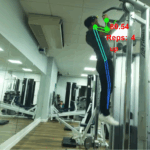
- Robotics: YOLO can enable robots to navigate environments, recognize objects, and perform tasks with precision, making them more autonomous and efficient
- Drones: With YOLO running on Raspberry Pi, drones can detect obstacles, track objects, and perform surveillance in real-time, enhancing their capabilities in industries like delivery and security
- Quality control in manufacturing: YOLO can help identify defects in production lines, ensuring higher quality standards with automated inspection
- Smart farming: By using YOLO to monitor crop health and detect pests, farmers can make data-driven decisions, improving yields and reducing resource waste
Benefits of running Ultralytics YOLO models on Raspberry Pi for edge AI
There are many advantages to deploying YOLO models on Raspberry Pi, making it a practical and affordable option for edge AI applications. For instance, performance can be boosted by using hardware accelerators like Google Coral Edge TPU, enabling faster and more efficient real-time processing.

Here are some of the other key benefits:
- Scalability: The setup can be extended to multiple devices, making it a great choice for larger projects such as factory automation or smart city systems
- Flexibility: YOLO’s compatibility ensures that developers can create solutions that work seamlessly across a variety of hardware setups, offering versatility for different applications
- Community and support: With extensive resources, tutorials, and an active community, Ultralytics provides the support needed for smooth deployment and troubleshooting of YOLO models on Raspberry Pi
To the edge and beyond with Ultralytics YOLO and Raspberry Pi
YOLO and Raspberry Pi are making edge AI applications more accessible, impactful, and transformative than ever before. By putting together the advanced capabilities of Ultralytics YOLO models with the cost-effectiveness and flexibility of Raspberry Pi, this partnership allows developers, researchers, and hobbyists to bring innovative ideas to life.
With support for devices like the Raspberry Pi AI Camera and scalable hardware options, this collaboration unlocks opportunities across industries, from robotics and agriculture to manufacturing and beyond.
Explore the possibilities of AI with Ultralytics: visit the Ultralytics GitHub repository to discover how vision AI is making a change in sectors like healthcare and self-driving cars, and join the Ultralytics community to be part of the future of vision AI.
11 comments
Jacob
What version of Python is required to run YOLO and the google coral together? Ive had issues using these two, especially the quantization process.
Nisarg Chauhan
Latest.
Bernard
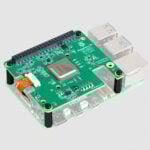
You can run also the larger variants with the AI hat (:
NGUYỄN TUẤN ĐẠT
Really need a more ram version for raspberry pi 16 or 32GB i still like the cheap price of raspberry pi, but why don’t you give more better options to choose from, 8GB ram in this era is really a bit little
Helen McCall
Dear NGUYỄN TUẤN ĐẠT
If you take a look at the amazing paged-memory systems devised in the 1970s for the 8-bit microprocessors of that time, you could work out how to design your own paged-memory hat to give you as much memory as you want. However you will probably spend a lot of time writing drivers for it that will work with all the software you want to use, and you will probably have to give your paged-memory hat its own additional power supply.
Personally having learnt to program computers in the 1960s using a 1950s first generation computer which had 2 kilobytes of magnetic core memory, I am delighted with the 8 gigabytes of RAM on my Raspberry Pi.
crumble
Why implementing something new?
Virutal memory exists. Only the latence will be a tiny bit slower than RAM. PCIe or USB is the bottleneck.
Paged Memory exist with pcie 5 and x64 systems.
Feed your LLM with newer documents.
Helen McCall
Dear Crumble,
Your reply is strange. This is a Raspberry Pi with PCIe2, not an X86 with PCIe5. The term LLM usually refers to Large Language Models, and feeding one of those with “newer documents” would not serve to provide him with the increase in RAM which he asks for.
Paul Milton
So nice to hear (rather see) a kindred spirit speak (write) wistfully of memory measured kB. In my case a ZX81 with 1k including screen buffer and system variables. Hey ho ….
Kyle Cooper
I don’t think Ultralytics YOLO models are available for the Sony IMX500 “AI camera” any more. The model zoo shows it was removed for licensing issues. Any insight on the issue and potential resolution?
Naushir Patuck — post author
You can now export Yolo models to the IMX500 directly through the Ultralytics website, see:
https://docs.ultralytics.com/integrations/sony-imx500/
archana deiva
Is it raspberry pi 4 or5?
Comments are closed